3
English
1
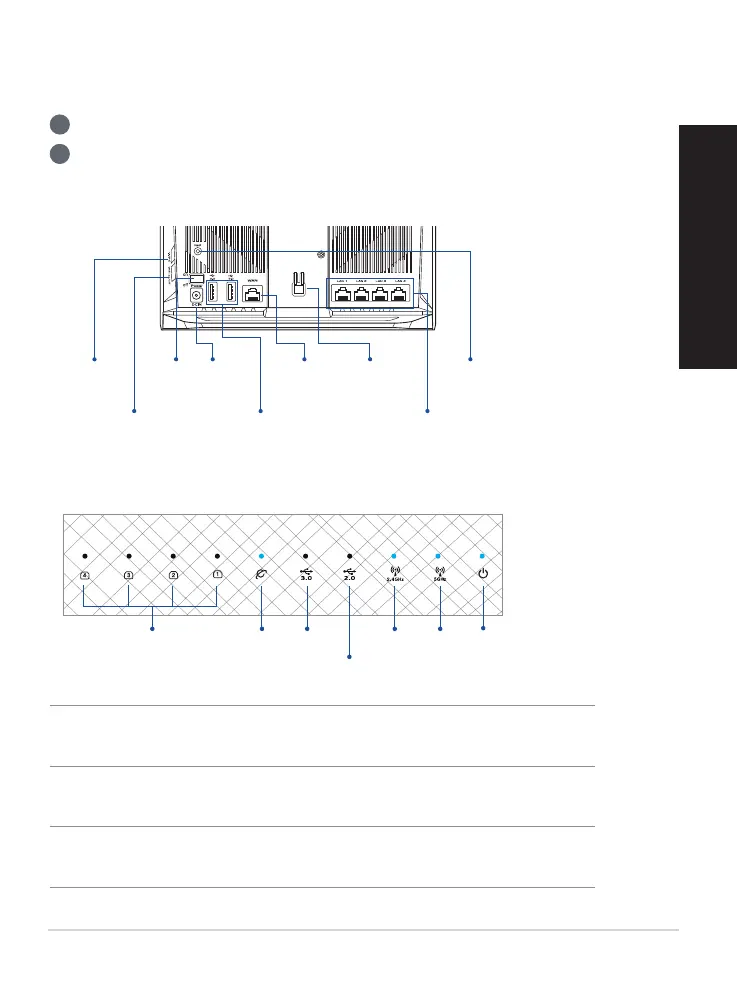
Plug the adapter into the DC-IN port, and press the power button.
2
The Power, 2.4GHz/5GHz LEDs will light up when your hardware is ready.
Hardware Explanations
Button Explanations
LED Explanations
RESET BUTTON
Reset the system to its factory defaults.
WAN PORT
Connect your modem to this port with a network cable.
LAN PORTS 1-4
Connect your PC to a LAN port with a network cable.
WPS
button
Power
button
DCIN
port
USB 3.0/2.0 ports
WAN
port
LED On/Off
button
LAN ports 1-4
Reset
button
WiFi On/Off
button
LAN LEDs WAN
LED
USB 3.0
LED
2.4GHz
LED
5GHz
LED
Power
LED
USB 2.0 LED


 To Next Page