Need help?
Do you have a question about the Asus SDRW-08D2S-U and is the answer not in the manual?
Instructions for installing the optical drive onto the vertical stand.
Instructions for removing the optical drive from the vertical stand.
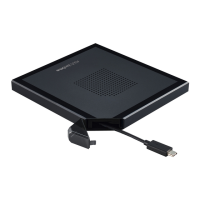
Connect the bundled USB Y cable to your computer for power supply.
Connect the mini-USB end of the cable to the optical drive's mini-USB port.
Verify the external drive is recognized in Windows Device Manager.
Follow steps to safely disconnect the drive via the system tray icon.
Disconnect the USB Y cable only after the system confirms safe removal.
Steps to take if the computer cannot detect the external optical drive.
 General
| CD write speed | 24 x |
|---|---|
| CD rewrite speed | 16 x |
| DVD+R write speed | 8 x |
| DVD-R Double Layer write speed | 6 x |
| Internal | No |
| Product color | Black |
| Interface | USB 2.0 |
| LightScribe | - |
| Optical drive type | DVD±R/RW |
| Optical disc diameter | 80, 120 mm |
| Disc-at-once (DAO) | Yes |
| Minimum RAM | 512 MB |
| Minimum processor | Intel Pentium 4 2.0GHz/AMD Athlon 2100+ |
| Dimensions (WxDxH) | 142 x 157 x 21 mm |
| Power requirements | 5V |
| Minimum storage drive space | 10 GB |
| Compatible operating systems | Windows 7 Windows Vista Windows XP Windows Server 2003 Windows Server 2008 Mac OS X 10.5+ |
| Storage temperature (T-T) | -30 - 60 °C |
| Operating temperature (T-T) | 5 - 40 °C |
| Storage relative humidity (H-H) | 10 - 90 % |
| Operating relative humidity (H-H) | 15 - 80 % |
 Weight and Dimensions
| Weight | 350 g |
|---|

 To Next Page