Notebook PC e-manual
75
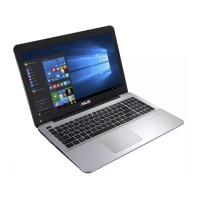
6. Find den hentede BIOS-l på ashdrevet og tryk på .
7. Når din BIOS er blevet opdateret, skal du klikke på Exit (afslut)
> Restore Defaults (gendan standarder) for at gendanne
systemet til dets standardindstillinger.
ASUSTek Easy Flash Utility
FSO
FS1
FS2
FS3
FS4
0 EFI <DIR>
[←→]: Switch [↑↓]: Choose [q]: Exit [Enter]: Enter/Execute
Current BIOS
Platform: X402CA/X502CA
Version: 101
Build Date: Oct 26 2012
Build Time: 11:51:05
New BIOS
Platform: Unknown
Version: Unknown
Build Date: Unknown
Build Time: Unknown
FLASH TYPE: MXIC 25L Series
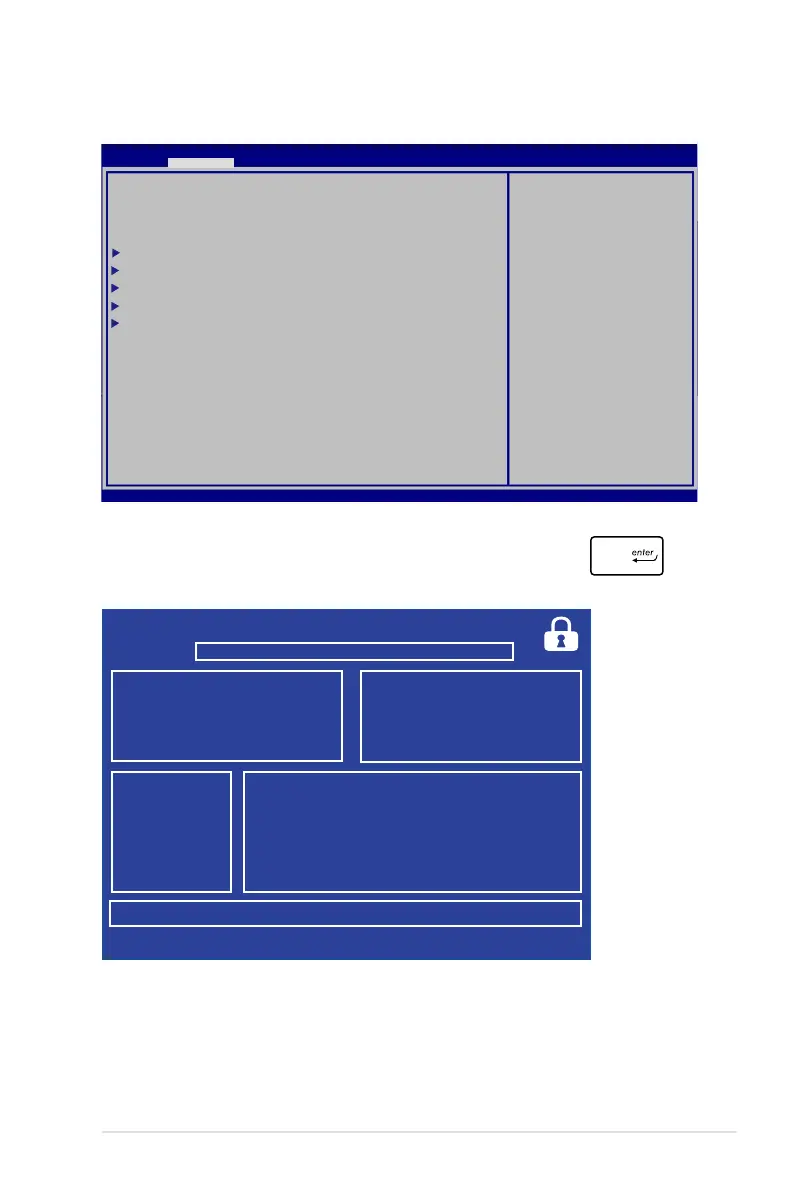
Aptio Setup Utility - Copyright (C) 2011 American Megatrends, Inc.
Start Easy Flash
Internal Pointing Device [Enabled]
Wake on Lid Open [Enabled]
Power Off Energy Saving [Enabled]
SATA Conguration
Graphics Conguration
Intel (R) Anti-Theft Technology Corporation
USB Conguration
Network Stack
Press Enter to run the
utility to select and
update BIOS.
Aptio Setup Utility - Copyright (C) 2012 American Megatrends, Inc.
Main Advanced Boot Security Save & Exit
→←
: Select Screen
↑↓
: Select Item
Enter: Select
+/— : Change Opt.
F1 : General Help
F9 : Optimized Defaults
F10 : Save & Exit
ESC : Exit
Version 2.15.1226. Copyright (C) 2012 American Megatrends, Inc.



 To Next Page