EasyManua.ls Logo

Atalax Huracan XL - User Manual

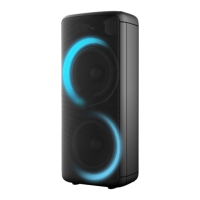
Atalax Huracan XL
2 pages
Print Icon
To Next Page IconTo Next Page
Loading...
Portable speaker user manual
OPERATING INSTRUCTIONS
” or “ ” key to select the previous or next track.
4. Shortly press PLAY/PAUSE button to play or pause music. Short press
Wireless Pairing Mode:
Press MODE on the unit or the remote control until wireless is selected.
1. Put the cell phone within 20 meters;
2.Activate the wireless features on your cell phone so that the cell phone starts
to search for the wireless device. Please refer to the users manual for details
3. Select the correct model “ HURACAN XL. The device found by the cell phone;
LINE IN MODE:
Press MODE button on the unit or the remote control until LINE is selected. Play
the music of the device connected to the LINE input.
3. Shortly press “ ” key to the previous song.
2. Press “ ” key shortly to pause or play.
USB MODE:
4. Shortly press “ ” key to the next song.
1. After start up, press MODE to select “USB” and insert the USB device. The
unit will automatically read and play the music in the USB device.
3, After connected, both of speakers can only be used in USB/TF/LINE/wireless
mode, FM model can not using.
TWS ( True Wireless Stereo)method of use :
6, The light mode can not interconnection under TWS function, press the host
change light mode, the deputy will not change.
7, Long press host/deputys Pause/Play disconnect TWS
5, Previous song/Next song/Pause/Play/Volume of the deputy can
interconnection with the host, the host can control all functions;
8, TWS eective distance between the host /deputy is 15m (the host /deputy
cannot face to face with each other)
4, Microphone/Recording/Recording play/Recording delete/Microphone
priority can not interconnection under TWS, music only.
1, Switch on both of speakers, we called the host and the deputy speaker.
2, After opening, long press around 3 seconds "Pause/Play", appear " SLAU "
then connect the wireless devices, it will connect to the host and the deputy.
Question and Answer IconNeed help?

Do you have a question about the Atalax Huracan XL and is the answer not in the manual?

Overview

This document describes the ATALAX HURACAN XL portable speaker, providing detailed instructions for its operation, features, and maintenance.

Function Description

The ATALAX HURACAN XL is a versatile portable speaker designed for various audio playback scenarios, including wireless streaming, USB playback, and TWS (True Wireless Stereo) functionality. It supports multiple input sources and offers extensive control over audio output.

Key Functions:

  • Wireless Pairing Mode: Allows the speaker to connect wirelessly to a device. The user needs to activate the wireless features on their cell phone and search for "HURACAN XL". The device will be found by the cell phone, and pairing is initiated by selecting it.
  • LINE IN Mode: Enables connection to an external audio source via a wired connection. The music from the connected device is played through the speaker.
  • USB Mode: Supports playback from a USB drive. Users can insert a USB device, and the unit will automatically read and play the music. Controls for play/pause, next/previous track are available.
  • TWS (True Wireless Stereo) Mode: Allows two HURACAN XL speakers to be paired together for a stereo sound experience. One speaker acts as the host, and the other as the deputy. Both speakers must be turned on, and a long press of the "Pause/Play" button initiates the pairing process. Once connected, both speakers can play music from a single source (USB/TF/LINE/wireless mode, FM mode).
  • Microphone/Recording/Recording Play/Recording Delete/Microphone Priority: The speaker supports microphone input, recording functionality, playback of recordings, and deletion of recordings. It also features a microphone priority function, which lowers music volume when the microphone is in use.
  • FM Radio: The speaker includes an FM radio tuner.
  • EQ (Equalizer) Settings: Provides various equalizer presets (Pop, Rock, Jazz, Classical, Flat) to customize the sound profile.
  • LED Display: A display panel provides visual feedback on the current mode, track information, and other settings.

Important Technical Specifications

While specific technical specifications like power output, frequency response, or battery capacity are not explicitly listed, the manual implies several key features:

  • Input Sources: Wireless (Bluetooth), USB, TF Card, Line-in (3.5mm), Microphone.
  • Output: Stereo sound (with TWS).
  • Controls: Top panel controls for power, volume, playback, mode selection, EQ, microphone input, and LED light. Remote control for comprehensive operation.
  • Storage: Supports USB and TF Card for music playback and recording storage.
  • Connectivity: Wireless (Bluetooth) for device pairing and TWS.
  • Power: Battery-powered for portability, with an implied charging mechanism (not detailed).

Usage Features

The HURACAN XL offers a user-friendly experience with both on-device and remote controls.

Top Panel Operation:

  1. Power Switch: Turns the unit on/off.
  2. USB Playing back: Indicates USB playback.
  3. TF Card Input: Slot for TF memory cards.
  4. Line-in (3.5mm): Audio input jack.
  5. Microphone Input/Guitar Input: Jacks for connecting microphones or guitars.
  6. REPEAT (repetitive playing): Selects repeat mode.
  7. VOLUME: Adjusts master volume level.
  8. MENU (control Bass/Treble/MIC Volume): Accesses sound adjustment menus.
  9. MEGA BASS: Enhances bass output.
  10. Light mode: Switches LED lights on/off, and changes light show styles.
  11. Next sound (under USB/TF/wireless mode): Skips to the next track.
  12. EQ: Changes EQ presets.
  13. Play/pause (under USB/TF/wireless, long press to get TWS function): Controls playback and initiates TWS pairing.
  14. RECORDING: Initiates recording.
  15. Previous sound (under USB/TF/wireless mode): Skips to the previous track.
  16. Mute: Mutes all audio output.
  17. Mode: Switches between input modes (USB, TF, Wireless, Line-in, FM).
  18. MIC VOL: Adjusts microphone volume.
  19. MIC PRI: Activates microphone priority.
  20. ECHO+: Increases microphone echo.
  21. ECHO-: Decreases microphone echo.
  22. LED Display: Shows current status.

Remote Control:

The remote control duplicates most top panel functions and adds some specific controls:

  1. Mute: Mutes audio.
  2. Previous Song: Skips to the previous track.
  3. Mode: Switches input modes.
  4. Record function: Initiates recording.
  5. ECHO-: Decreases echo.
  6. BASS+/-: Adjusts bass level.
  7. EQ function: Selects EQ presets.
  8. Microphone Volume+/-: Adjusts microphone volume.
  9. Stand by: Puts the speaker in standby mode.
  10. Pause&Play: Controls playback.
  11. Next song: Skips to the next track.
  12. Light mode: Controls LED lights.
  13. Repeat function: Selects repeat mode.
  14. Record play: Plays back recordings.
  15. Record delete: Deletes recordings.
  16. Echo+: Increases echo.
  17. Microphone priority: Activates microphone priority.
  18. Treble+/-: Adjusts treble level.
  19. Main volume: Adjusts master volume.
  20. Number buttons: For direct track selection or FM frequency input.

Recording Feature:

  • Insert a USB/TF Card.
  • Connect a microphone.
  • Press and hold the play button for 2 seconds to start recording.
  • The speaker announces "Starting Recording" and a recording indicator blinks.
  • Press the button again to stop recording.

Maintenance Features

The manual provides limited explicit maintenance instructions, but some points can be inferred:

  • Cleaning: While not directly stated, the presence of an LED display and physical controls suggests that regular cleaning of the exterior surfaces would be beneficial to maintain functionality and appearance.
  • Storage: The portable nature implies that proper storage in a dry, safe environment would prolong the device's lifespan.
  • Battery Care: As a portable speaker, battery maintenance (e.g., avoiding deep discharges, charging regularly) is crucial, though specific battery care instructions are not detailed.
  • TWS Effective Distance: The manual states that the effective distance between the host and deputy speakers for TWS is 15m (the host/deputy cannot face to face with each other). This is an important operational constraint to ensure optimal performance.
  • Interconnection Limitations: When using TWS, microphone/recording/recording play/recording delete/microphone priority functions cannot interconnect between TWS speakers. Similarly, next song/pause/play/volume of the deputy can't interconnect with the host, and the host can control all functions. The light mode cannot interconnect under TWS function, and the host changes light mode, the deputy will not change. Long press host/deputy's Pause/Play disconnects TWS. These limitations are important for users to understand to avoid operational issues.

Atalax Huracan XL Specifications

General IconGeneral
BrandAtalax
ModelHuracan XL
CategoryPortable Speakers
LanguageEnglish