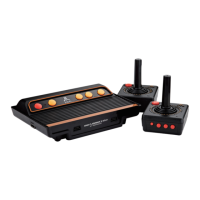
Howto connect the ATARI console to a TV?
Connect the
game console to
TV using
the enclosed
AV
cable.
Configure theTV input
source to
AV in, then
press
the POWER
button
on the game console. The console will detea the presence of a TV and
display the game menu on TV screen automatically.
NOTE:
For
Plasma & LCD
TV
of
over 32',
please adjust your
TV
to
the
following
setting for the best display result.
Back-Light:
100 Brightness: 36 Contrast: 70
Color:
60 Sharpness: 60
Aspect
Ratio: 1 6:9
Howto connect the wireless controllers with the console?
Switch the
ON/Off button on
the
controllers to ON and
the
controllers
will automatically connect with the console.
What are
the
two
controller ports
on the console
for?
These ports are
for
the wired controllers (optional) and wired paddles
(optional).
These ports
are also
compatible
with
the
original Atari 2600
wired controllers and paddles.
Howto connect the wired controllers?
(Wired controllers are not included in this
product.)
For
1
-Player Games: Connect a wired controller
to
the left controller
port.
For 2-Player Games: Connect a wired controller to the left controller
port for player one, and connea another wired controller to
the right
controller port for player two.
Howdo I play the 4-player games?
The
4
player games are designed
to
be played
by
paddles. Please plug
in your paddle controller(s) into controller port(s) on the game
console.
How
do I
start
playing?
1 •
Press the POWER
button to turn on the game
console. Press
the
POWER button again if you like to turn off the game console.
2. Use the
player 1 (PI
)
wireless
controller or use
the
wired controller
that is connected to the left controller port to browse menu and select
game: Move
the
joystick of PI controller left and
right
to navigate
the
menu pages,
and move
the
joystick up and down to
highlight
games
on each menu page. Press the FIRE (red) or SELECT button on the
wireless controllerto
enterthe
selected game.
3
3.
Press START on the game console or on the PI controller to begin the
game.
(For the
games
Aquaventure, Fatal
Run
,
Gravitar
and
Swordquest;
Earthworld,
press
the FIRE button
on the
controllerto begin the game.)
How do I pause
/
unpause the game?
To pause, press and hold the FIRE button and a few seconds the SELECT
button for a few seconds.
To
unpause, press and hold the FIRE button and the START button
for few seconds.
How do I switch back to game menu while playing a game?
Press
the
START and the SELECT buttons simultaneously on the
main console, or press the RESET button on the wireless PI controller,
and the screen will go back to
the
game menu.
How do I adjust the game level?
Press SELECT on the console or on the wireless PI controller, then press
START, to begin adjusting level.
PROBLEM
SOLUTION
No
picture on the screen
Connect the AC adapter
Connect the
A/V
cable
Turn the console unit on
Turn the
TV
on
Set the
TV
to A/V input
Screen flickers or no color
No game sound
Adjust TV color controls
Increase or turn on the TV volume
Connea the
A/v
cable
Picture on TV
screen
is unsteady
Adjust the vertical and horizontal
hold controls on your TV until the
picture becomes steady
Re-connect A/V cable
Picture is blinking or distorted
Power off the console and then
power
on
the console
Picture background color varies
at
the beginning
or
end
of
the
game
This a normal
Press START to enter or restart
the game
4


 To Next Page
 Loading...