Install and Register
Download the Atomi App via app stores or ATOMI website.
Turn on the scooter. Bluetooth icon on display dashboard will blink
which indicate that the scooter is ready for connect. Please note that
the Bluetooth icon will become dark after 2 minutes without connection.
However, you can still connect the scooter after 2 minutes when the
icon is dark.
Please follow the instruction in the app to connect to your scooter.
The Bluetooth icon on dashboard will stop blinking and remain lit when
the connection is successful.
Combination Lock
The Atomi App is available for iOS and Android. Please visit our
website www.atomiscooters.com, or look for it in the app store.
Speed settings
Cruise control setting
Lock and unlock the scooter
KickStart and ZeroStart
App Features
Range
Km/Mile
Atmosphere lights settings
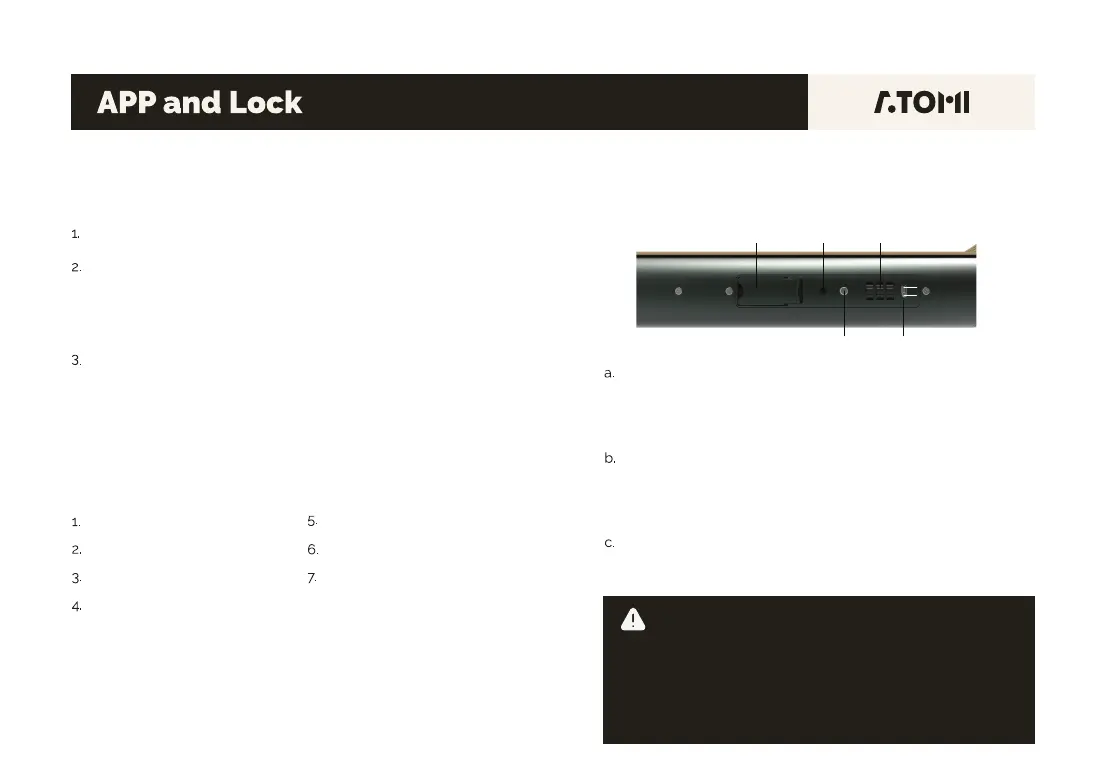
To reset the dial combination: Place the dial at “000” (Defaulted
dial). Place the Reset Button from Position 1 to Position 2. Set
your own combination by turning the dials. Place the Reset
Button back to Position 1 then the setting is complete.
To lock: Open the lock cable cover and pull out the cable. Place
the cable around anywhere you want to lock your scooter. Turn
the dial to your combination. Then insert the head of the cable
inside the keyhole and turn the dial to other combinations.
To unlock: Turn the dial to your combination, then press the
Unlock Button to unlock. Unplug the head of the cable from the
keyhole and it will bounce back to its home place.
Lock Cable
Unlock Button Reset Button
Keyhole Dial
1
2
WARNING!
DO NOT FORGET YOUR COMBINATION!
Please write it down and keep it safe. For security reason, there
is no way to unlock the lock without your combination. Replacing
the lock due to forgetting the combination is not covered by the
warranty. If you need to replace a new lock, please contact
ATOMI Support Center. You will need to pay for the new lock and
return shipping costs.
10


 To Next Page
 Loading...