Adding a PiP Source to your Program Feed
Now that you’ve selected your main feed, by choosing either HDMI, USB, or SD Card, we
can start adding a PiP overlay.
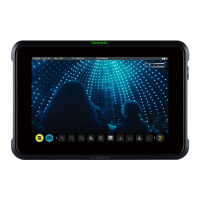
For this, navigate to the PiP menu within the Overlay tab.!Once you’re there, you may now
physically connect your additional PiP input source to the ZATO CONNECT (HDMI or USB
UVC) or select the SD Card if your PiP overlay should be playing back a pre-recorded file.
Depending on your previous selection for the main input source, you’ll see that you can now
select one out of two available PiP input sources.
Example 1: If HDMI is your main input source, you can select either USB or the SD Card as
a PiP input source.



 To Next Page