5.
Press the Manual/Auto button to exit this function.
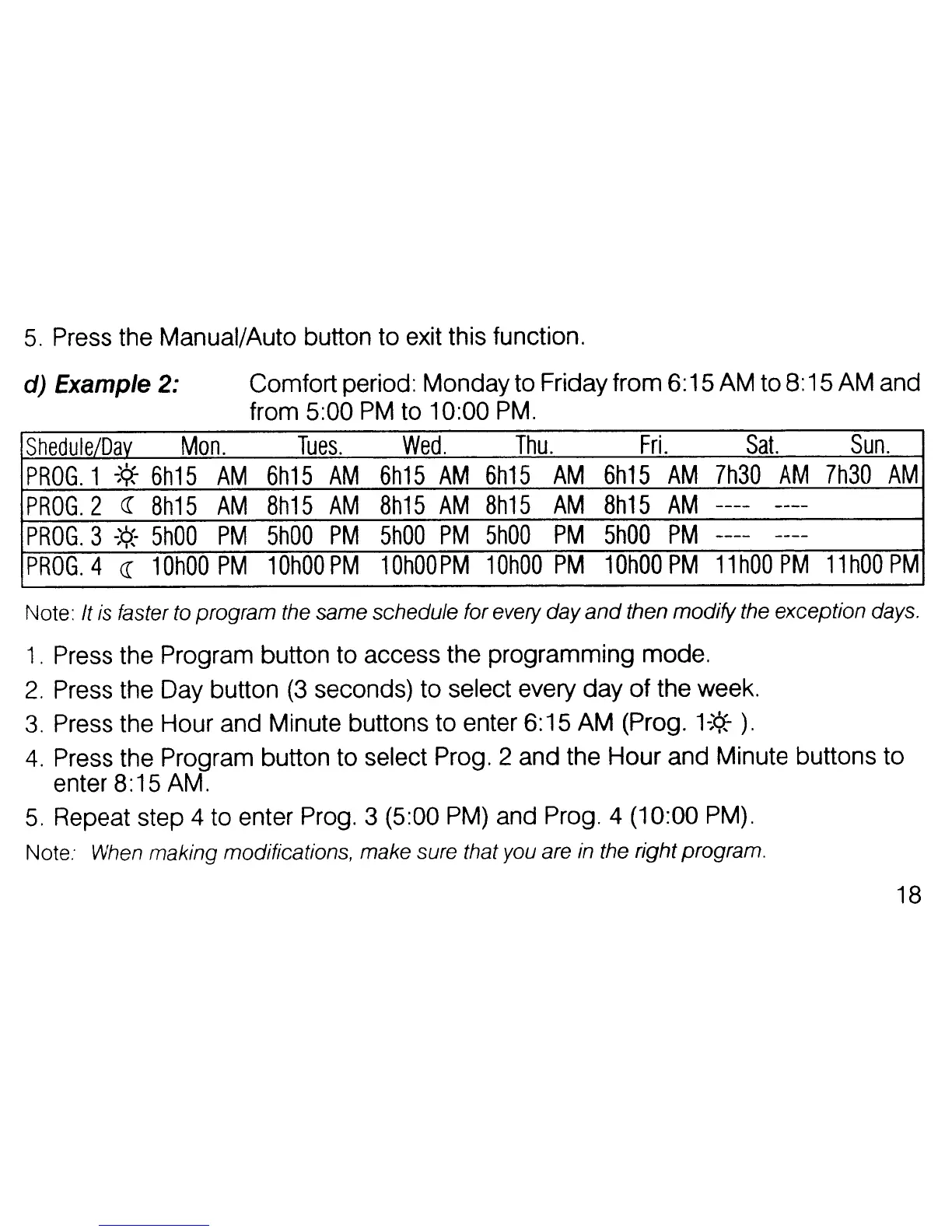
d) Example 2:
Comfort period: Mondayto Friday from
6:
15 AM to 8:15AM and
from
5:00
PM
to 10:00
PM.
Shedule/Dav
Mon.
Tues.
Wed.
Thu.
Fri.
Sat.
Sun.
PROG.
1
~'¢;
6h15
AM
6h15
AM
6h15
AM
6h15
AM
6h15
AM
7h30
AM
7h30
AM
PROG.
2 «
Bh15
AM
8h15
AM
Bh15
AM
Bh15
AM
Bh15
AM
----
----
PROG.
3
-;<>:-
5hOO
PM
5hOO
PM
5hOO
PM
5hOD
PM
5hOO
PM
----
----
PROG.
4 « 1
OhOO
PM
10hOO
PM
1
OhOO
PM
10hOO
PM
10hOO
PM
11
hOD
PM
11
hOO
PM
Note: It
is
faster to program the same schedule for every day
and
then modify the exception days.
1.
Press the Program button to access the programming mode.
2.
Press the Day button
(3
seconds) to select every
day
of
the week.
3.
Press the Hour and Minute buttons to enter 6:15 AM (Prog.
1~'¢;
).
4.
Press the Program button to select Prog. 2 and the
Hour
and Minute buttons to
enter
8:15 AM.
5.
Repeat step 4 to enter Prog. 3 (5:00 PM) and Prog. 4 (10:00 PM).
Note:
When
making modifications, make sure that you are
in
the right program.
18



 To Next Page
 Loading...