Need help?
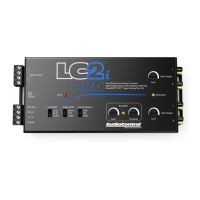
Do you have a question about the Audio Control LC2i PRO and is the answer not in the manual?
The LC2i PRO requires constant +12V power and ground connection for operation.
Triggering the unit via DC offset detection from the factory head unit when it turns on.
Triggering the unit when audio is detected from the head unit, not just when it's on.
Traditional method to turn on the unit using a 12V remote turn-on switch.
Tricks factory amps into detecting a speaker load to prevent audio dropout.
Adjusting Main Output (full range) and Bass Output (low pass) levels.
Indicates when the LC2i PRO output is close to clipping or distorting.
Remote control for the Bass Output level, acting as an attenuator.
 Input and Output
| maximum input handling | 40V / 400W (20 kΩ setting) |
|---|---|
| maximum output level | 9.5 Vrms |
| output gain | +/- 12 dB |
 Performance
| frequency response | 20 Hz to 50 kHz |
|---|---|
| total harmonic distortion | 0.01% |
| signal to noise ratio | >110 dB |
Impedance| input impedance | Selectable (20 Ω, 60 Ω, 20 kΩ) |
|---|---|
| output impedance | 150 Ω |
 Power
Power| power draw | 200 mA |
|---|---|
| recommended fuse rating | 1 Amp |
 Weight and Dimensions
| weight | 0.75 lbs. |
|---|---|
| length | 6.9 inches |
| width | 3 inches |
| height | 1 inch |

 To Next Page