100-240V
50-60Hz
30-60s
!
SUB OUT
SPEAKER OUT TO RIGHT
AUX IN OPTICAL IN
TV/ARC
This device complies with part 15 of the FCC rules.
Its operation is subject to the following two conditions:
1. This device may not cause harmful interference, and
2. This device must accept any interference recieved,
including interference that may cause undesired operation.
Canices-3(B)/ NMB-3(B)
A36
LEFT SPEAKER
DESIGNED & ENGINEERED BY
AUDIO PRO AB SWEDEN
AC 100-240V 50-60Hz, 2 x 75 W
AC 100-240V 50-60Hz, 2 x 75 W
Audio Pro AB, Box 22272, SE-250 24 Helsingborg, Sweden
WIFI
CONNECT
FCC ID: 2AGNC-A36
IC: 20967-A36
SERIAL NO:
Placez l’enceinte près du routeur pour
eectuer la configuration. Vous pouvez
ensuite voir la force du signal dans l’app-
lication pour tester d’autres positions.
Coloca el altavoz cerca del router cuando
estés realizando la configuración. A
continuación puedes ver la potencia de
la señal en la aplicación con objeto de
probar otras ubicaciones.
Quando si esegue la procedura di confi-
gurazione, posizionare lo speaker vicino
al router. Successivamente sarà possibile
visualizzare nell’app la potenza del seg-
nale per testare diverse posizioni.
Aseta kaiutin reitittimen lähelle asetus-
ten ajaksi. Tämän jälkeen näet signaa-
linvoimakkuuden sovelluksesta muiden
sijaintien testaamiseksi.
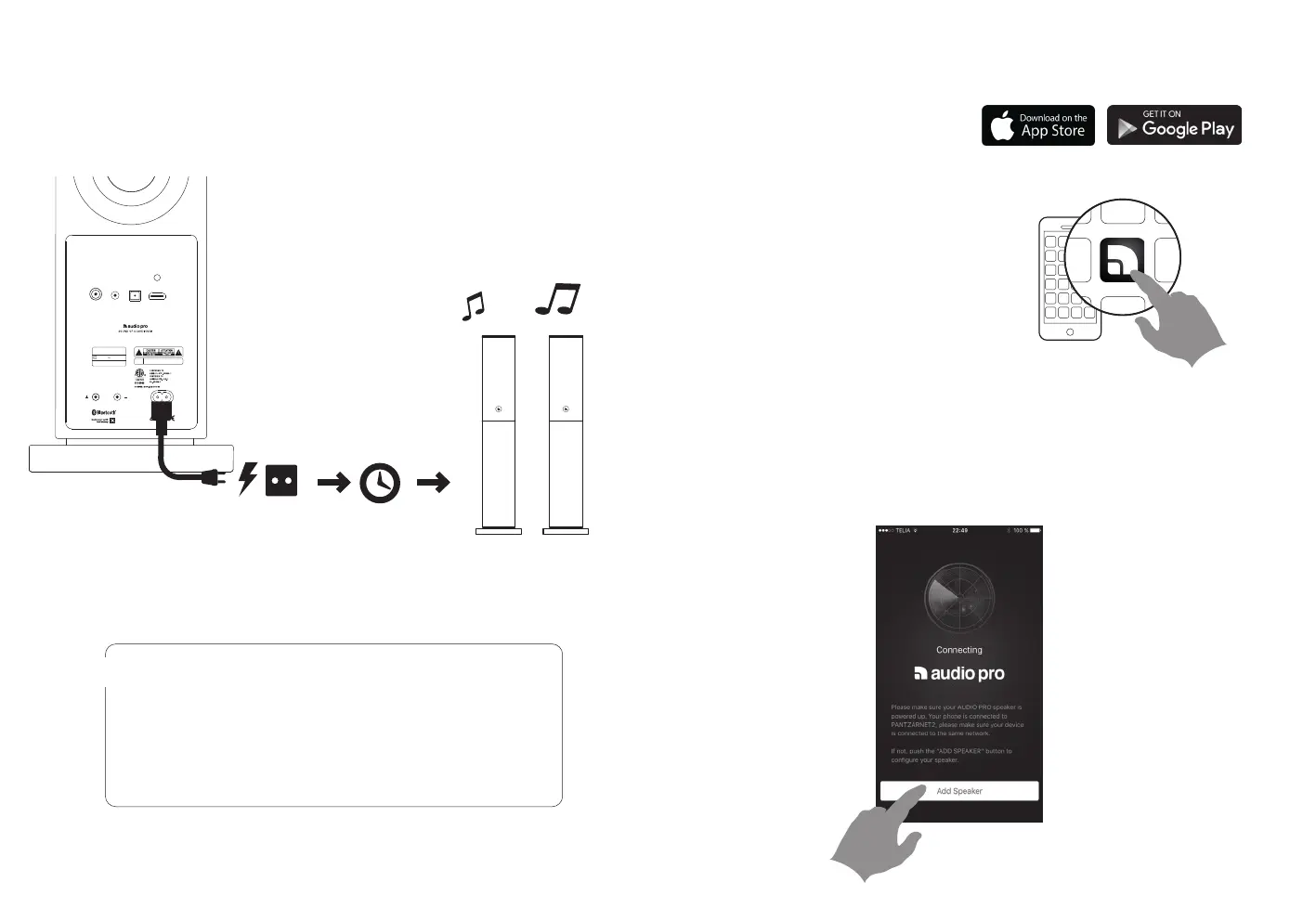
1. CONNEXION À L’ALIMENTATION CONEXIÓN A LA CORRIENTE
COLLEGAMENTO ALL’ALIMENTAZIONE KYTKE VIRTA
Après le signal sonore, le haut-parleur est prêt pour la configuration.
Después del sonido, el altavoz está listo para la configuración.
Dopo il suono, il diusore è pronta per l’installazione.
Sen jälkeen ääni, kaiutin on valmis setup.
2. TÉLÉCHARGEZ L’APPLICATION DESCARGA DE LA APLICACIÓN
DOWNLOAD DELL’APP LATAA SOVELLUS
3. AJOUT D’UNE ENCEINTE AÑADIR UN ALTAVOZ
AGGIUNGI SPEAKER LISÄÄ KAIUTIN
Recherchez « Audio Pro Control »
Busca “Audio Pro Control”
Cercare ”Audio Pro Control”
Etsi ”Audio Pro Control” -sovellus.
Lancez l’application et suivez les instructions .
Abre la aplicación y sigue las instrucciones.
Avviare l’app e seguire le istruzioni.
Käynnistä sovellus ja noudata ohjeita.


 To Next Page
 Loading...