ANVÄNDNING MED BLUETOOTH USING DEVICES WITH BLUETOOTH
VERWENDUNG VON GERÄTEN MIT BLUETOOTH
LAITTEIDEN KÄYTTÖ BLUETOOTHIN KANSSA
MAC ELLER PC
De flesta datorer har inbyggd Bluetooth som möjliggör
att du kan spela musik trådlöst direkt från din dator
till Addon T9. Sök efter “Bluetooth” i din dators hjälp-
funktion för att se hur det fungerar med just ditt opera-
tivsystem.
MAC OR PC
Most computers have built-in Bluetooth that enables the
wireless playing of music directly from your computer
to Addon T9. Search for “Bluetooth” in your computer’s
help function to see how it works with your particular
operating system.
MAC ODER PC
Die meisten Computer verfügen über eine eingebaute Bluetooth-
Schnittstelle, die eine funkgesteuerte Musikwiedergabe an der Ad-
don T9 direkt von Ihrem Computer aus ermöglicht. Suchen Sie im
Hilfemenü Ihres Computers nach „Bluetooth“, um herauszufinden,
wie Sie den Bluetooth-Dienst bei Ihrem jeweiligen Betriebssystem
aktivieren können.
MAC TAI PC
Useimmissa tietokoneissa on sisäänrakennettu Bluetooth,
jonka ansiosta musiikkia voidaan toistaa langattomasti
suoraan tietokoneeltasi Addon T9:n välityksellä. Kir-
joita tietokoneesi tukitoimintoon hakusana “Bluetooth”
nähdäksesi, miten tämä toimii juuri sinun käyttöjärjest-
elmässäsi.
ANDROID-ENHETER
Läs i manualen till din telefon eller surfplatta hur du
aktiverar Bluetooth i just din enhet.
ANDROID DEVICES
Read the manual for your telephone or tablet for
instructions about how to activate Bluetooth on your
particular device.
ANDROID-GERÄTE
Lesen Sie die Bedienungsanleitung Ihres Mobiltelefons oder Tablet-
Computers durch und suchen Sie nach Anweisungen, die beschrei-
ben, wie Sie Bluetooth an Ihrem jeweiligen Gerät aktivieren.
ANDROID-LAITTEET
Lue puhelimesi tai tablet-laitteesi opas saadaksesi
selville, miten Bluetooth otetaan käyttöön juuri sinun
laitteellasi.
IPHONE/IPAD/IPOD TOUCH
Para först din iOS enhet med Addon T9.
Öppna en musiktjänst (Spotify, WIMP, LastFM m fl).
Hitta AirPlay
®
-ikonen i musiktjänsten. Välj din Addon
T9-högtalare i listan. Tryck på play spela din musik.
IPHONE/IPAD/IPOD TOUCH
First pair your iOS device with Addon T9. Open a
music service (Spotify, WIMP, LastFM, etc.). Locate the
AirPlay
®
symbol in the music service. Select your Ad-
don T9 speaker in the list. Play your music.
IPHONE/IPAD/IPOD TOUCH
Verbinden Sie zuerst Ihr iOS-Gerät und die Addon T9. Aktivieren
Sie dann eine Musikanwendung (Spotify, WIMP, LastFM usw.).
Suchen Sie das Piktogramm AirPlay
®
in Ihrer Musikanwendung.
Wählen Sie Ihre Lautsprecherbox Addon T9 aus der Liste aus.
Drücken Sie zur Wiedergabe auf die Schaltfläche „Play“
(Abspielen) Ihrer Musikwiedergabeanwendung.
IPHONE/IPAD/IPOD TOUCH
Muodosta ensin pari iOS-laitteesi ja Addon T9:n välille.
Avaa musiikkipalvelu (Spotify, WIMP, LastFM, jne.).
Etsi AirPlay
®
-kuvake musiikkipalvelusta. Valitse Addon
T9 -kaiuttimesi luettelosta. Paina “play” kuunnellaksesi
musiikkia.
AirPlay symbol
AirPlay symbol
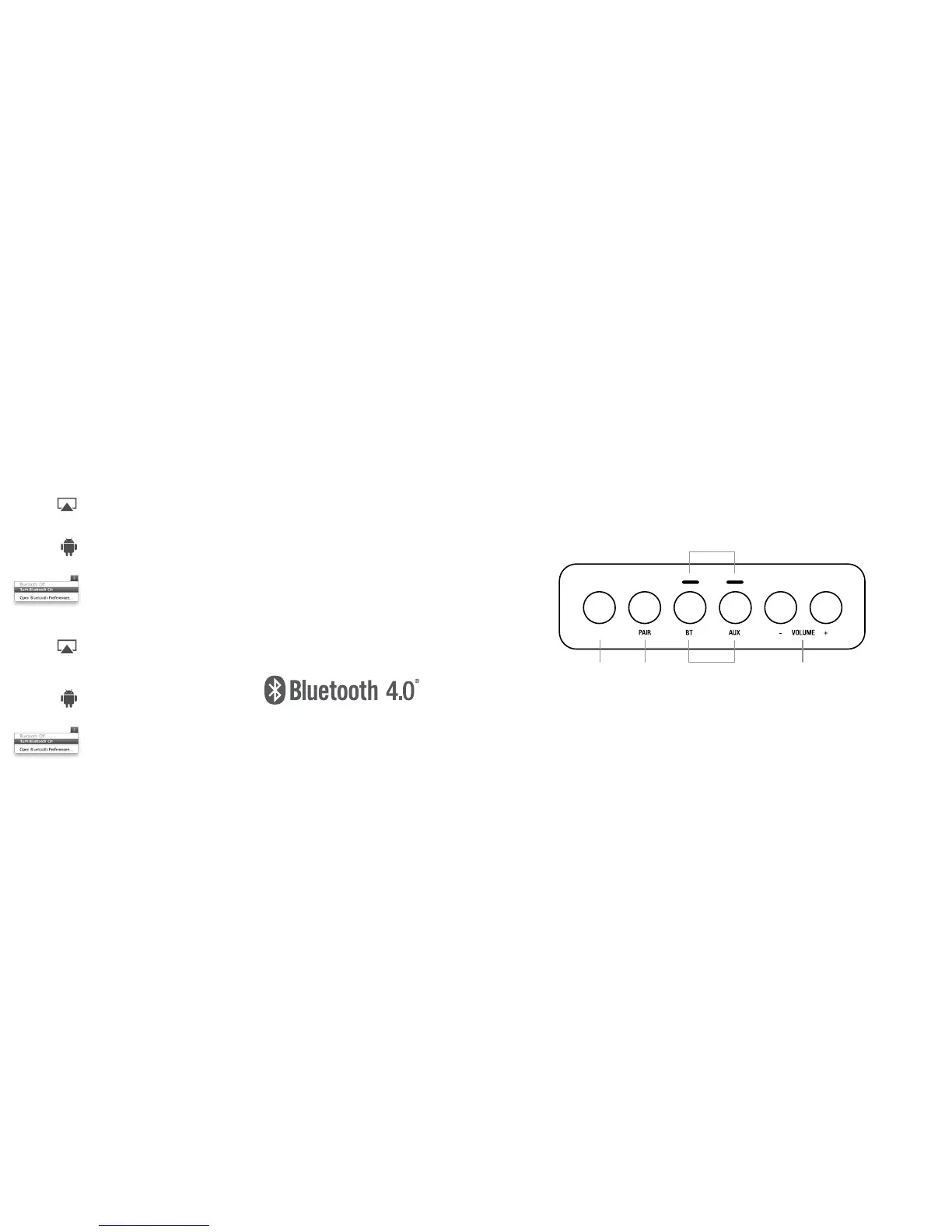
KONTROLLER | CONTROLS | SCHALTTAFEL | PAINIKKEET
På/Standby
On/Standby
Auf/Standby
Päällä/valmiustila
ON/STBY
Para Bluetooth
Pair Bluetooth
Koppeln Bluetooth
Parinmuodostus Bluetoothiin
Välj ljudkälla
Select source
Quelle auswählen
Valitse äänilähde
Indikerar val av ljudkälla och PÅ
Indicates chosen source, and ON
Anzeige der gewählten Quelle, aktiv
Ilmaisee valitun lähteen ja laitteen päälläolon
Volymkontroll
Volume control
Lautstärkeregelung
Äänenvoimakkuus






 To Next Page