7
audio pro
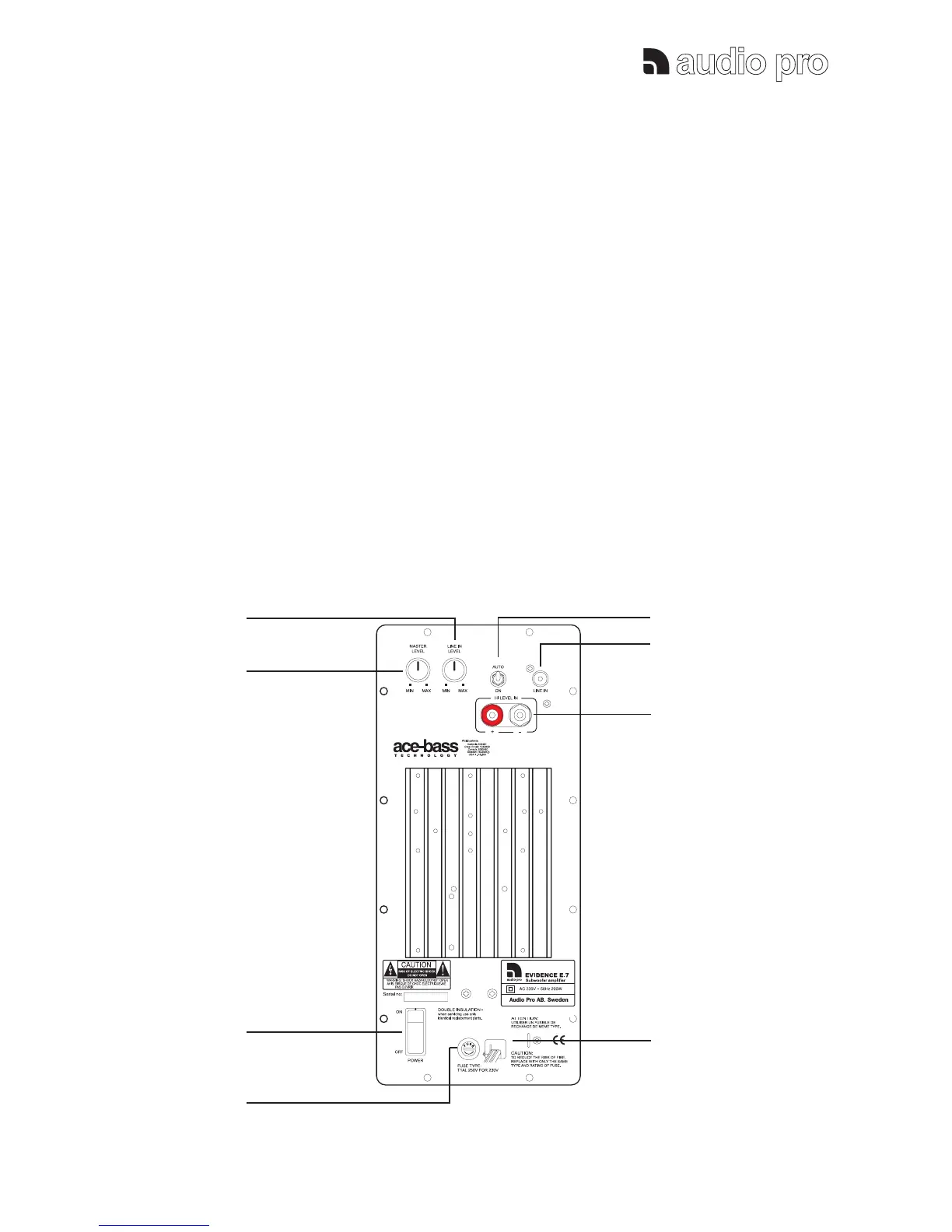
Power switch (3):
To switch the subwoofer amplifier to ON or OFF
mode. Make sure it is turned OFF during installation.
Turn OFF the subwoofer when it will not be used for a
longer period of time.
Standby switch (5):
In Auto mode: The subwoofer amplifier goes
automatically into standby mode if no signal has been
detected in about 20 minutes. It starts automatically
when signal is detected again.
In ON mode: The sub-amplifier will be constantly ON.
Power indicator: (Blue on front)
The blue indicator shows the operation status. Blue
light - the subwoofer amplifier is on.
No blue light - the subwoofer amplifier is in standby
mode or the amplifier is shut off by the main switch.
3. FUNCTIONS
Master volume control (2):
The sound level of the subwoofer can be adjusted.
Use the volume control carefully, remember that
program material may contain very high energy.
Line-In level control (1):
To adjust the subwoofer level in 5.1 connection.
NOTE: Only possible when the LINE-IN is used.
1
2
5
6
7
3
4
8
Note regarding Line in input:
Line-in shall only be connected
when the speaker is used in a 5.1
Home Theater system.


 To Next Page