8
Using the remote control (RC):
• Place the emitting window of the remote control in the direction of the sensor
window on the device.
• The working angle for receiving remote control signals is about 30 degrees.
• Distance between the emitting window of the remote control and the touch
window of the device should be less than 5 meters.
• A depleted battery can damage the remote control.
• Keep batteries out of the reach of children!
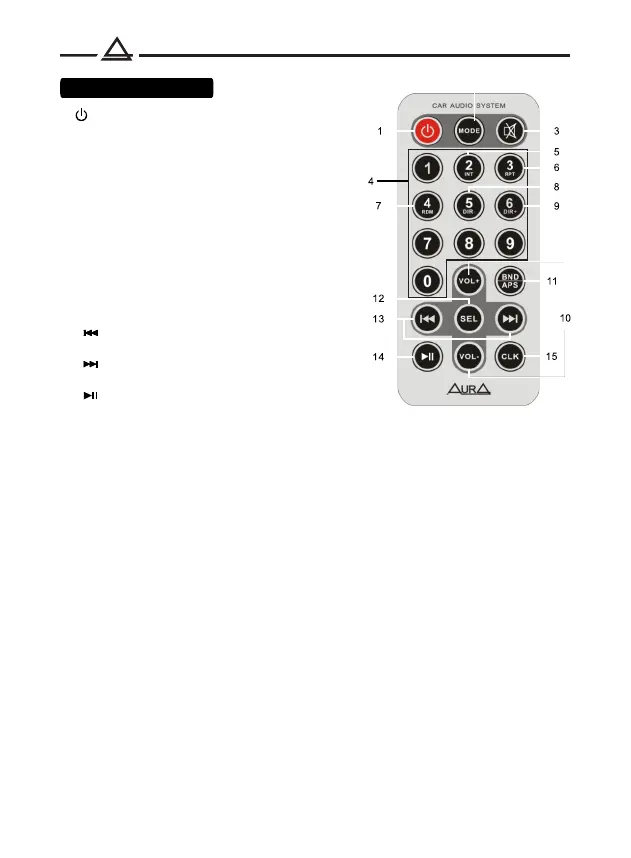
Remote control
1. Turn on / off the device
2. Source selection
3. Muting the sound (Mute)
4. Radio preset buttons
5. Track scan mode (INT)
6. Repeat Mode (RPT)
7. Random Play Mode (RDM)
8. Go to the previous folder (DIR-)
9. Go to the next folder (DIR +)
10. Volume control
11. Switching radio bands (BND)
/ Automatic search and memorization
stations (APS)
12. Function selection button
13. Previous track / Rewind
/ Radio setup
Next track / Fast forward
/ Radio setup
14. Pause
15. Clock setup
2


 To Next Page