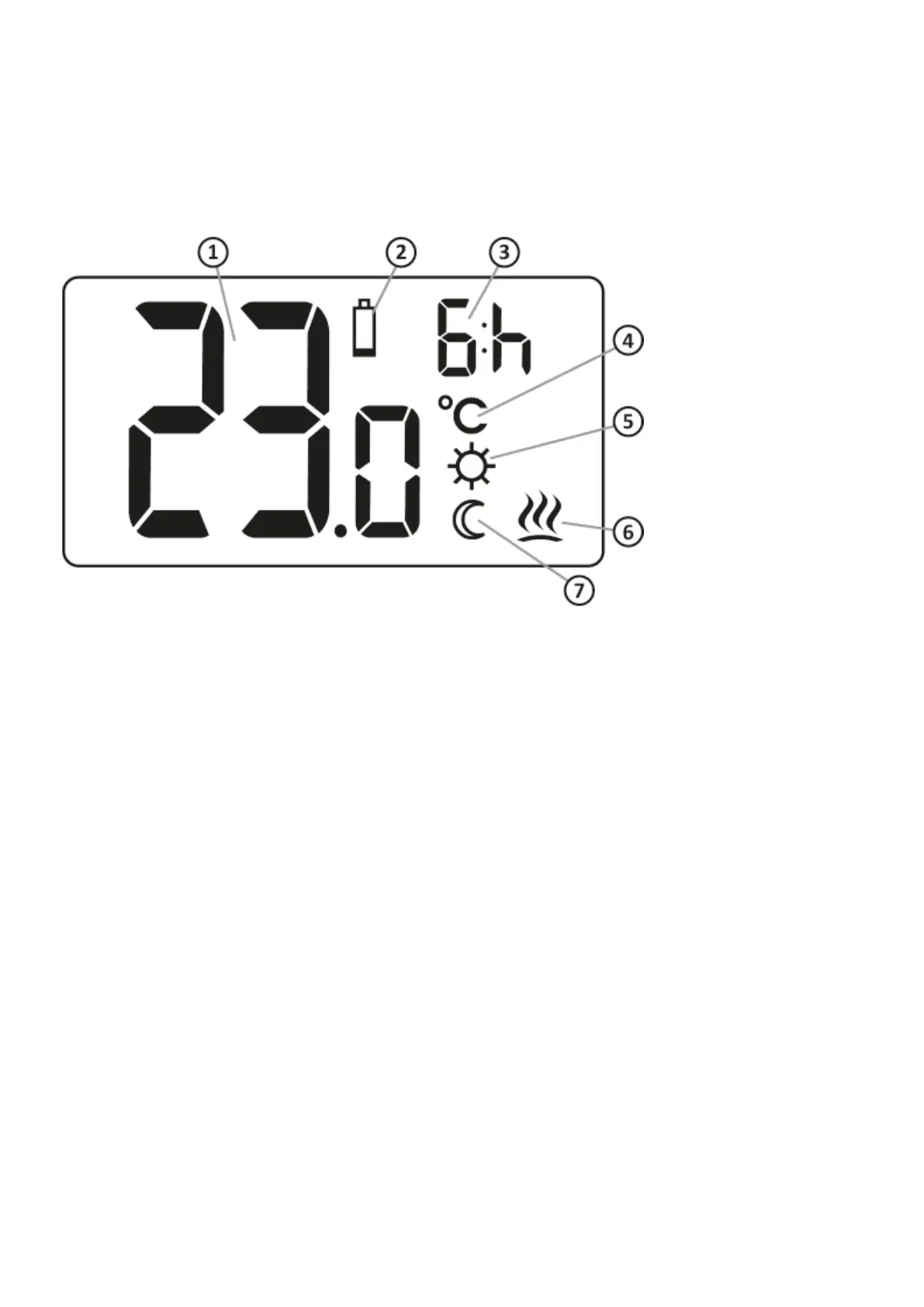
Display
Temperature1.
In normal operation, AURATON Auriga displays the temperature of the room in which it is
currently installed.
Battery depletion (X)2.
An indicator visible when the minimum acceptable battery voltage is exceeded. Replace the
batteries as soon as possible.
NOTE: To save your AURATON Auriga settings, battery replacement should take less than 30
seconds.
Indication of the duration of the “temporary temperature lowering”3.
It indicates how long the “Temporary temperature lowering” mode will remain active.
Temperature unit (R)4.
It indicates that the temperature is displayed in degrees Celsius
“Temporary temperature Temperature unit” programming mode indicator (S)5.
It indicates a user-scheduled “temporary temperature lowering” mode. Appears when the mode
is not currently active, but the “temporary temperature lowering” function is active (more
information in the chapter “Setting the temporary temperature lowering mode”)
Indicator of AURATON Auriga switch-on (a)6.
Pictogram indicating the working status of the device. Visible when the controlled device is
switched on.
Temporary temperature lowering mode indicator (T)7.



 To Next Page