4 IPU-108Owner’s Manual
Mounting the IPU-108 to a Microphone
Stand’s Threaded Mount
Important! Do not insert your tablet
into the bracket until you have
successfully mounted the IPU-108 onto
the microphone stand.
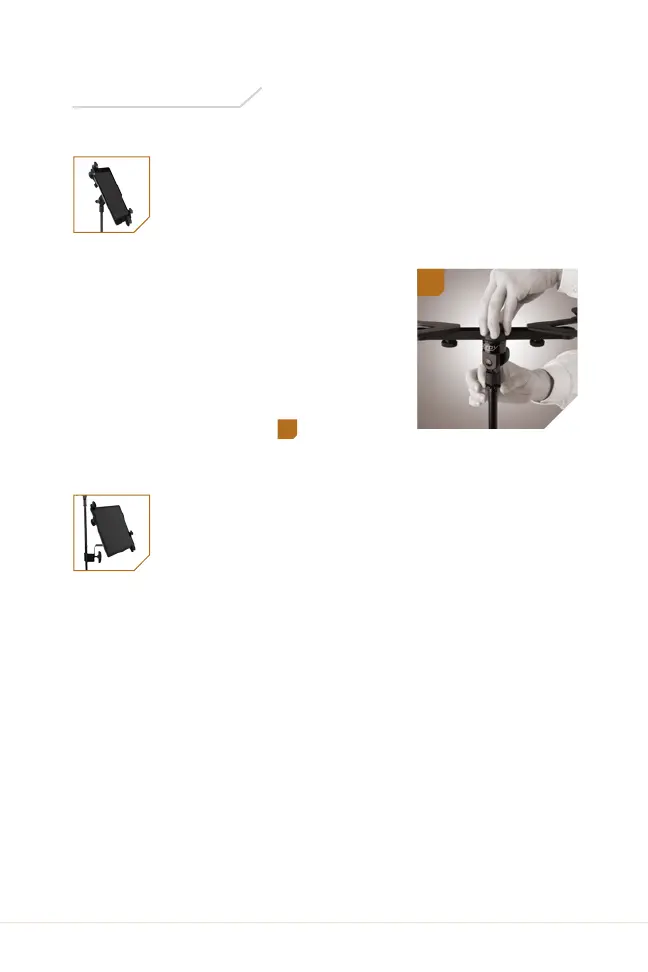
Align the 5/8 in. threaded socket with
the microphone stand’s threaded
mount, and screw the universal tablet
holder on until secure.
1
Adding the Clamp to the
Tablet Holder
To mount the IPU-108 to a microphone stand shaft, the clamp
must first be attached to the tablet holder.
1. Align the 5/8 in. threaded socket with the clamp’s 5/8 in.
threaded post and locking knob.
2. Screw the clamp into the tablet holder by turning the
locking knob until secure.
Instructions
1


 To Next Page