TX-button 42 to manually transmit the temperature from the outdoor sensor to the weather station. Close the battery
compartment. Press the °C/°F-button 41 to select °C-Celsius or °F-Fahrenheit.
Note: The outdoor sensor must be within a maximum distance of 100 m of the weather station with no obstructions.
If you are using mutliple outdoor sensors: Press the CHANNEL-button 26 to select the reception channel.
The rotation symbol on the display at 22 indicates that the weather station is rotating through channels 1-3.
Only active outdoor sensors are displayed. Press and hold the CHANNEL-button 26 to remove unused channels. When
adding an additional outdoor sensor, the weather station will detect it automatically. You can also manually transmit the
signal by pressing the TX-button 42.
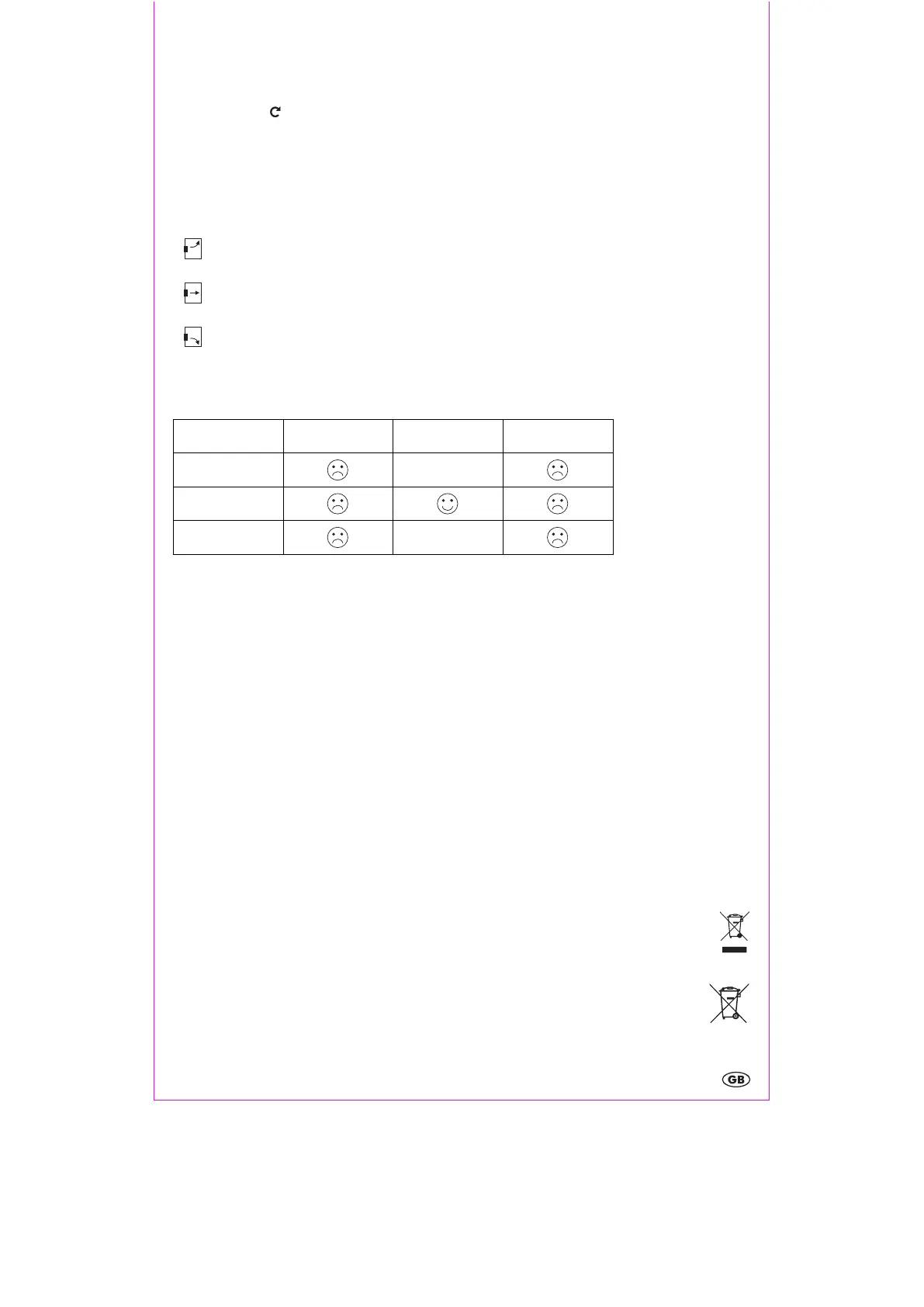
Outdoor temperature tendency
The temperature trend 21 is displayed upon successful reception from the outdoor sensor.
Outdoor temperature rising
Outdoor temperature constant
Outdoor temperature falling
Indoor humidity
The current indoor humidity is shown on the display at 5. The comfort icon 4 can show 3 levels of comfort:
< 40 %
DRY
40 – 60 %
COMFORT
> 60 %
HUMID
< 20 °C
/
20 – 26°C
> 26 °C
/
Maximum and minimum values
The maximum and minimum temperature and humidity are stored as soon as the batteries are inserted.
Briefly press the Max/Min- -button 29 to display the maximum MAX, minimum MIN and current indoor temperature 3,
outdoor temperature 24 and humidity 5 on the display. To delete the maximum and minimum values, press and hold the
Max/Min- -button 29 for 3 seconds. An audible signal will sound and the stored values will be deleted. The weather
station will immediately restart recording of the values.
Battery level indicator
If the batteries run too low to power the weather station, the outdoor sensor and signal transmission, the battery level
indicator 23 will appear on the display. Replace the batteries in all devices as soon as possible. Restart the weather
station.
Restart (RESET)
Press the RESET-button 33 within the battery compartment to reset the weather station.
Cleaning instructions
Clean the product with a soft, dry and lint-free cloth. A glasses cleaning cloth is ideal.
Simplified EU declaration of conformity
Hereby, digi-tech gmbh declares that the radio equipment type radio-controlled weather station 4-LD4437 is in
compliance with Directives 1999/5/EU et 2014/53/EU. The full text of the EU declaration of conformity is available
at the following internet address: http://www.digi-tech-gmbh.com/ce/277484_WS.pdf
Disposal of the electronic appliance
This weather station may not be disposed of with normal household waste. Dispose of the unit at an approved
disposal facility or at your local recycling centre. Please observe the current rules and regulations when disposing
of the appliance. Contact the disposal system if in doubt.
Disposal of the batteries
Please dispose of your batteries properly in containers especially set up at retailers. Batteries do not belong in
household waste. Dispose of the batteries at an approved disposal facility or at your local recycling centre.
Contact the disposal system if in doubt


 To Next Page
 Loading...