EasyManua.ls Logo

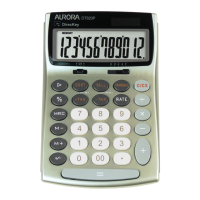
Aurora DT820P - User Manual

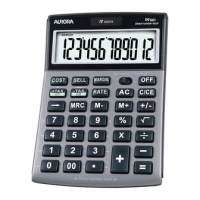
Aurora DT820P
2 pages
Print Icon
To Next Page IconTo Next Page
Loading...
Thank you for purchasing your new Aurora DT820P calculator, please remove and recycle all packaging and
carefully remove the printed overlay from the screen of the calculator
Instructions and FAQ’s:
1. Turning your calculator on and off.
Your calculator is equipped with a patented ‘direct number input’ feature, which allows you to press ‘any’
key to turn your calculator on, should you press a number key, then this number will also register in the
display. The calculator is equipped with an ‘auto off’ feature and will power down by itself after a period
of inactivity.
2. What are the COST, SELL and MARGIN keys for?
These buttons allow you to calculate ‘gross profit margin’ and your required cost or sell prices. There are
3 variables - Cost, Sell and Margin, if you input two of these variables the calculator will automatically
solve the third.
Example 1.
My cost is 30, I will sell for 60 what gross profit margin am I making?
[Input 3, 0, COST, 6, 0, SELL] The answer will be displayed as 50%
Example 2.
My cost is 30, I want to make 50% gross profit what should I sell it for?
[Input 3, 0, COST, 5, 0, MARGIN] The answer will be displayed as 60
Example 3.
I will sell for 60 and want to make 50% gross profit what should my cost be?
[Input 6, 0, SELL, 5, 0, MARGIN] The answer will be displayed as 30
After you have solved any third variable you can review all 3 variables by pressing the cost, sell and
margin keys again.
3. What are the ‘+TAX’ and ‘–TAX’ keys for?
These buttons allow you to add or deduct a user definable percentage at the touch of a button. A
common use for these buttons is too add or deduct sales tax.
Firstly you need to set the tax rate.
Example Setting a tax rate of 19%
[Input 1, 9, RATE, SET] The SET key is on the same key as ‘+TAX’ .
The tax rate is now set at 19% and will remain in the memory until you change it even when the
calculator turns off. Now you have set you tax rate you can simply add or deduct tax easily by using the
‘+Tax’ and -TaxKeys
Example1 The price is 60 including 19% sales tax, what is the price exclusive of tax?
[Input 6, 0, -TAX] The answer is displayed as 50.42
Example 2 The price is 60 excluding 19% sales tax, what is the price including tax?
[Input 6, 0, +TAX] The answer is displayed as 71.40.
You can also view the actual tax content and the total by pressing the same tax key again.
You can also review the currently programmed Tax rate by pressing ‘RATE’ and ‘RECALL (the recall key is
on the same key as the -TAX’ key) the currently set tax rate will be displayed on the screen.
4. How do the memory keys work?
Your calculator has a memory and you can store a variable number, to store a number press the ’M+’ key,
you can store a simple number or an answer from a calculation. The memory also has a running total, so
you can add and deduct numbers using the M+ and M- keys. To see the number stored in the memory or
the running total press the MRC key once. To clear the memory and reset back to zero press MRC key
twice.
Example1 Store the answers to the simple sums 2+2 and 3+3 in the memory and calculate the total.
[Input 2, +, 2, M+, 3, +, 3, M+] now press the MRC key once, the correct answer of 10 will be displayed.
Example 2 Use the memory to add these number together 5, -6, 8,9,-4.
[Input 5, M+, -6, M+, 8, M+, 9, M+, -4, M+] now press MRC once and the correct answer 12 will be
displayed. To clear and reset your memory press the MRC key twice. Whenever a number is stored in the
memory an ‘M’ will show on the display.
Question and Answer IconNeed help?

Do you have a question about the Aurora DT820P and is the answer not in the manual?

Overview

This document describes the Aurora DT820P calculator, a device designed for various mathematical calculations, including business-specific functions like gross profit margin and tax calculations.

Function Description:

The Aurora DT820P calculator offers standard arithmetic operations and specialized functions. It features a "direct number input" system, allowing any key press to turn on the calculator, with number keys also registering their value. An "auto off" feature conserves power by shutting down the calculator after a period of inactivity.

COST, SELL, and MARGIN Keys:

These keys are designed for business calculations related to gross profit margin, cost, and sell prices. The calculator operates with three variables: Cost, Sell, and Margin. By inputting any two of these variables, the calculator automatically solves for the third.

  • Example 1 (Calculating Gross Profit Margin): If the cost is 30 and the selling price is 60, inputting 3, 0, COST, 6, 0, SELL will display a gross profit margin of 50%.
  • Example 2 (Calculating Sell Price): If the cost is 30 and a 50% gross profit is desired, inputting 3, 0, COST, 5, 0, MARGIN will display a selling price of 60.
  • Example 3 (Calculating Cost): If the selling price is 60 and a 50% gross profit is desired, inputting 6, 0, SELL, 5, 0, MARGIN will display a cost of 30. After solving for a variable, users can review all three variables by pressing the COST, SELL, and MARGIN keys again.

+TAX and -TAX Keys:

These keys allow users to add or deduct a user-definable percentage, commonly used for sales tax.

  • Setting the Tax Rate: To set a tax rate (e.g., 19%), input 1, 9, RATE, SET. The SET key is co-located with the +TAX key. The set tax rate remains in memory even when the calculator is turned off.
  • Example 1 (Price Exclusive of Tax): If the price is 60 including 19% sales tax, inputting 6, 0, -TAX will display the price exclusive of tax as 50.42.
  • Example 2 (Price Including Tax): If the price is 60 excluding 19% sales tax, inputting 6, 0, +TAX will display the price including tax as 71.40. Users can view the actual tax content and total by pressing the same tax key again. The currently programmed tax rate can be reviewed by pressing RATE and RECALL (the RECALL key is co-located with the -TAX key).

Memory Keys:

The calculator includes memory functions to store and manipulate numbers.

  • Storing Numbers: Press the M+ key to store a number or the result of a calculation.
  • Running Total: The memory maintains a running total, allowing users to add or deduct numbers using the M+ and M- keys.
  • Viewing Memory Content: Press the MRC key once to view the number stored in memory or the running total.
  • Clearing Memory: Press the MRC key twice to clear the memory and reset it to zero.
  • Example 1 (Storing and Summing): To store the sums of 2+2 and 3+3 and calculate their total, input 2, +, 2, M+, 3, +, 3, M+. Pressing MRC once will display 10.
  • Example 2 (Adding Multiple Numbers): To add 5, -6, 8, 9, -4 using memory, input 5, M+, -6, M+, 8, M+, 9, M+, -4, M+. Pressing MRC once will display 12. An 'M' indicator on the display signifies that a number is stored in memory.

C/CE Key:

  • CE (Clear Entry): Removes the last entered value without clearing the entire calculation.
  • C (Cancel): Clears the entire calculation. Pressing it again will cancel the whole calculation.

▷ (Backspace/Delete) Key:

Deletes the last digit entered.

Rounding Switch (+5/4+)

This switch controls how answers are rounded, with three positions:

  • Upward Arrow: Rounds all answers up.
  • 5/4: Uses mathematical rounding rules (rounds up if the digit is 5 or above, down if below 5).
  • Downward Arrow: Rounds all answers down. Important: The rounding behavior is also affected by the decimal place setting switch.

Decimal Place Setting Switch (A 0 2 4 F):

This switch controls the number of decimal places displayed.

  • A (Add Mode): Performs addition and subtraction with an automatic two-digit decimal, useful for currency. For example, entering 1, 0, 0, 0 and pressing + will display 10.00.
  • 0: Fixes decimal places to zero, rounding all answers to zero decimal places based on the rounding key setting.
  • 2: Rounds all answers to two decimal places.
  • 4: Rounds all answers to four decimal places.
  • F (Floating): Displays answers without shortening, using the maximum number of digits the screen permits.

Maintenance Features:

Battery Replacement:

The calculator uses an LR1130 battery. To replace it, locate the circular battery compartment on the back, use a coin or screwdriver to rotate the cover anti-clockwise, replace the battery, and then carefully tighten the cover. Important: Always perform a reset after changing or removing the battery.

Resetting the Calculator:

If the calculator performs strangely, a reset may resolve the issue. Locate the small "RESET" hole on the back of the calculator. Gently depress the reset button with a blunt, narrow object (e.g., a paperclip or small screwdriver).

Troubleshooting (Calculator Not Working):

  1. Perform a Reset: Try resetting the calculator as described above.
  2. Check Battery: If a battery failure is suspected, replace the battery.
  3. Warranty: If the calculator is faulty and purchased less than one year ago, it is covered by a manufacturer's warranty. Contact your supplier for details.

Aurora disclaims liability for incidental or consequential damages. Its liability is limited to the cost of repair/replacement under warranty.

Aurora DT820P Specifications

General IconGeneral
BrandAurora
ModelDT820P
CategoryCalculator
LanguageEnglish

Related product manuals