SelectAlarm
Clock Enable or
Disable
Press button => Enable or
Press button => Disable
Press button confirm its
selection, move to next option.
Adjust Parking
Meter
countdown
hours from 0 to
2
Press button = (+)or
Press button = (-)
Press button confirm its
selection, move to next option.
Adjust Parking
Meter
countdown
minutes from 0
to 59.
Press button => (+)or
Press button => (-)
Press button confirm its
selection, move to next option.
SelectParking
meter
countdown
Enable or
Disable
Press button => Enable or
Press button => Disable
Press button confirm its
selection, move to next option.
There is a beep sound at 5 min.
before Parking countdown reach 0.
SelectPower
Save Enable
or Disable
Press button => Enable or
Press button => Disable
When power save enable, the LCD
remotetransceiver uses “0” current
to save the battery power. LCD
show “Save” on text area
Exit: Press any button of the LCD
remote transmitter to exit the
“Power Save Mode”.
Press button confirm its
selection, move to next option.
Select2-way
HHU
confirmation by
Melody or
Vibration
Press button =>Melody or
Press button =>Vibration
Press button confirm its
selected, move to next option.
Second Car
Security Option
CAR 1 or
CAR 2 ( II icon
On)
- CAR 1 operation.
- CAR 2 operation (II icon On
mean 2nd car operation).Press
button confirm its selected, move
to next option.
IGNITION CONTROL DOOR LOCKS.
If the vehicle’s door locks have been interfaced to the security system, the system will
automatically lock the vehicle's doors when the ignition is turned “ON” and /or unlock the
vehicle’s doors when the ignition is turned “OFF”.
TRUNK RELEASE: Press and hold button on transmitter for three seconds to remote
control the trunk release or other electric devices.
CAR LOCATOR : Press the button on the transmitter when the vehicle is in the
armed / locked mode to active car locator function. The siren or horn will chirp 6 times.
The parking light will flash 12 times, allowing you to easily locate your car.
Stop The Trigger Melody Sound:
While triggering the alarm the LCD screen will alert user through melody sound and
flashing trigger icon, press any button on the LCD remote transmitter to stop melody
sound only, the remote control buttons will not send a command to the system.
BATTERY REPLACEMENT LCD TRANSMITTER:
A 1.5V type AAA Alkaline battery powers the Remote Transmitter. When the power
of the battery weakens a icon shall be displayed on the LCD screen. When the
old battery is replaced to new one, there will be beep sounds indicate the power is
up.
Note: Press the button two times when the battery compartment is empty,
and then insert the new battery.
Key lock (by 2-way LCD HHU programming)
Enter : Press & hold + button until 1 beep heard, release + buttonto icon.
Press or button to Enableor Disable the key lock feature on your 2-way LCD
HHU.
Exit : Press & hold + button for 2 sec. or do nothing wait for 5 sec. automatic exit
2-way LCD (1 beep) Confirm Exit.
ALARM OPERATING CONDITION: (OPTIONAL)
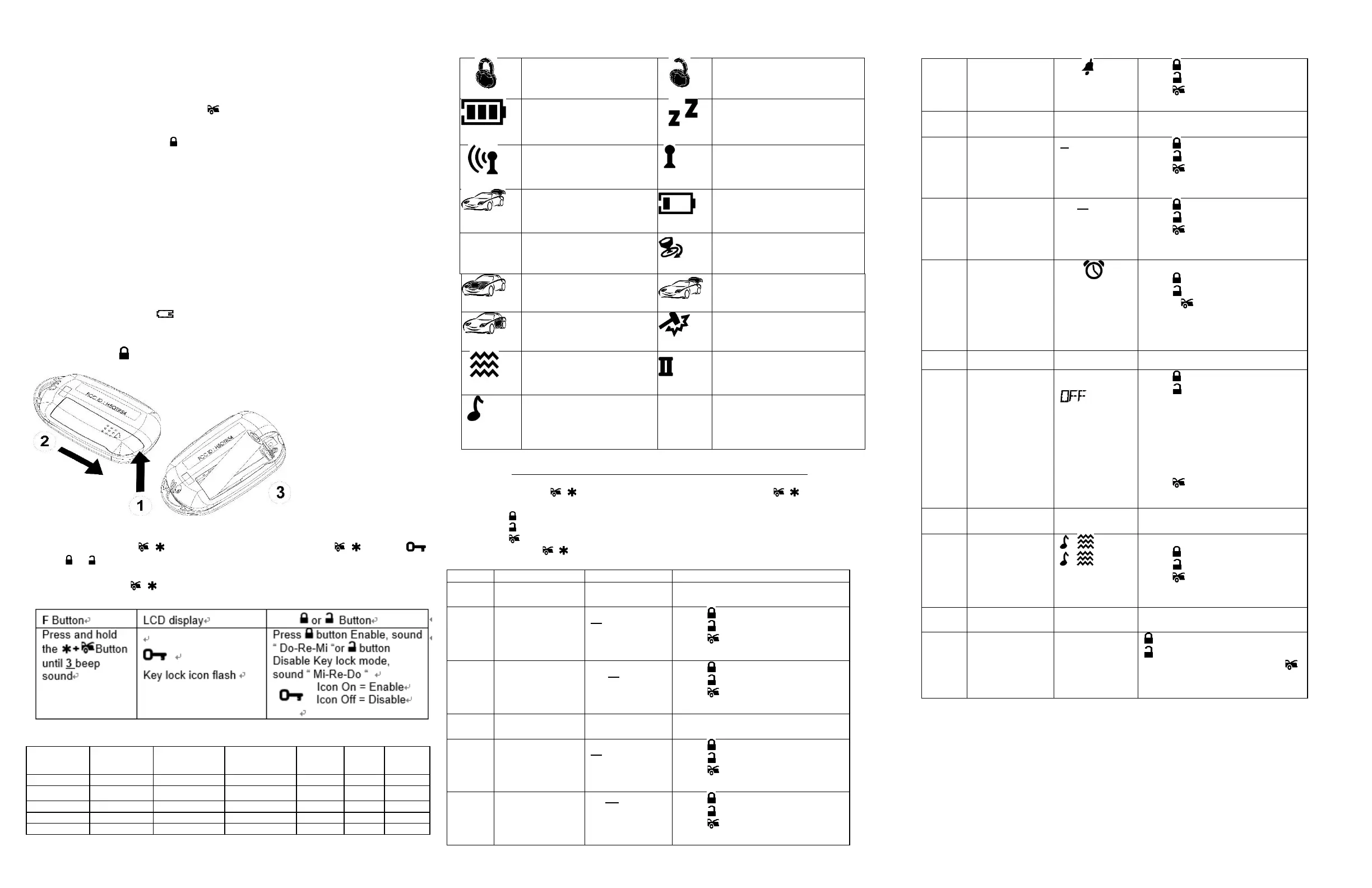
THE REMORE LCD ICONS WITH FUNCTION:
Door Lock
Your vehicle doors are
locked.
Door Unlock Your vehicle doors
are unlocked
Power Save Mode
Save the battery power
(Full bar icon flash)
Valet Mode
All the function shall be
temporarily on hold.
Remote Transmission You
are transmitting the signal
to control unit
* In – Range Indicator
You are within the remote
control range.
Trunk Release (Channel 3
op) Trunk open.
Low Battery
You have to replace the
battery of remote control.
Parking Meter
Reminder when time is up
for parking
Hood Trigger (Zone 1)
Hood is illegally opened
Trunk Trigger (Zone 2)
Trunk is illegally opened
Door Trigger(Zone 3)
Doors are illegally opened
Sensor Trigger(Zone 4)
Trigger on Sensor 1
Vibration Mode
Remote Control vibrates
when system is triggered
Melody Mode
Remote Control alert
user through melody
sound
Activate Channel 4
(or Chanel 5) Output.
PROGRAM MODE2-WAY LCD REMOTE TRANSCEIVER:
Enter:
1. Press and hold + button until 2 beeps heard then release the + button. (LCD
display show Hours of current time set up, set up hour(s) first.)
2. Press button to increase value, or Enable the selected feature.
3. Press button to decrease value, or Disable the selected feature.
4. Press button to confirm its selection, move to the next option.
EXIT: Press & hold + button or do nothing wait for 5 sec.
exit 2-way LCD programming mode automatically (1 beep) Confirm Exit.
Adjust clock
hours from 0 to
12
Press button => (+)or
Press button = >(-)
Press button confirm its
selection, move to next option.
Adjustclock
minutes from 0 to
59
Press button => (+)or
Press button => (-)
Press button confirm its
selection, move to next option.
Adjust Alarm
Clock hours from
0 to 12
Press button => (+)or
Press button => (-)
Press button confirm its
selection, move to next option.
Adjust Alarm
Clock minutes
from 0 to 59
Press button => (+)or
Press button => (-)
Press button confirm its
selection, move to next option.



 To Previous Page
 Loading...