EasyManua.ls Logo

Automated Logic DIAG485 - User Manual

Automated Logic DIAG485
3 pages
Print Icon
To Next Page IconTo Next Page
Loading...
Automated Logic Corporation 1150 Roberts Blvd. Kennesaw, GA 30144 770/429-3000 770/429-3001 Fax
www.automatedlogic.com Copyright 2003 Automated Logic Corporation. All rights reserved. Automated Logic, the
Automated Logic logo, SuperVision, Eikon, and Alert are registered trademarks of Automated Logic Corporation.
InterOp is a trademark of Automated Logic Corporation. BACnet
®
is a registered trademark of ASHRAE. All other brand
and product names are trademarked by their respective companies.
Technical Instructions
DIAG485
Using the DIAG485 2
Specifications 2
Mounting 2
Power Wiring 2
Communications Wiring 2
Diagnosing Network Problems 3
Protection 3
Question and Answer IconNeed help?

Do you have a question about the Automated Logic DIAG485 and is the answer not in the manual?

Overview

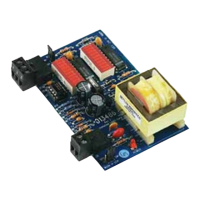
The DIAG485 is a diagnostic board designed to monitor and improve the communication signal levels on a network segment, specifically the CMnet. It provides visual feedback on network activity and can help reduce noise by adding bias.

Function Description

The primary function of the DIAG485 is to display communication signal levels on the network segment, aiding in the diagnosis of network problems. It achieves this through a series of LEDs that illuminate based on the signal strength and quality. The board can also add bias to the CMnet, which helps to reduce the effects of noise and improve communication reliability. This bias feature is crucial for maintaining stable network performance, especially in environments prone to electrical interference. The visual indicators allow technicians to quickly assess the health of the network segment and identify potential issues such as missing terminators, improper termination, or excessive cable length.

Important Technical Specifications

  • Power: The DIAG485 operates on 24VAC, drawing 0.3A, at 50-60Hz, with a power consumption of 7.2VA. It requires a single Class 2 power source, rated at 100VA or less. This specification highlights its low power requirements and suitability for integration into existing control panels without significant power infrastructure changes.
  • Temperature Range: The device is designed to operate within a temperature range of 0 to 130 °F (-17.8 to 54.4 °C). This broad operating range makes it suitable for various indoor environments, including those with moderate temperature fluctuations.
  • Operating Humidity Range: The DIAG485 can function in environments with 10-90% relative humidity, non-condensing. This non-condensing requirement is standard for electronic equipment, preventing damage from moisture accumulation.
  • Dimensions: The board itself measures approximately 4 inches (10.2 cm) in length and 2 1/2 inches (6.4 cm) in width. These compact dimensions facilitate easy installation in control panels or other confined spaces.
  • Class 2 Device: The DIAG485 is classified as a Class 2 device, meaning it operates at less than 30VAC and 100VA. This classification is important for safety considerations, particularly when mounting it in control panels that may also house non-Class 2 (120VAC or greater) devices. Appropriate isolation measures must be taken to prevent electrical hazards.
  • Termination: The device is designed to work with two 120 Ohm terminators, which are included with each DIAG485. These terminators are essential for preventing signal distortions and should be placed at each end of the network segment for optimal performance.

Usage Features

  • Visual Diagnostics: The DIAG485 features LED indicators that provide real-time visual feedback on network communication. These LEDs display the "Net - Net +" signals, allowing users to interpret the network status. Different LED patterns correspond to various network conditions, such as good communications, one terminator missing, both terminators missing, no terminator/no bias, properly terminated/no bias, or too many terminators/excessive cable length. The number of illuminated LEDs can also indicate the length of the network segment; longer segments may show fewer illuminated LEDs, while shorter segments may show more.
  • Bias Jumper: A "Bias Jumper" on the board allows users to enable or disable the addition of network bias. This feature is critical for reducing noise on the CMnet. It is important to note that only one DIAG485 per network segment should have the Bias jumper in place, ideally positioned in the middle of the segment for maximum effectiveness. Additional DIAG485s can be used on the same segment for monitoring without adding bias.
  • Easy Installation: The DIAG485 is designed for snap-track mounting. It can be easily removed from and mounted onto a snap-track by pushing it firmly into the grooves. For secure installation, self-drilling screws can be used to mount the snap-track, with drilling directly into the plastic near the edges to ensure screws are visible and prevent shorting.
  • Power Jumper: The device includes an ON/OFF power jumper. The LED labeled "POWER" lights up when the jumper is set to ON, indicating that the device is receiving power.
  • Communication Wiring: The DIAG485 connects to the CMnet port using standard communication wires. It is crucial to maintain consistent polarity with the rest of the CMnet to ensure proper operation.
  • Network Verification: After installation and wiring, communication with the network can be verified by viewing module status reports on a SuperVision workstation, confirming the DIAG485's successful integration and functionality.

Maintenance Features

  • Self-Resetting Polyswitch: The DIAG485 is protected by an internal solid-state Polyswitch on the CMnet. This Polyswitch is not replaceable but will automatically reset itself once the condition causing a fault returns to normal. This self-resetting feature enhances the device's durability and reduces the need for manual intervention in case of minor electrical faults.
  • Clearance Requirements: To ensure proper wiring and prevent interference, a minimum of 1.5 inches (3.8 cm) of clearance should be provided around each edge of the DIAG485. This allows for easy access during installation and troubleshooting.
  • Environmental Considerations: The device's specified operating temperature and humidity ranges indicate its robustness for typical indoor environments. Adhering to these conditions helps ensure long-term reliability and minimizes the need for environmental control.
  • Warning for Improper Use: The manual explicitly warns that if the equipment is used in a manner not specified by the manufacturer, the protection provided by the equipment may be impaired. This emphasizes the importance of following installation and usage guidelines to maintain the device's protective features and overall performance.

Automated Logic DIAG485 Specifications

General IconGeneral
BrandAutomated Logic
ModelDIAG485
CategoryControl Systems
LanguageEnglish