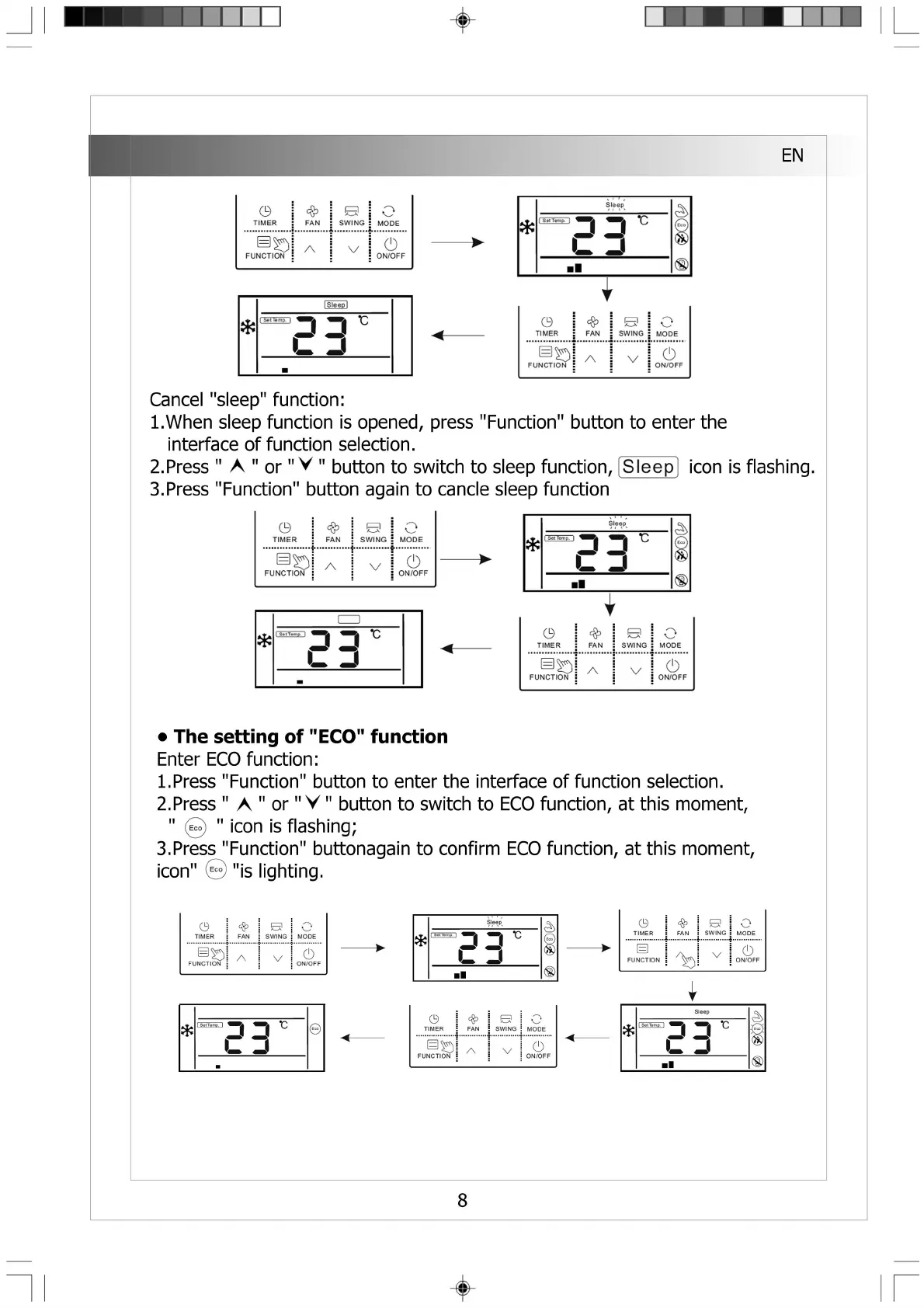
• The se
Enter EC(
1. Press "
2. Press"
ii ii
fe )
jttonagain to confirm ECO function,
;nt,
at this moment,
0
TIMER
❖
FAN
e
SWING
o
MODE
巨)
FUNCTION
%
v
0
ON/OFF
Sleep
氺
1 Sal Tamp. I ^
3
■ I
0
TIM E R FAN
s
SW IN G
〇
MOD E
目妁
FU N CT IO N
八
V
0
O N /O F F
◄-
0
TIM E R
FAN
SW IN G
〇
MO DE
目
幻
FU N CT IO N
八
V
(!)
O N /O F F
itting of "ECO" function
D function:
Function" button to enter the interface of function selection,
A " o r " V " button to switch to ECO function, at this mome
icon is flashing;
3.Press Function
icon" © "is lighting.
0
TIMER FAN
S
SWING
o
MODE
FUNCTION
/ s V
o
ON/OFF
<
Cancel "sleep" function:
1. When sleep function is opened, press "Function" button to enter the
interface of function selection.
2. Press " A " o r " V " button to switch to sleep function, [Sleep] icon is flashing.
3. Press "Function" button again to cancie sleep function
O
T IM E R
❖
FAN SW IN G
〇
M O D E
曰 ”
F U N C TIO N
八
V
0
O N /O FF
氺
Sleęp^
>IT««np. I
c d
0
TIME R
❖
FAN
s
SW IN G
o
MO DE
目 Q
FUN CT IO N
A
V
0
ON /O FF
EN
■
1 Sleep 1
氺
■
Sleep
氺
1 Sełtemp. ) I Q
c □
■ ■
氺
Sleepa
1 Sal Tamp.、 ^
C 3
■■
8


 To Next Page
 Loading...