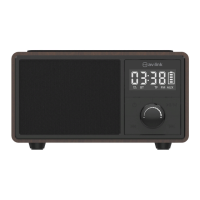
General Usage
• Charging the battery: Fully charge the Fusion’s internal battery before first use. Use the USB cable
provided and only connect to a suitable 5V USB power supply. To check the battery capacity at any time,
view the battery level indicator on the side of the LED display. During charging, the battery level
indicator will flash, changing to constant when fully charged.
• Setting the time: On first use, you need to set the Fusion’s internal clock to the correct time. To do this,
first switch the unit on by long pressing the Power button (2), the Fusion will enter Bluetooth mode. Next
short press the Power button again to enter Standby/clock mode. Double press the Play/mode button (4)
and the hour digits will flash on the LED display. Use the Volume knob (6) to select the correct time then
press the Play/mode button again to store and move to the minute digits. Repeat the process again for the
minute setting then press the Power button to store the correct time.
• Bluetooth Pairing and playback: Press and hold the Power button (2) and the Fusion will turn on and
enter Bluetooth pairing mode. Ensure your device is in range and Bluetooth is enabled, then search in the
device list for “AV:Link-Fusion” and select to connect. If your device asks for a pairing code, enter
“0000” to connect. Once connected, you can use the track buttons (4,5&7) on the Fusion to control your
music. To disconnect from your device at any time and connect to a different device, double click the
Play/mode button (4).
• TF card media playback: With the Fusion switched on, insert a compatible TF (MicroSD) card into the
port on the back of the unit (11). The inbuilt media player will detect any compatible files on the card and
automatically play the first track. You can now use the track buttons (4,5&7) on the Fusion to control your
music. NOTE: Ensure the TF card is formatted to FAT32 standard and is no larger than 64MB in size.


 To Next Page
 Loading...