NOTE: The countdown timer will count up to 99 mins and 59secs.
MONITOR AND TRANSMITTER BATTERY INSTALLATION:
• Remove the battery compartment cover on the back of the device.
• Place 2 x AAA batteries (Included) in the compartment as indicated by the polarity symbols (+and-)
• Replace cover.
• Use the Toggle switch at the back of the device to power on “COOK” mode or “TIMER” mode.
• When the device is switched on it will beep once.
TOGGLE SWITCH FUNCTIONS
1. Power “OFF” device
2. Cooking Mode
3. Timer Mode
COOKING MODE INSTRUCTIONS:
1. Use the Toggle switch at the back of the device to power on “COOK” mode.
2. Locate the probe socket on the left hand side of the device and insert the meat probe connector-plug into
the socket.
3. Place your meat on a barbeque or oven safe tray.
4. Insert thermometer probe into the meat making sure the probe is as close to the centre of the meat as
possible. To obtain a precise temperature reading, it is important to ensure the probe’s point is not resting
on bone, gristle or on the surface of the cookware.
5. Press the button until desired meat setting is on screen. Meat icons displayed in visual format. Choose
from eight selections:
6. Press to select from four preset temperatures:
WELL- Well Done
M WELL- Medium Well Done
MEDIUM- Medium
M RARE- Medium Rare
RARE- Rare
7. Press to choose between Fahrenheit and Celsius reading.
DIGITAL STEAK
THERMOMETER
PRODUCT CODE: 12932
USAGE INSTRUCTIONS

 Need help?
 General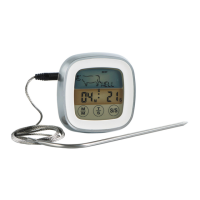

 To Next Page