Need help?
Do you have a question about the Avaya SBM24 and is the answer not in the manual?
How to answer an incoming call using the SBM24 Button Module and its line buttons.
Using one-button dialing for commonly called numbers via the SBM24 Button Module.
How to activate features like Call Forwarding using SBM24 feature buttons.
Instructions on how to change preset labels for SBM24 module buttons.
Procedure to reset a specific button label on the SBM24 to its original setting.
Steps to reset all button labels on the SBM24 module to their default settings.
Guide to adjust the screen brightness of the SBM24 Button Module.
Instructions to modify the screen contrast settings for the SBM24 Button Module.
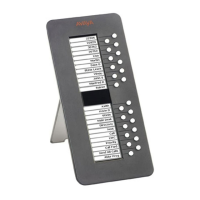
The SBM24 Button Module is an accessory designed to expand the functionality of a telephone by providing additional call appearances and feature buttons. It integrates seamlessly with the existing telephone system, offering 24 extra lines for various purposes, including incoming and outgoing calls, as well as access to advanced calling features.
The primary function of the SBM24 Button Module is to extend the number of available lines and feature buttons on a user's telephone. This expansion is particularly useful for managing multiple calls, accessing frequently used features, and streamlining communication workflows. It supports additional lines for calls bridged from other extensions, enabling users to monitor and answer calls for colleagues. Furthermore, it facilitates abbreviated dialing, allowing users to program one-button access to commonly called numbers. The module also provides dedicated buttons for accessing various switch features, such as call forwarding, call pickup, go to coverage, and auto callback, enhancing the overall efficiency of call management. The call appearances and features displayed on the Button Module are mirrored on the main telephone screen, ensuring a consistent user experience.
The SBM24 Button Module is designed to work in conjunction with compatible Avaya telephones. While specific technical specifications like dimensions, power consumption, or connectivity interfaces are not detailed in the provided text, its core functionality revolves around extending the existing telephone's capabilities. It features a display and a set of physical buttons, which are configurable for various functions. The module supports the display of incoming call icons (a triangle), in-use icons (an equals sign within a square), and allows for the personalization of button labels.
When an incoming call arrives on a Button Module line, an incoming call icon (triangle) is displayed. To answer the call, the user can either press the flashing line button on the Button Module, which activates the speaker, or pick up the handset and then press the flashing line button. Once answered, the icon changes to a square. For bridged call appearances, the module indicates when a bridged extension is in use by its owner with an "in use" icon (equals sign within a square), allowing users to monitor and answer calls for other extensions.
The SBM24 Button Module supports Abbreviated Dial (AD) buttons, which enable one-button dialing for frequently called numbers. If configured by the administrator, users can simply lift the handset and press the corresponding button, or press the button directly to use the speakerphone, to dial a programmed number. Users with the "Program Abbreviated Dialing" feature enabled on their telephone can also program these numbers themselves.
The module provides dedicated feature buttons for various telephone functionalities, including Call Forwarding, Call Pickup, Go to Coverage, and Auto Callback. To activate a feature, the user simply presses the button adjacent to the desired feature.
Users can customize the labels on their feature buttons to make them more intuitive and useful. This personalization process involves navigating through the telephone's menu:
To revert a single customized label back to its original default setting:
To restore all labels on the Button Module to their default configurations:
Users can adjust the brightness of the Button Module's display for optimal visibility:
The contrast of the Button Module's display can also be adjusted to improve readability:
These features collectively enhance the user's ability to customize and maintain the SBM24 Button Module for a personalized and efficient communication experience.
 General
| Brand | Avaya |
|---|---|
| Model | SBM24 |
| Category | Control Unit |
| Language | English |

 To Next Page