P/N: 300APF01-XXX
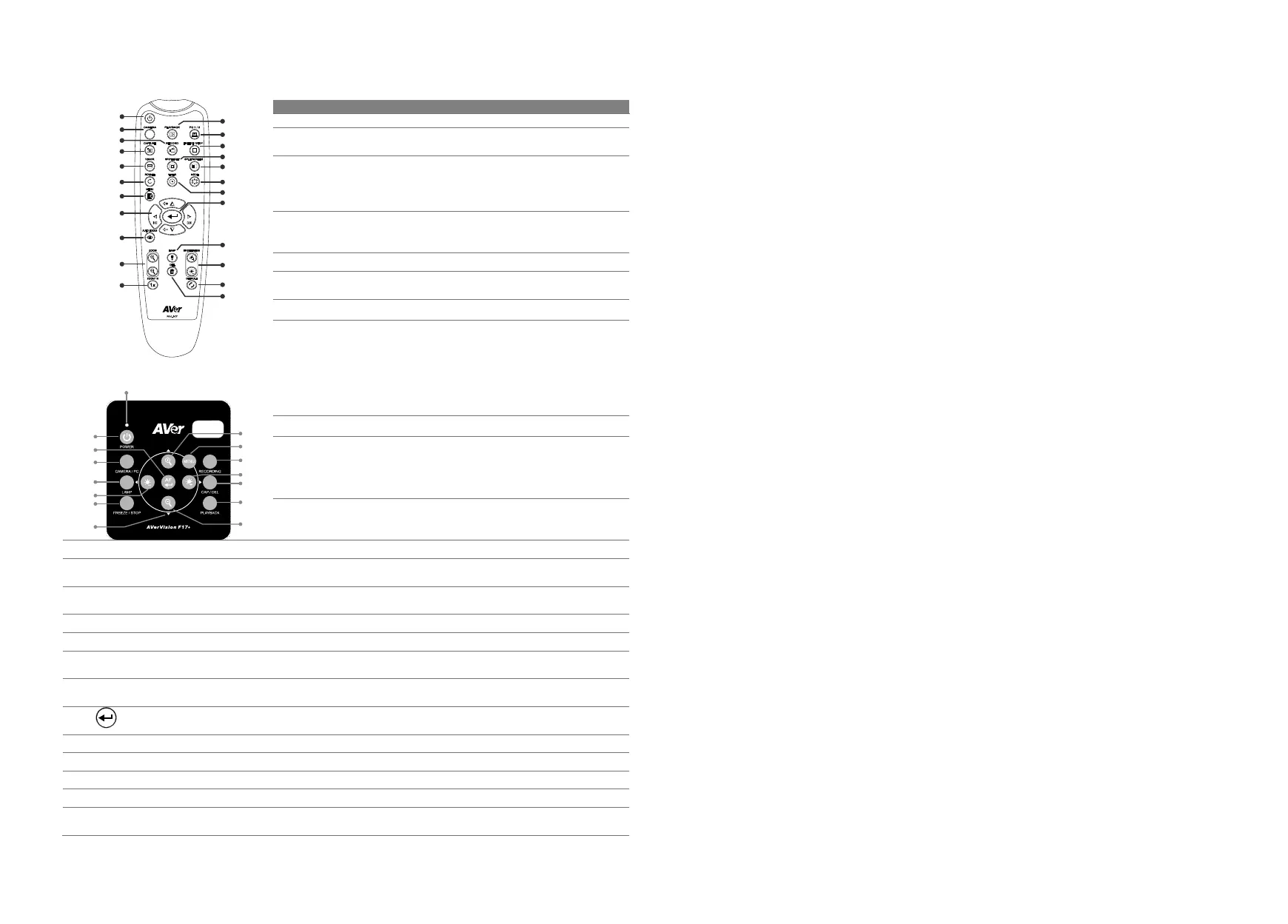
Remote Control and Control Panel
N
(18)
(14)
(11)
(7)
(8)
(5)
(2)
(1)
(22)
(13)
(4)
(3)
(15)
(12)
(17)
(23)
(20)
(19)
(9)
(6)
(16)
(10)
(21)
(1)
(9/19)
(2)
(14)
(8)
(20)
(7)
(10)
(3)
(21)
(4/23)
(12)
(10)
(21)
(24)
Name Function
(1) POWER Turn the unit on/standby.
(2) CAMERA Camera mode displays the video signal
from the built-in camera.
(3) RECORD Start/Stop audio & video recording.
Video recording can only be saved either
in a SD memory card or a USB flash
drive.
(4) CAPTURE Capture still image in Camera mode. In
continuous capture mode, press this
button again to stop.
(5) VISOR Not supported
(6) ROTATE Rotate the image by 0/180° in Camera
mode.
(7) MENU Open and exit the OSD menu.
(8)
▲,▼,◄, & ►
- Pan and zoom-in image (above digital
zoom level) in live mode.
- Select options in OSD menu.
- Use ▲&▼ to increase and decrease
the video playback volume.
- Use & to play the video backward
and forward.
(9) AUTO FOCUS Adjust the focus automatically.
(10) ZOOM +/- Increase/decrease the image
magnification in camera and picture
playback mode.
(11) ZOOM 1X Reset zoom level to 100%.
(12) PLAYBACK View the captured picture/video from the memory in images.
(13) PC 1/2 PC mode displays the video signal from the RGB/HDMI INPUT
port of F17+.
(14) FREEZE / STOP - Freeze live images.
- Stop video playback.
(15) SPOTLIGHT Not supported
(16) SPLIT SCREEN Not supported
(17) MODE Press to switch between Normal (Microscope), Motion, and High
quality.
(18) TIMER Call the Timer submenu. Start/Pause/Stop the timer countdown
and set the timer duration.
(19)
- Make a selection in Playback mode and OSD menu.
- Play/Pause video playback.
(20) LAMP Turn the overhead light on/off.
(21) BRIGHTNESS +/- Adjust the brightness.
(22) DEFAULT Reset to factory default setting.
(23) DEL Delete the selected picture/video in Playback mode.
(24) Power LED INDICATOR
- Red: Standby
- Green: On
Federal Communication Commission Interference Statement
NOTE: This equipment has been tested and found to comply with the limits for a Class A digital device,
pursuant to part 15 of the FCC Rules. These limits are designed to provide reasonable protection against
harmful interference when the equipment is operated in a commercial environment. This equipment
generates, uses, and can radiate radiofrequency energy and, if not installed and used in accordance with
the instruction manual, may cause harmful interference to radio communications. Operation of this
equipment in a residential area is likely to cause harmful interference in which case the user will be required
to correct the interference at his own expense.
FCC Caution: Any changes or modifications not expressly approved by the party responsible for
compliance could void the user's authority to operate this equipment.
This device complies with part 15 of the FCC Rules.
The Operation is subject to the following two conditions:
(1) This device may not cause harmful interference, and
(2) This device must accept any interference received, including interference that may cause undesired
operation.
This Class A digital apparatus complies with Canadian ICES-003. Cet appareil numérique de la classe A est
conforme à la norme NMB-003 du Canada.
Warning
This is a class A product. In a domestic environment this product may cause radio interference in which
case the user may be required to take adequate measures.
Caution
Risk of explosion if battery is replaced by an incorrect type. Dispose of used batteries according to the
instructions.
警告
為避免電磁干擾,本產品不應安裝或使用於住宅環境。
COPYRIGHT
©2023 AVer Information Inc. All rights reserved. | December 21, 2023
The information contained in this documentation is subject to change without notice.
Contact Information
Headquarters
AVer Information Inc.
https://www.aver.com
8F, No.157, Da-An Rd.
Tucheng Dist., New Taipei City
Taiwan
Tel: +886 (2) 2269 8535
USA Branch Office
AVer Information Inc.
https://www.averusa.com
668 Mission Ct.
Fremont, CA 94539, USA
Tel: +1 (408) 263 3828
Toll-free: +1 (877) 528 7824
Technical support:
support.usa@aver.com
Europe Branch Office
AVer Information Europe B.V.
https://www.avereurope.com
Westblaak 134, 3012KM,
Rotterdam, The Netherlands
Tel: +31 (0) 10 7600 550
Technical support:
eu.rma@aver.com
Japan Branch Office
アバー・インフォメーション株式会社
https://jp.aver.com
〒160-0023 日本東京都新宿区
西新宿 3-2-26 立花新宿ビル 7 階
Tel: +81 (0) 3 5989 0290
テクニカル・サポート:
https://jp.aver.com/technical-support
Vietnam Branch Office
Công ty TNHH AVer Information
(Việt Nam)
Tầng 5, 596 Nguyễn Đình
Chiểu, P.3, Quận 3, Thành phố
Hồ Chí Minh 700000, Việ
t Nam
Tel: +84 (0)28 22 539 211



 To Previous Page
 Loading...