Home
Avision
Scanner
AV332IL
Page 92
Avision AV332IL - Page 92
135 pages
Manual
Save Page as PDF
To Next Page
To Next Page
To Previous Page
To Previous Page
Loading...
User’s Manual
4-
65
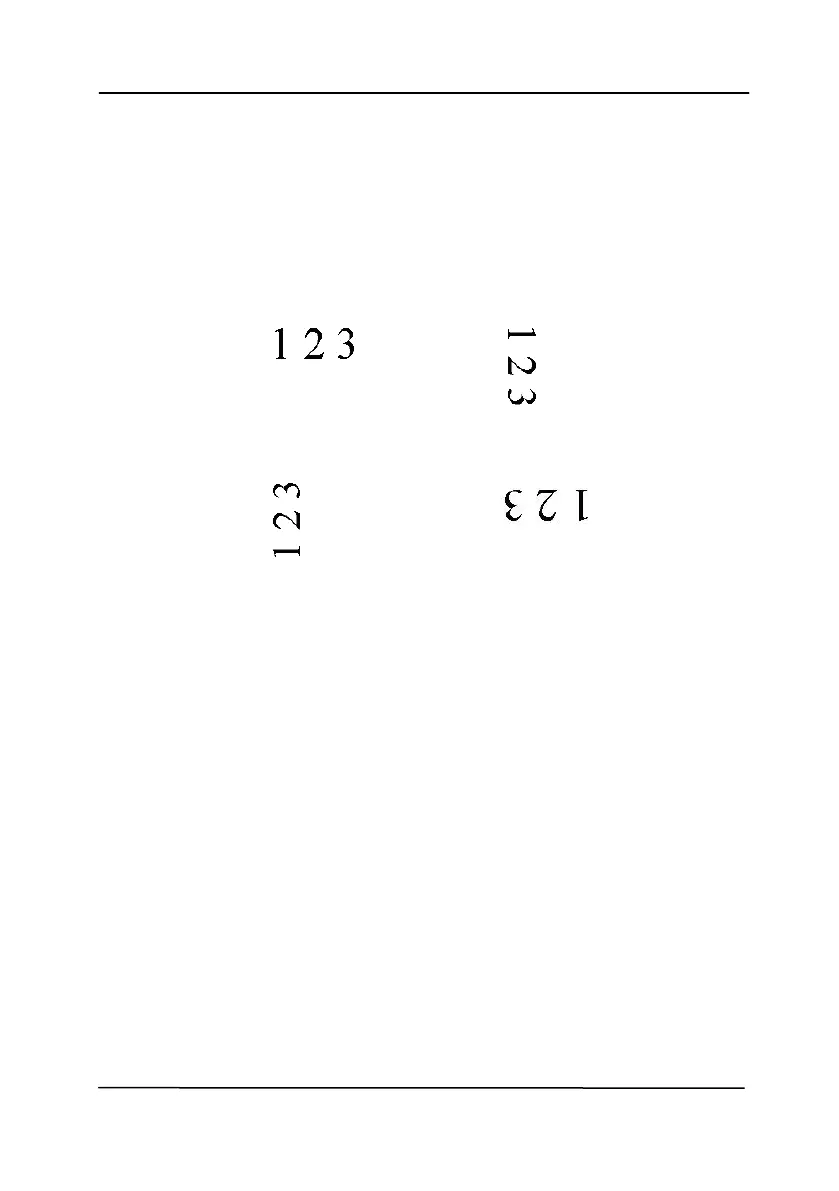
Rotate
Image
Choose the ro
tation ang
le from the drop down
li
st if you wish to rotate your scanned image.
Choice: None,
90°
CW(clock
wise),
90°
CCW(counter clockwise), 180°
, Auto
based on contents.
Auto rotate every
even page.
Original
Rotate 90°
CW
Rotate 90°
CCW
Rotate 180°
91
93
Table of Contents
Main Page
1. Introduction
9
1.1 Package Items
9
1.2 Front View
11
1.3 Rear View
12
1.4 Removable Parts
13
2. Scanner Installation
14
2.1 Precautions
14
2.2 Installing the Scanner Driver and Connecting the Cables
15
2.2.1 Connecting to Power
15
2.2.2 Turning on the Power
16
2.2.3 Installing the Scanner Driver
16
2.2.4 Connecting to Computer
18
3. Completing Your First Scan
19
3.1 Loading Your Paper
19
3.1.1 Notice on Using the ADF
19
3.1.2 Loading Your Document in the ADF Paper Tray
20
3.1.3 Scanning a Stack of Document with Various sizes and Weights
23
3.2 Verifying Your Scanner Installation
25
3.3 A Glance of the Scanner Properties Dialog Box
29
4. Using the Scanner Properties Dialog Box
30
4.1 Buttons on the Scanner Properties Dialog Box
31
4.2 Showing or Hiding Tabs
33
4.3 The Image Tab
35
4.3.1 The Image Selection Box
36
4.3.2 Other Image Options
41
4.3.3 Scanning color images
53
4.3.4 Scanning grayscale images
53
4.3.5 Scanning B&W images
53
4.3.6 Editing Profiles
54
4.4 The Compression Tab
57
4.5 The Color Dropout Tab
60
4.5.1 Color Dropout Selection
60
4.6 The Paper Tab
66
4.6.1 Cropping
67
4.6.2 Other Paper Selection
73
4.7 The Multi-Feed Detection Tab
79
4.8 The Preview Tab
82
4.9 The Enhancement Tab
83
4.10 The Rotation Tab
91
4.11 The Separation Tab
97
4.12 The Setting Tab
102
4.13 The Imprinter Tab
105
4.14 The Information Tab
109
5. ISIS Interface Operation
111
6. Using the Buttons
112
6.1 Installing Button Manager V2
112
6.2 Checking the Button Configurations before Scanning
113
6.3 Scanning From One Touch of the Buttons
115
7. Maintenance
116
7.1 Cleaning the ADF
116
7.2 Cleaning the Friction Roller
118
7.3 Cleaning the Calibration Area
120
7.4 Replacing the ADF Friction Roller
121
7.5 Replacing the ADF Roller
126
8. Troubleshooting
129
8.1 Clearing a Paper Jam
129
8.2 Questions and Answers
130
8.3 Technical Service
133
9. Specifications
135
Related product manuals
Avision AV332U
135 pages
Avision AV332 Series
131 pages
Avision AVA6
43 pages
Avision AV121
27 pages
Avision AV176U
107 pages
Avision AV5200
20 pages
Avision AV8350
103 pages
Avision AD345
2 pages
Avision AD215
173 pages
Avision AD240
26 pages
Avision AN240W
172 pages
Avision AD370 Series
159 pages



 To Next Page