40
Introduction
Thank you for purchasing the model AWEI T28 smart
touch true wireless sport earbuds. Please read this manual
before using.
Bluetooth wireless communications Technology
introduction
How To Use
How To Use How To Use Specifications
Bluetooth Specifications
Bluetooth Version: V5.1
Profile Support: HSP、HFP、A2DP、AVRCP
Stand-by Time: 300 h
Talk Time: 7 h
Music Play Time: 6 h
Charging Time: 1.5 h
Charging Voltage: DC 5V
Frequency Range: 2.402G-2.480G
Ambient Temperature: -20/+45℃
Transmission Distance: 10m
Earbuds Battery Capacity:35mAh
Charging Case Battery Capacity:300mAh
Power on: Take out earbuds from charging case / long touch
the MFB 3 seconds.
Power off: Put earbuds into the charging case, turn off
automatically / unconnected device,touch the MFB button for 5
seconds.
Earphone pairing: the left and right earbuds are paired
automatically, no need to operate automatic pairing.
User Manual
1. Waterproof IPX6 Level, Sweat-proof.
2. V5.1 solution, low power consumption, super
compatibility.
3. Hands-free function.
4. True wireless earbuds, You can use by single or a pair.
Products Features
Light status
Accessories List
2X Wireless Earbuds 1X User Manual
1X Portable Charging Case 1X USB Charging Cable
R
L
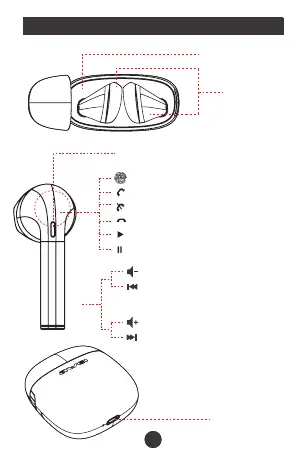
LED Indicator / Microphone
Touch Area, MFB Button
Touch And Answer The Phone
Touch 2 Second To Reject The Phone
Touch 1 Time To Hang Up
Touch 1 Time To Play
Touch 1 Time To Pause
Long Touch For Vol -
Double Touch For
Previous Track
L
Long Touch For Vol +
Double Touch For
Next Track
R
L
R
Bluetooth is a kind of wireless technology which support
short distance communications (work normally within a
distance of 10M) with it you can exchange information by
wireless between many IT digital devices like mobile
phones / wireless earphones / computers etc. Bluetooth
technology effectively simplify the communications which
makes device and data transmission quickly and effectively.
Dear AWEI User,
Thank you for choosing AWEI product. Your choice is
crucial for us,which means AWEI has added a new
user. Hope that we will bring you a good experience
through our products and services. Also hope you will
put forward the good advice and suggestions by
official customer hotline, Weibo and Wechat in the
process of product experience,which can help AWEI
to constantly improve product and service.
If you encounter any problems in the using product,
please refer to service process. Your support is our
strongest power, also your recognition and evaluation
are a great encouragement to AWEI. Thank you!
AWEI sales team
TRUE WIRELESS EARBUDS
WITH CHARGING CASE
SMART TOUCH
USER MANUAL (JL)
T28
Hello!
Charging Case
True Wireless
Earbuds
Single Earbud Connection
1. Take out one earbud from charging case.
2. Open mobile bluetooth, find pair name “AWEI T28”, click
and connect. (When the earbud and phone connect
successfully, white light continuous flashing and you could also
hear prompt tone“Connected”.)
Pairing
Double Earbuds Connection
1. When you take out two earbuds from charging case,
earbuds will connect automatically. Master earbuds’ green
and white light will flash alternately and earbuds start to
enter pairing status. (Now earbuds are in pairing and you
could open phone or connect other Bluetooth devices.)
2. Open phone or other Bluetooth devices, search “AWEI
T28”, click it and connect.(when Bluetooth paired
successfully, you will hear " connected")
3. Re-connect automatically: It will re-connect
automatically to paired devices. (Premise is that devices’
Bluetooth is on and earbuds paired record still exist. )
DC 5V
Charging Port
Answer incoming call: Touch the MFB
Reject incoming call: Long touch the MFB for 2 seconds
Hang up the phone: Touch the MFB
Play: Touch the MFB
Pause: Touch the MFB
Vol + : Long touch the R MFB
Vol - : Long touch the L MFB
Next Track: Double touch the R MFB (Play status)
Previous Track: Double touch the L MFB (Play status)
Last number redial: Double touch the MFB (Pause status)
Siri: Touch the L MFB three times
Game Mode ON/OFF:Touch R three times
Button Definition
1. Earbuds
When charging, the green light on; Full charge, the
light off; Pairing, the green and white light blinking;
2. Charging Case
The red light flashes slowly when charging; after fully
charged, the indicator light will be always on.
Note:
When your eabuds connected phone and you find one
earbuds no sound, you could turn off bluetooth on phone
and put earbuds back to charging case. Then take them out
again, these two earbuds will paired successfully within 10
seconds, and only white light show single continuous
flashing. You could follow above 1 and 2 steps to connect
your phone.
(Note:
1. These two earbuds already be paired before delivery. So
when you get earbuds, it is unnecessary to pair two earbuds
by yourself.
2. If both earbuds cannot be automatically paired (i.e. two
earbuds are flash green and white lights alternately at the
same time), put the left and right earbuds into the charging
case and then take them out. The left and right earbuds will
be automatically paired without any other operation.
3. When TWS connect successfully, "L" earphone white
indicator flashes slowly, "R" earphone green and white light
alternately flashing. Then it's available to connect with
mobile. ( If pairng is not successful, please put back
earphones to charging case and repeat above instructions)
4


 To Next Page
 Loading...