4
Warning!
DCA
High Voltage! Danger!
ACA
Ground
DCA & ACA
Double Insulation
In accordance wiyh the instructions
of European Trade Union
Battery Undervoltage
Fuse
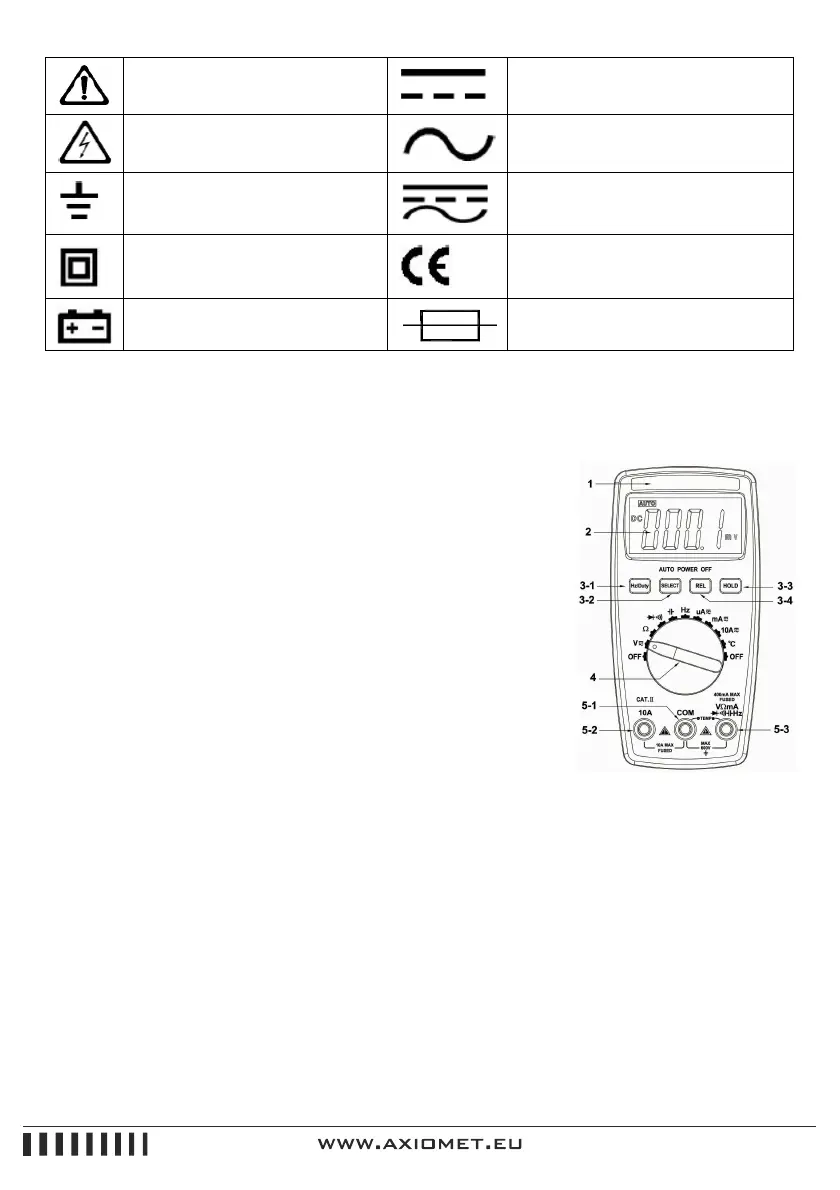
IV. Instrument Panel & Button Function Description
1. Instrument Model Number
2. LCD Display: Display the measured data and unit.
3. Function Button
3.1. Hz/Duty (Frequency/Duty Cycle): Press this button to select the
frequency or duty cycle mode. The measurement mode of
voltage/frequency/duty cycle or current/frequency/duty cycle could
be selected by pressing this button in AC/DC voltage or AC/DC
current gear.
3.2. SELECT (Function Switch): Press this button, the function could
switch between DC/AC.
3.3. REL (Relative Value Measurement): The relative value
measurement of all functions could be conducted by pressing this
button except the Hz/Duty function
3.4. HOLD (Data Hold): Press this button, the reading is locked; Press it again, the lock is cleared
and enter normal measurement status.
4. Knob Switch: It could be used to change the measurement function and range.
5. Input Terminals
5.1. Current Voltage, Diode, Resistance, Capacity, Frequency, Buzzer, Temperature “-“ Input
terminal.
5.2. 10A “+”input terminal.


 To Next Page
 Loading...