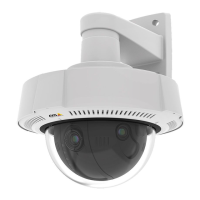
AXISQ37NetworkCameraSeries
Configureyourdevice
Remotefocusandzoom
Theremotefocusandzoomfunctionalityallowsyoutomakefocusandzoomadjustmentstoyourcamerafromacomputer.Itisa
convenientwaytoensurethatthescene’sfocus,viewingangleandresolutionareoptimizedwithouthavingtovisitthecamera’s
installationlocation.
Straightenaskewedimage
Youcanstraightenaskewedimagebyrotatingandcroppingitdigitally.Duetothecropping,apartoftheoriginalimageislost.
Thefunctionalityisusefulduringinstallation.
Theillustrationshowsbeforeandafteranimagehasbeenstraightened.
1.GotoVideo>Installation>Imagecorrection.
2.TurnonStraightenimage.
3.Usethecontrolstoadjusttheimage.
Hidepartsoftheimagewithprivacymasks
Youcancreateoneorseveralprivacymaskstohidepartsoftheimage.
1.GotoVideo>Privacymasks.
2.Click.
3.Clickthenewmaskandtypeaname.
4.Adjustthesizeandplacementoftheprivacymaskaccordingtoyourneeds.
5.Tochangethecolorforallprivacymasks,clickPrivacymasksandselectacolor.
Seealso
Reducenoiseinlow-lightconditions
Toreducenoiseinlow-lightconditions,youcanadjustoneormoreofthefollowingsettings:
•Adjustthetrade-offbetweennoiseandmotionblur.GotoVideo>Image>ExposureandmovetheBlur-noisetrade-off
slidertowardLownoise.
8



 To Next Page