Page 2
Axon Body 3 Camera Display and Triad LED Status Information
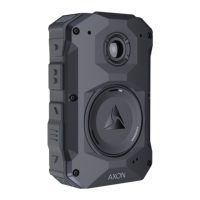
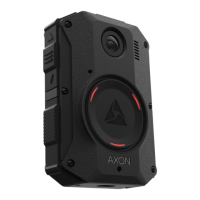
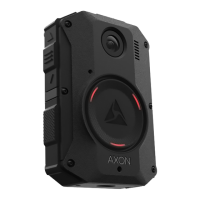
When you plug an Axon Body 3 camera into the Axon Body 3 Dock, the Triad LED on the front of the camera
shows the device status and battery capacity. The Axon Body 3 camera display, on top of the camera, is divided
into a Status Bar and Activity Area. The display shows information on camera status and activity.
See the camera’s user manual for more information about the camera LEDs and display .
Device Status Activity Area Status Bar Triad LED
Uploading data
UPLOADING 1/10
Spinning yellow (cycling on
each Triad LED)
Downloading data or applying device
settings
UPDATING
Spinning yellow (cycling on
each Triad LED)
Applying firmware update - DO NOT
remove camera from Axon Dock
UPDATING
Spinning white (cycling on
each Triad LED)
Possible network error. Check network
connection and refer to Troubleshooting
section of the Axon Body 3 User Manual
or go to help.axon.com.
NETWORK ERROR
Blinking red, yellow and
green (cycling all colors)
Device error. Refer to device page in
Axon Evidence.
NETWORK ERROR
Blinking red
Assign user ID - shown when no other
activity (other than charging)
USERID123
Battery capacity
Battery capacity. The charge indicator
( ) is shown to the right of battery
capacity during charge
Solid green (> 98%)
Solid yellow (33% to 97%)
Solid red (< 33%)
, AXON, Axon, Axon Body 3, Axon Commander, Axon Dock, and Axon Evidence are trademarks of Axon
Enterprise, Inc., some of which are registered in the US and other countries.
For more information, visit www.axon.com/legal. All rights reserved. ©2019 Axon Enterprise, Inc.
MPC0293 Rev: A
Status Bar
Activity Area
Uploading Videos and Charging Axon Body 3 Cameras
Insert the Axon Body 3 camera into Axon Body 3 Dock
bay to upload videos and charge the camera’s battery.
DO NOT unplug the power supply from the Axon Dock
while Axon devices are inserted in the bays.
Examples: Axon Body 3 camera inserted into an 8-Bay dock (left)) and a 1-Bay dock (right)
Removing Cameras from the Axon Body 3 Dock
Do not remove an Axon Body 3 camera from the Axon Body 3 Dock if the device’s Triad LED is spinning white
(cycling white on each Triad LED) and the camera display shows UPDATING.
It is recommended that you wait until the camera is fully charged (the Triad LEDs display green) before removing
it from the Axon Dock. Axon cameras with low battery capacity may not record. Axon cameras provide audio and
vibration prompts to notify users of low battery conditions.
Camera Display Sections


 To Previous Page
 Loading...