This document is a user manual for AXS AUDIO earphones, engineered and tuned in Southern California, USA. It provides detailed information on the product's features, usage, and maintenance.
Function Description:
The AXS AUDIO earphones are a pair of wireless earbuds designed for audio playback and call management. They come with a charging case that also serves as a power bank for the earbuds. The earphones feature Active Noise Cancellation (ANC) and a "Voice Through" mode, allowing users to control their audio experience and awareness of their surroundings. They are designed for ease of use with capacitive touch controls for various functions.
Important Technical Specifications:
- Pairing Name: AXS Earbuds
- Bluetooth Version: V5.2
- Battery: 55mAh (each earbud), 500mAh (charging case)
- Play Time: 10H (ANC off), 8H (ANC on)
- Call Time: 10H (ANC off), 8H (ANC on)
- Earbuds Charging Time: 1.5H
- Case Charging Time: 2H
- Case Standby Time: 180 days
- Charging Port: Type-C
- ANC Performance: 20-25dB
Usage Features:
Contents:
The package includes:
- Earbuds charging case (1 PCS)
- Earphones (1 Pair)
- Ear tips (6 Pairs: S/M/L, with 1 pair of L size already installed on earphones)
- Type-C charging cable (1 PCS)
- User Manual (with an inner QR code for an online version)
Product Introduction:
Each earphone features a LED indicator, microphone, touch panel, and charging pins. The charging case includes a charging indicator, multi-function button, and a charging port.
Selecting Ear Tips:
It is crucial to wear the right size ear tips for your ears to achieve the best noise reduction performance and overall sound quality. The manual emphasizes the importance of adjusting the earphones correctly.
Get Started:
- Preparation: Remove the protective film from each earbud after first removal from the charging case.
- Automatic Power On/Pairing: Take out the earphones from the charging case. Both L&R earphones will automatically turn on and pair with each other. The main device indicator will blink in red and green alternately.
- Bluetooth Connection: Activate Bluetooth on your device and click on "AXS Earbuds" in the Bluetooth list. If not found, turn Bluetooth off and on to discover the earphones. Once tapped, you will hear "Connected."
- Single Use: The earphones support single use. If earphones don't pair to each other normally, put both back into the charging case. With the cover open, hold the multi-function button for 3 seconds until the earphone LED indicator blinks red and green alternately. Then follow the above steps again.
- Reconnection: After the first successful Bluetooth connection, opening the charging case cover will automatically reconnect the device to the last connected device.
- Automatic Power Off: The earphones will automatically power off after 5 minutes without a connection.
Capacitive Touch Control:
The colored area on the earphones designates the capacitive touch pad. It is sensitive to touch/proximity. After locating with a finger, allow 1-2 seconds for the pad to reset prior to giving tap/touch commands.
Operating:
- Power On/Off: Earphones turn on automatically when taken out of the charging case and turn off automatically when placed back in the charging case. Manual power on/off is not possible.
- Incoming Call:
- Accept/Answer Call: Tap the L or R earphone once.
- Reject Call: Press and hold the L or R earphone for 2 seconds.
- Hang up Call: Double tap the L or R earphone.
- Voice Assistant: When not in phone mode, press and hold the L earphone for 2 seconds to activate the voice assistant.
- Volume Control:
- Up: Tap the R earphone once to increase volume.
- Down: Tap the L earphone once to reduce volume.
- Play/Pause Music: Double-click the L or R earphone to play/pause music.
- Last Song/Next Song:
- Last Song: Three-click the L earphone to return to the beginning of the song. Three-click the L earphone again to go to the previous song.
- Next Song: Three-click the R earphone to fast forward to the next song.
- ANC / Voice Through Mode:
- The earphones default to Voice Through mode when first powered ON.
- Press the R earphone for 2 seconds to activate ANC.
- Continue to press the R earphone for an additional 2 seconds to deactivate ANC.
- Continue to press the R earphone for an additional 2 seconds to activate Voice Through.
Voice Prompts:
The earphones provide voice prompts for various statuses:
- "Pairing": Earphones are in discoverable mode.
- "Connected": Earphones are connected to your Bluetooth device. (A second "Connected" prompt will be heard when the secondary earphone connects for stereo mode).
- "Disconnected": Earphones have lost Bluetooth connection.
- "ANC On": Active Noise Cancellation mode is activated (20-25dB).
- "ANC Off": Active Noise Cancellation mode is deactivated.
- "Voice Through": Allows environmental sounds through.
- "Low Battery": Battery life is less than 30%.
Maintenance Features:
Reset:
- Factory Reset: Put both earphones back into the charging case, open the cover, and hold the multi-function button of the charging case for 10 seconds. The four LED indicators will blink 5 times. This clears previous pairing records. Then follow the "Get Started" page to connect with your Bluetooth device.
Charging:
- Charging Process: Use the provided Type-C charging cable to recharge the earphones via the charging case. The charging case LED indicators will pulse white when charging.
- Full Charge Indication: After a full recharge, the 4 LED indicators on the charging case will turn off.
- Wireless Charging: The charging case is also compatible with wireless charging.
Notes (Safety and Care):
- Audio Warning: Listen responsibly. Limit continuous exposure to 85dB for a maximum daily dose of 8 hours to prevent noise-induced hearing impairment. Turn volume down before putting on earphones, then adjust to the right volume.
- Usage Restrictions: Do not use earphones while driving or riding a bike.
- Physical Care: Keep away from sharp edges, uneven surfaces, metal parts, and anything that could damage the earphones.
- Tampering: Any attempt to modify, self-repair, disassemble, or tamper with the product may cause a hazard.
- Cleaning: Do not use corrosive or volatile liquids to clean the earphones.
- Environment: Do not use earphones in dangerous environments.
- Small Parts: Earphones contain small parts that may cause a choking hazard. Keep away from children and pets.
- Battery Warning:
- Audio Expert Systems, Inc. is not liable for improper use or external damage to earphones and/or battery.
- The battery can only be charged using an adapter specifically designed to accept the cable of this product.
- Dispose of batteries according to local regulations. Recycle if possible. Do not dispose of batteries as household waste or throw them into a fire, as they may explode.
- Refer to the user manual for instructions on the charging status indicator.
AUDIO EXPERT SYSTEMS, INC.
Website: www.axsaudio.com
Support Email: support@axsaudio.com

 Need help?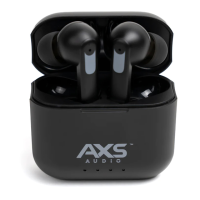

 To Next Page
 General