EN-21
CONTROL PANEL
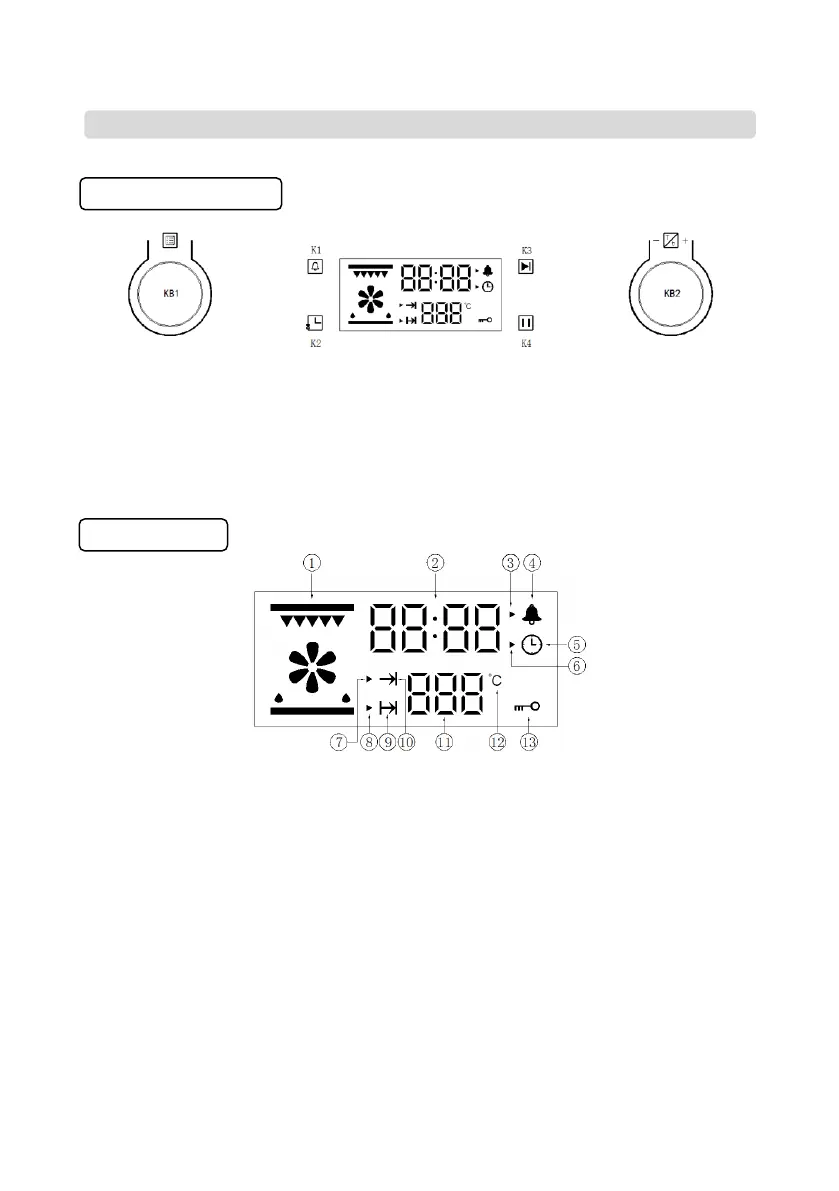
Button icon instruction
Pic 1: Buttons diagram
K1: Reminder/parameter switch (temperature/time)
K2: Clock/ reservation
K3: Start-up
K4: Pause/ cancel
KB1: Plus/minus (cooking function)
KB2: Plus/minus (temperature/time)
Display section
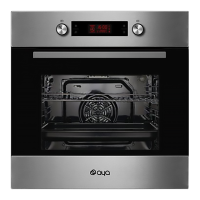
Pic 2: Display screen icon
Display screen icon instruction
1. Function icon
2. Display the time value
3. Reminder time setting icon
4. Reminder time icon
5. System time icon
6. System time setting icon
7. Work parameter setting icon (time and temperature)
8. Cooking end time setting icon
9. Reservation function
10. Oven working icon 11. Display the temperature value
12. Unit of degree Celsius ℃ 13. Lock function


 To Next Page