Instructions
A. Lighting
Control
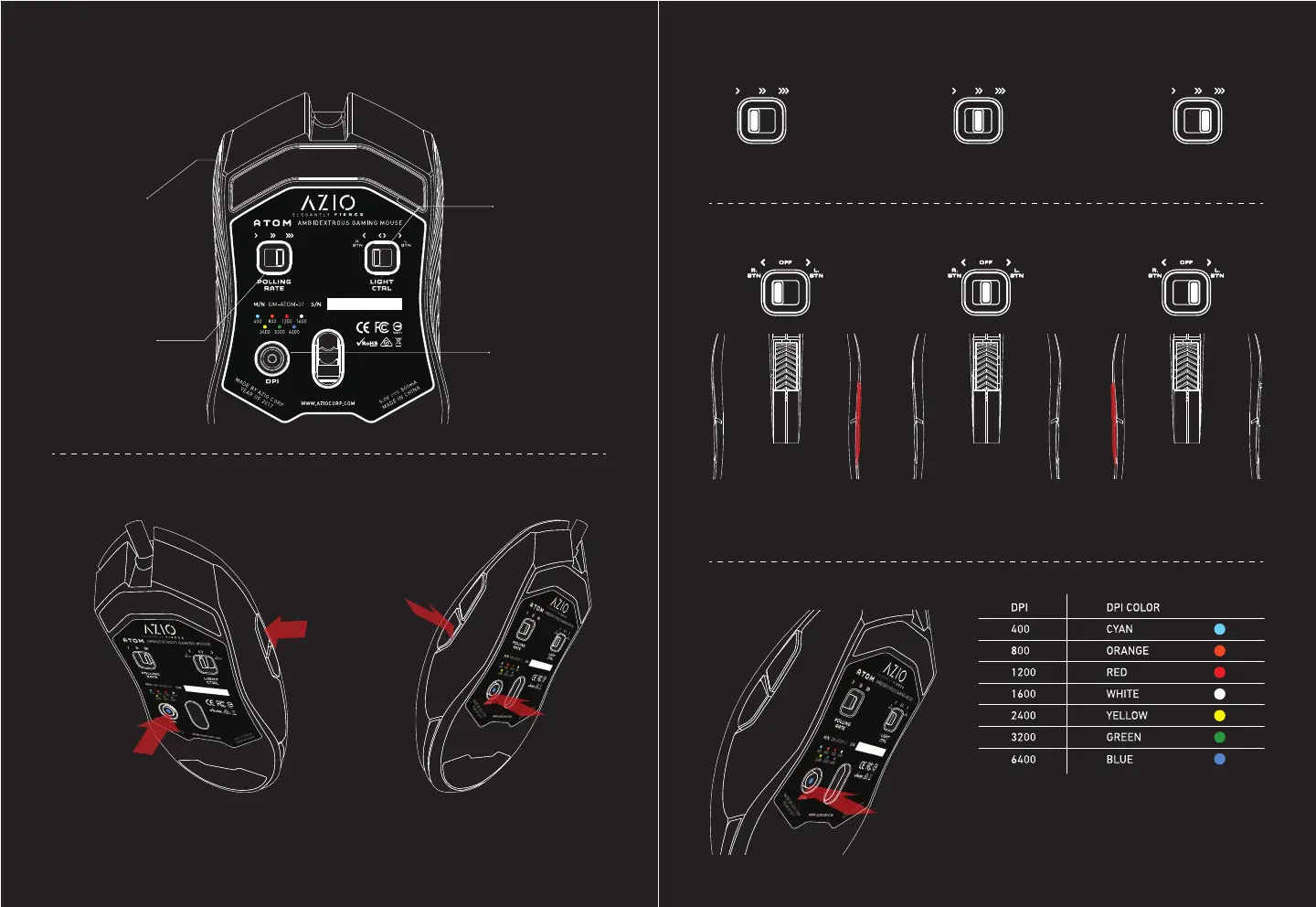
A. Lighting Control
B. Polling Rate
C. Button
Control
C. Button Control
D. DPI Control
D. DPI
Control
B. Polling
Rate
1.
Left = 125 Hz
Backlight Color: Cyan, Orange, Red, White, Yellow, Green, and Blue.
Lighting Mode: Static, Breathing, RGB Cycling, RGB Marquee, and o.
Center = 500 Hz Right = 1000 Hz
Turn on the right
side buttons
Press the DPI
button for 5
seconds. The
backlight will
flash 5 times.
Use the left side
buttons to switch
between dierent
lighting modes.
Use the right
buttons to
switch between
desired colors.
Click the DPI
button once
to save setting
and exit.
Deactivate all
four side buttons
Turn on the left
side buttons
2. 3.
1.
1.
2.
2.
3.
3.
4.
Press the DPI button once to change
DPI setting. Please refer to the color
chart for each DPI setting and its
corresponding LED light color.


 To Previous Page