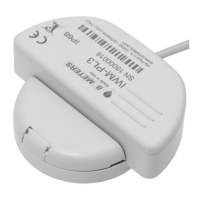
Il modulo aggiuntivo IR-MB-PULSE consente l’abilitazione della trasmissione
M-Bus cablata su contatori d’acqua HYDRODIGIT-S1 / HYDROSONIC e l’aggiunta
di due ingressi impulsivi al contatore di energia termica HYDROCAL-M4.
The IR-MB-PULSE add-on module enables wired M-Bus transmission on
HYDRODIGIT-S1/ HYDROSONIC water meters and adds two pulse inputs to
the HYDROCAL-M4 thermal energy meter.
*Le batterie non sono sostituibili. NON TENTARE SOSTITUZIONI di alcun tipo.
Con collegamento alla rete M-Bus la batteria interna ha funzione di backup.
**seriale modulo superiore a 24636000
*The batteries are not replaceable. DO NOT ATTEMPT SUBSTITUTIONS of any kind.
When connected to the M-Bus network, the internal battery has backup function.
** module serial number 24636000
Dati tecnici Technical Data
Descrizione prodotto Product Description
› Temperatura di esercizio/stoccaggio: da +1°C a +55 °C, da -20°C a +70°C
› Alimentazione: rete M-Bus (+Batteria al litio 3V*)
› Interfaccia comunicazione rete: M-Bus cablato, da 24V a 42V
› Interfaccia utente: LED rosso di stato
› Frequenza campionamento impulsi (Hz): 10, 25 (10 default)
› Consumo MBUS: 1 carico unitario (≤1,5 mA)
› Intervallo minimo interrogazioni MBus: 15 minuti
› Congurazione: tramite app android BMetering NFC Cong o BMBus
› Baud Rate M-BUS (bps): 300/2400/9600 (2400 default)
› Compatibilità:
- HYDROCAL-M4 da seriale 05053000
- tutte le tipologie HYDRODIGIT-S1 da MID 2022 e HYDROSONIC**
› Aggiornamento dati consumo (congurabile): ogni 30 minuti per
HYDROCAL-M4, ogni 24 ore per HYDRODIGIT-S1 e HYDROSONIC.
› Operating temperature/storage: from +1°C to +55°C, from -20°C to +70°C
› Power supply: from M-Bus (+Lithium battery 3V*)
› Network communication interface: wired M-Bus, from 24V to 42Volt
› User interface: red status LED
› Pulse sampling rate (Hz): 10, 25 (10 default)
› MBUS consumption: 1 unit load (≤1.5 mA)
› Minimum MBus query interval: 15 minutes
› Conguration: via Bmetering NFC Cong android app or BMBus
› M-BUS Baud Rate (bps): 300/2400/9600 (2400 default)
› Compatible device:
- HYDROCAL-M4 from serial number 05053000
- every HYDRODIGIT-S1 from MID 2022 and HYDROSONIC**
› Consumption data update (congurable): every 30 minutes for HYDROCAL-M4, every
24 hours for HYDRODIGIT-S1 and HYDROSONIC.
Precauzioni di sicurezza Safety precautions
› Maneggiare il dispositivo con cura, non schiacciare, non esporre a cariche
elettrostatiche, non installare vicino a sorgenti di calore.
› Il dispositivo non contiene materiale pericoloso, in conformità alla direttiva
europea 2011/65/UE (RoHS) e successive modifiche.
› Alla fine del ciclo di vita del dispositivo, smaltire il prodotto come da direttiva
RAEE UE, o comunque sempre in ottemperanza delle leggi e norme locali.
› Non bruciare, non sottoporre ad alte temperature.
› Il prodotto funziona in modo affidabile nelle condizioni ambientali specificate
nel manuale utente ed installazione. Eventuali interventi non autorizzati e/o
cambiamenti di uso e funzionamento possono provocare malfunzionamenti
o il danneggiamento del prodotto.
› Handle the device carefully, do not crush, do not expose to electrostatic charges,
do not install near heat sources.
› The device does not contain hazardous material, in accordance with European
Directive 2011/65/EU (RoHS) and subsequent amendments.
› At the end of the life cycle of the device, it is necessary to dispose of the product
as specified in the WEEE Directive for EU countries, or in any case always in
compliance with local laws and regulations
› Do not burn, do not subject to high temperatures.
› The product operates reliably under the environmental conditions specified in the
user and installation manual. Any unauthorized interventions and / or changes in
use and operation may cause malfunctions or damage to the product.
Per assistenza tecnica, contattare il Vs. fornitore oppure il supporto tecnico
B METERS all’indirizzo ticket@bmeters.com.
If the product needs technical assistance or warranty service, please contact your
dealer or contact the BMETERS after sales service at ticket@bmeters.com.
Assistenza e Garanzia sui prodotti Support and Warranty on the products
Con la presente B METERS dichiara che questo prodotto è conforme ai requisiti
essenziali ed alle altre disposizioni pertinenti stabilite dalla Direttiva 2014/30/UE
e dalla Direttiva 2014/35/UE. La dichiarazione completa ed ulteriori dati tecnici
possono essere scaricati dal sito web ufciale www.bmeters.com.
B METERS hereby declares that this product complies with the essential
requirements and other relevant provisions established by Directive 2014/30/EU
and Directive 2014/35/EU. The complete declaration and further technical data
can be downloaded from the ofcial website www.bmeters.com.
Dichiarazione di conformità
Declaration of Conformity
SOGGETTO A MODIFICHE SENZA PREAVVISO - SUBJECT TO CHANGES WITHOUT PRIOR NOTICE v1.4_IR-MB-PULSE_QUG
Installazione
Installation
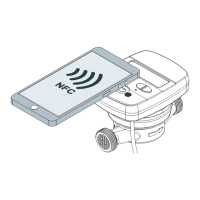
Prima dell’installazione congurare il contatore HYDROCAL-M4 tramite app
BMetering NFC Cong (fare riferimento al manuale App) [1]. Rimuovere i tappi dal
coperchio superiore dell’HYDROCAL-M4 / HYDROSONIC utilizzando un cacciavite
a punta na e/o un punteruolo pulendo la porta infrarossi con un panno morbido
e asciutto [2]. Posizionare il modulo sul contatore di energia termica o acqua [3].
È necessario far combaciare i fori del contatore con quelli del modulo. Tenere
fermo il modulo, avvitare le viti di ssaggio riferite al tipo di contatore abbinato
ed applicare tappi di protezione [4]. Per avviare il processo di allineamento dati
su Hydrocal-M4 premere T1 o T2 sul contatore per attivare il display [5]. Entro
30 secondi passare un magnete sul modulo, attivando la sequenza di stato LED
[6], consultare la relativa tabella. Entro alcuni minuti, si avvierà la comunicazione
(per Hydrocal-M4 lampeggio icona avviso , per Hydrodigit-S1/Hydrosonic
accensione icona ) e la corretta sincronizzazione verrà confermata dalla scritta
“Mod ON” visualizzata sul display Hydrocal-M4 mentre su contatori d’acqua
l’icona si spegnerà. Nel caso di modulo montato su contatori acqua utilizzare il
software BMBus per congurare il modulo (indirizzo primario di default 0).
ATTENZIONE: attivare la rete M-Bus solo dopo la corretta installazione e
attivazione del modulo su contatore. B Meters declina ogni responsabilità
per installazioni improprie o incomplete.
ATTENTION: activate the M-Bus network only after the correct module
installation and activation on the meter. B Meters declines any responsibility
for improper or incomplete installations.
Before installation, congure the HYDROCAL-M4 device using BMetering NFC
Cong app (refer to the App manual) [1]. Remove the caps from the top cover of
the HYDROCAL-M4 / HYDROSONIC using a ne-tipped screwdriver and/or awl
and clean the infrared port with a dry cloth [2]. Place the module on the thermal
energy meter or water meter [3]. It is necessary to match the holes of the counter
with those of the module. Hold the module rmly, tighten the two xing screws
referring to the type of device and apply protective caps [4]. To start the data
alignment process, press T1 or T2 on Hydrocal-M4 to activate the display [5].
Within 30 seconds pass a magnet over the module, activating the LED status
sequence [6], refer to the relative table. In few minutes the communication will start
(for Hydrocal-M4 flashing alert icon , for Hydrodigit-S1/Hydrosonic icon
on ) and the correct synchronization will be conrmed by the word “Mod ON” on
Hydrocal-M4 display while on water meters the icon will go off. In the case of a
module mounted on water meters, use the BMBus software to congure the module
(default primary address 0).


 To Next Page
 Need help?
 General