ENGLISHDEUTS CHFRANÇAIS NEDERLANDS
Error
codes
Meaning of
Error Codes
POWER
Green
CAP
G1
CAP
G2
CAP
G3
CAP
G4
CAL
White
COP
Yellow
ERROR
Red
Impact to
Babboe-E
cargo bike
1
No charging current ON ON OFF OFF OFF OFF OFF ON
Failed to
operate
2
Communication
error
ON OFF ON OFF OFF OFF OFF ON
Failed to
operate
3
Bad Cell(s) ON ON ON OFF OFF OFF OFF ON
Failed to
operate
4
COP2 over
temperatur >80°C
ON OFF OFF ON OFF OFF OFF ON
eBike is still
working
5
Connection problem
in MX216 connector
or R37 30ohms
failed
ON ON OFF ON OFF OFF OFF ON
Failed to
operate
6
Cell temperature is
>45°C of <0°C or
R37 NTC failed
ON OFF ON ON OFF OFF OFF ON
Failed to
operate
7
Cells unbalance
or Cells
difference > 0.4V
ON ON ON ON OFF OFF OFF ON
eBike is still
working
8
Individual cell
voltage calibration
failed (cell voltage <=
+/- 200 mv)
ON OFF OFF OFF ON OFF OFF ON
Failed to
operate
9
Current sensor
failed
ON ON OFF OFF ON OFF OFF ON
eBike is still
working
10
Upon connecting
COP2 & charger,
COP2 performs
self-checking
on individual
circuit loop
ON OFF ON OFF ON OFF OFF ON
eBike is still
working
• Battery charging status
The power LED (Green) will remain ON until you powers off the COP2. After power on, you will see the battery
capacity LEDs (Green) power on and begin flashing.
The COP2 automatically enters the standard charging process, the COP LED (Yellow) will begin slowly flashing,
meaning it is charging the battery pack. The battery capacity LEDs (Green) will grow from 1 LED to 4 LEDs
gradually as it reaches full capacity. Afterwards, the COP LED (Yellow) will no longer flash and be steady,
meaning that the entire COP process is finally completed.
• Error codes on the COP2
When the ibo-COP2 is in operation, the error checking and error identification processes are always active.
That means that it will automatically detect and report any battery pack errors. If there is an error, the charging
process will be stopped and the which error is detected will be shown via the 5 LEDs on the COP2.
If an error is detected, the error LED will glow, and, in the meantime, the battery capacity LEDs will turn green
representing the error code, which can be decrypted in the table.
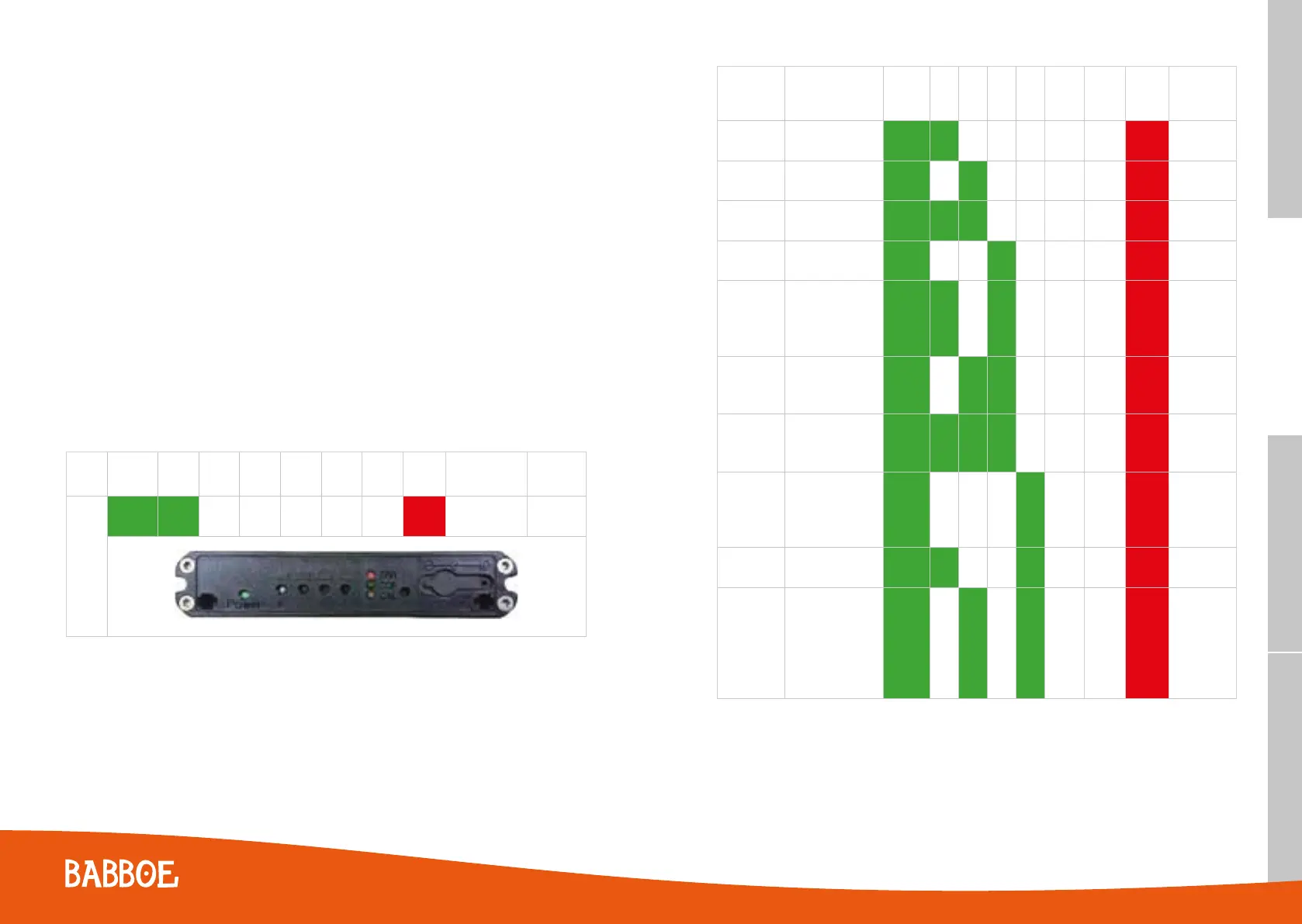
For example, if an error 1 is detected the power LED will be green, the error light will be red and the CAP 1 light will
be green. In the table below it is visualized how this appears on the COP2.
Error
Code
POWER CAP CAP CAP CAP CAL COP ERR
Error Code
Interpretation
Battery
Impact
1
ON ON ON
No charging
current
Failed to
operate
6362



 To Next Page