4
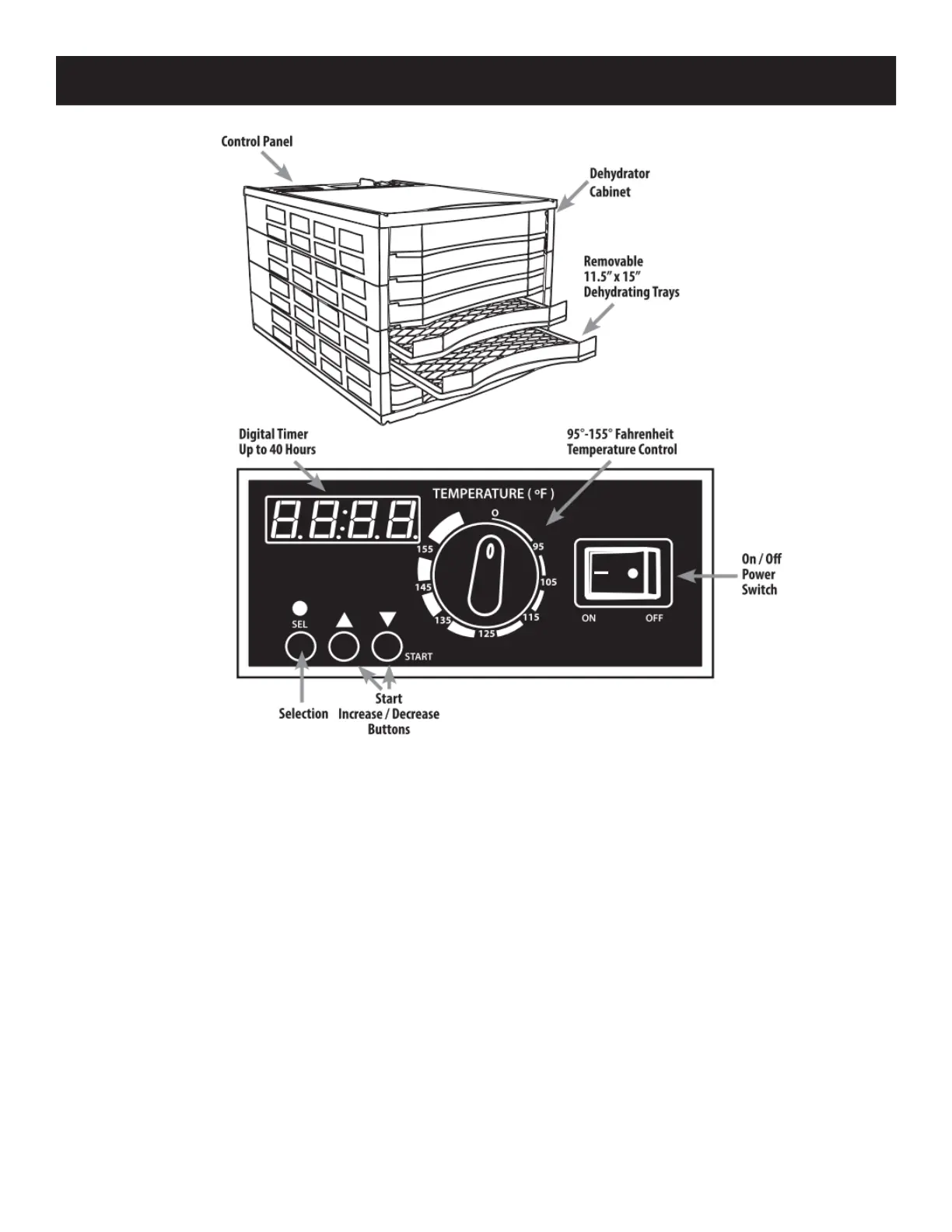
PARTS AND OPERATING INSTRUCTIONS
For the safest results, read all of the instructions first.
1. Make sure the power switch is turned o. Place the unit on a clean, dry surface. Plug into an
undamaged electric outlet.
2. DO NOT block the air vents on the door or at the rear of the Dehydrator. Keep the Dehydrator at
least 12” (30.5 cm) away from any wall to allow for proper air circulaon.
3. DO NOT operate the Dehydrator on ammable surface such as carpeng.
4. Turn the unit on by pressing the Power Switch.
5. Set Temperature by turning Temperature Knob to desired seng.
6. Set Timer by pressing the Select buon. Digital Timer Display will ash.
7. Set the Hours by pressing the Arrows (▲▼ ) to increase or decrease Hour Seng, up to 48 hours.
8. Press Select again and set the minutes by pressing the Arrows (▲▼ ) to increase or decrease
minutes seng.


 To Next Page