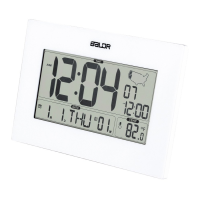
2
11. Low Battery Indicator
1. Remove the battery compartment cover.
2. Insert 2xAA batteries matching the polarity (+and-).
1)When batteries installed,LCD will full display for 3 seconds,then you will hear "BI" soundchange to
normal display.
2)Calendar default value:year: 2015, Month: Jan, date: 1th, hour:12:00
3) Alarm time default: AM12:00 OFF;
4) Temperature unit default : ℉
5)Time Zone default: PST
6)Language weekdays display default: ENG
RCC Receiving Conditions
:
1. When power on or reset, the clock will start searching WWVB signal for 7 minutes.
2. There are daily automatic WWVB receiving at 1:00AM,2:00AM, 3:00AM, 4:00AM, 5:00AM. It will first start receiving WWVB
time at 1:00AM, 2:00AM, 3:00AM each day. If WWVB time is not received till 3:00AM, it will start receiving again at 4:00AM and
5:00AM. If the time is not successfully received at 5:00AM, there will be no receiving the day. It will start searching for signal at
3. On normal time mode, press and hold “DOWN” key for 2 seconds to enter WWVB signal receiving
a. When receiving signal , RCC icon will be flashing by“1HZ”;
b. When signal received, RCC icon will be flashing by“1HZ”;
c. When signal is weak and cannot tell the right signal, icon of will be flashing by“1HZ”as well ;
d. When signal successfully received, LCD will display complete RCC icon , and exit RCC receiving.
e. If no signal is received, the RRC icon will disappear.
Note:On the receiving mode, press and hold “DOWN” key for 3 seconds to exit RCC receiving.
1.In standard mode, press and hold “TIME SET” key for 3 seconds to enter into time setting.
2.The figure to be set will be flashing.
3.Press “UP” or “DOWN” key to increase or decrease setting value with one step. Hold “UP” or “DOWN” key,
the setting value will increase or decrease quickly.
4.Press “TIME SET” key to confirm and move to next setting.
5.The time setting order is: Year
a) Language order: ENGGERFREITADUTSPADANPOR
b) Calendar from 2000~2099
6.If no operation within 10 seconds, it will exit setting and back to time mode.
7.Press “TIME SET” again to confirm and exit setting
8.On normal time mode, press “UP” key to change the hour display in 12/24H.
ALARM SET
1. On normal time mode, press and hold “AL SET” key for 3 seconds to enter into alarm time setting
Setting order:hour
min
exit
2. The figure to be set will be flashing.
3. Press “UP” or “DOWN” key to increase or decrease setting value by one step. Hold “UP” or “DOWN” key to
quickly change the setting value.
4. Press “ AL SET” key to confirm the setting
5. If no operation within 10 seconds, it will exit setting.
6. ALARM ON/OFF:
On normal time mode, press “AL SET” key to turn on/off the alarm. Selectable order is MO-SU MO-FR


 To Next Page
 Loading...