EasyManua.ls Logo

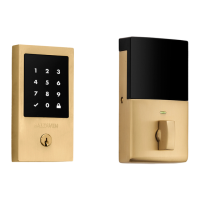
Baldwin 85393 - User Manual

Default Icon
18 pages
Print Icon
To Next Page IconTo Next Page
Loading...
1-800-437-7448 | BALDWINHARDWARE.COM © 2019 Spectrum Brands, Inc.
1 / 18
8225 / 8235 / 85306 / 85358 / 85393
TOUCHSCREEN ELECTRONIC DEADBOLT
Cerrojo electrónico con pantalla táctil
Pêne dormant électronique à écran tactile
PROGRAMMING AND TROUBLESHOOTING GUIDE
Guía de programación y solución de problemas
Guide de programmation et de dépannage
MASTERCODE
Codigo maestro
Code principal
TROUBLESHOOTING: INSTALLATION
Solución de problemas: instalación
Dépannage : Installation
TROUBLESHOOTING: DOOR JAMMING AND DOOR HANDING
Solución de problemas: bloqueo de puertas y entrega de puertas
Dépannage : blocage de porte et remise de porte
TROUBLESHOOTING: TOUCHSCREEN
Solución de problemas: pantalla táctil
Dépannage : écran tactile
TROUBLESHOOTING: SMART HOME SYSTEMS
Solución de problemas: sistemas de hogar inteligente
Dépannage : systèmes de maison intelligents
TROUBLESHOOTING: BATTERY
Solución de problemas: batería
Dépannage : pile
BAT TERY FAQ
Preguntas frecuentes sobre la batería
Foire aux questions sur les piles
1
2
3
4
5
6
2
12
13
16
17
18
PK.1287 Rev 01
7
18
Question and Answer IconNeed help?

Do you have a question about the Baldwin 85393 and is the answer not in the manual?

Summary

Mastercode Management

Enabling and Setting the Mastercode

Step-by-step guide to activate and configure the Mastercode on the lock.

Adding User Codes with Mastercode Enabled

Procedure for adding new user codes when the Mastercode is active.

Deleting a Single User Code with Mastercode Enabled

Instructions for removing one specific user code using the Mastercode.

Deleting All User Codes with Mastercode Enabled

Steps to erase all user codes from the lock via the Mastercode.

Disabling and Deleting the Mastercode

Guide to deactivate and remove the Mastercode feature from the lock.

Troubleshooting: Door Jamming and Handing

Lock Jams and Turnpiece Rotation Issues

Resolves lock jamming and stiff turnpiece operation issues.

Lock Beeps, Symbols Flash, Door Wont Lock

Addresses lock beeping, flashing symbols, and failure to lock.

Troubleshooting: Touchscreen Issues

Touchscreen is Unresponsive

Guides on activating the touchscreen when it fails to respond.

Troubleshooting: Smart Home Systems

Lock Fails to Pair with Z-Wave System

Resolves issues when pairing the lock to a Z-Wave smart home system.

Troubleshooting: Battery Issues

Batteries Drain Within One Day

Troubleshoots rapid battery drain issues in the lock.

Baldwin 85393 Specifications

General IconGeneral
BrandBaldwin
Model85393
CategoryTouchscreen
LanguageEnglish

Related product manuals