4
Item Time (mins.) Temp (°C)
Frozen chips 15 200
Chips 25 180
Shrimp 20 160
Cake 30 160
Chicken 20 200
Steak 20 180
Fish 20 160
• OPERATION
• Connect the mains plug to the supply socket
and turn on supply.
• To turn on the unit press the On/Off button
(g.1) and release.
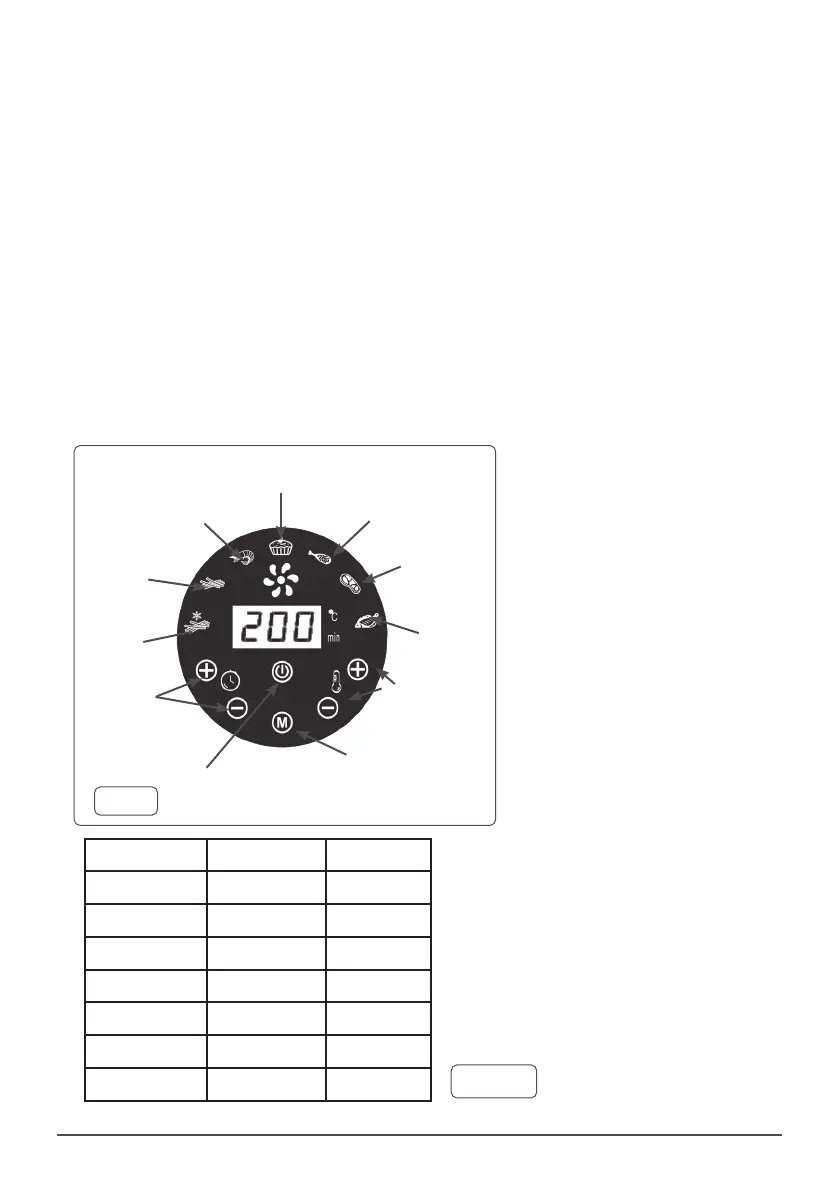
• The fryer has 7 default modes which operate
the fryer for pre-set time/temperature (see g.
1 and Table 1).
• Alternative user dened modes can be
achieved using Time and Temperature
controls (g.1). Suggested times and
temperatures for a range of foodstuffs are
listed in Table 2.
• The fryer will switch off once the set time has
expired.
• To force a shut-down, press the On/Off button
and hold down for at least 20 seconds.
• DO NOT cover fryer when in use.
• DO NOT obstruct rear air vent.
g. 1
Frozen
Chips
Chips
Shrimps
Cakes
Chicken Leg
Steak
Fish
TemperatureTime
On / Off
Mode
Table 1


 To Next Page
 Loading...