8
© 2020. All rights reserved.
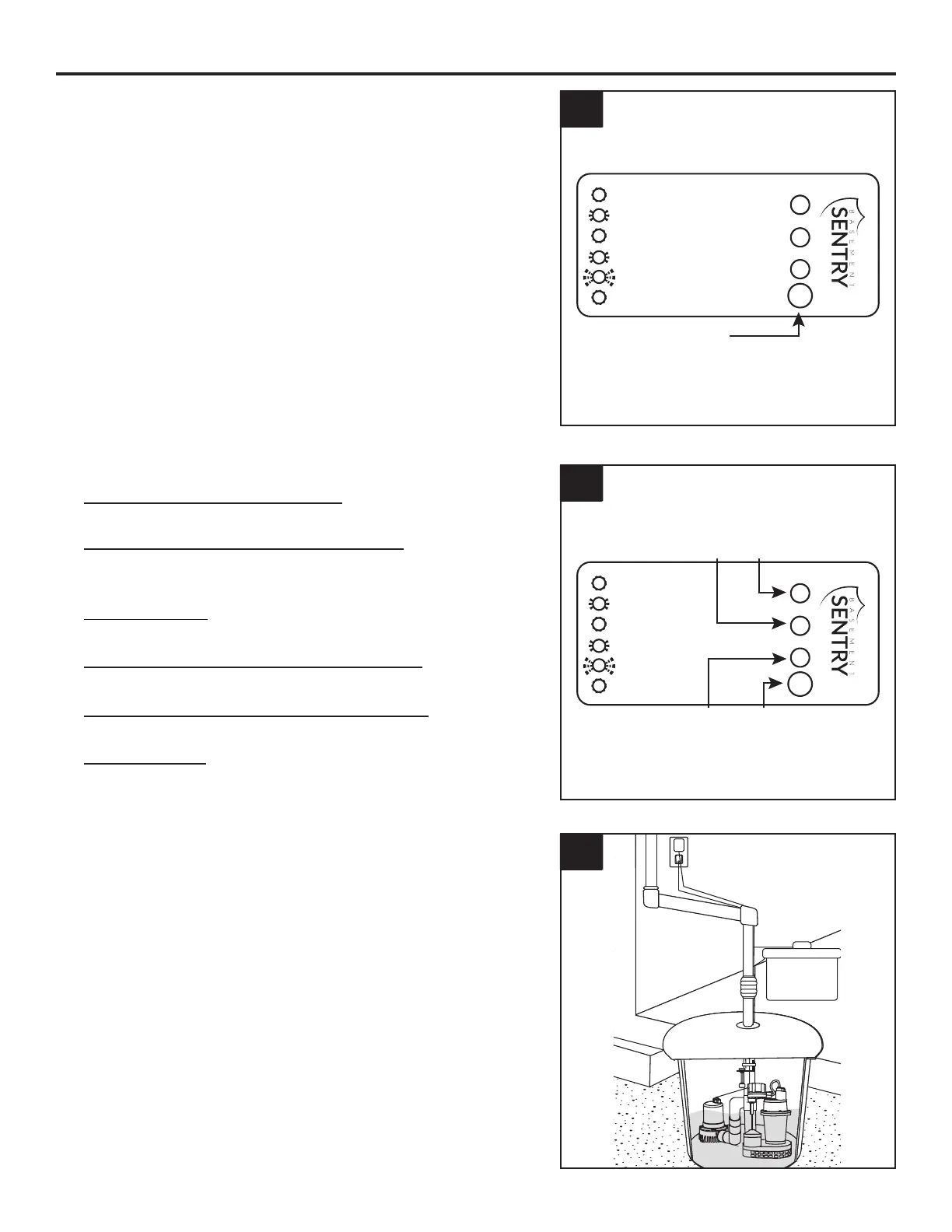
10. Test all system connections by pressing the
‘RESET’ button for 1 - 4 seconds. The alarm will
sound. This will cause the system to run a self-
test and the DC pump will run for 3 seconds.
To silence an alarm, press the ‘RESET’ button,
hold for 4 - 8 seconds and release. The alarm
should stop.
After the system returns to normal status, the
alarm will automatically reset.
11. LED Indicator Lights
Red light on and alarm sounds:
Battery backup pump is working
Red light slow flash and alarm sounds:
Pump wire connection problems or pump
failure
Yellow light on:
Battery is recharging
Yellow light slow flash and alarm sounds:
Power off or power adapter failure
Yellow light quick flash and alarm sounds:
Battery is disconnected or DC fuse broken
Green light on:
The system is normal
SW1401 A
Red light on and alarm sounds:
Battery backup pump working
Red light slow flash and alarm sounds:
Pump wire connection problems or pump failed
Yellow light on:
Battery recharging
Yellow light slow flash and alarm sounds:
Power off or power adapter failed
Yellow light quick flash and alarm sounds:
Battery disconnected or DC fuse broken
Green light on:
System is normal
RESET
RedYellow
Green
11
SW1401 A
Red light on and alarm sounds:
Battery backup pump working
Red light slow flash and alarm sounds:
Pump wire connection problems or pump failed
Yellow light on:
Battery recharging
Yellow light slow flash and alarm sounds:
Power off or power adapter failed
Yellow light quick flash and alarm sounds:
Battery disconnected or DC fuse broken
Green light on:
System is normal
RESET
Press Reset
10
INSTALLATION INSTRUCTIONS
12. Completed Installation
12


 To Next Page