This document provides information about the Baseus Halo Electric Wireless Charging Car Mount, model BS-CM015, including its specifications, usage instructions, and safety guidelines.
Function Description
The Baseus Halo Electric Wireless Charging Car Mount is designed to securely hold and wirelessly charge a smartphone in a car. It features an automatic clamping mechanism that opens when powered on and closes when a phone is placed on the mount. The mount also includes ambient lighting with various effects to indicate its status. Wireless charging can be toggled on or off using a button.
Important Technical Specifications
- Model No.: BS-CM015
- Rated power: 15W
- Charging port: Type-C
- Ambiance light: Multi-color gradient light
- Material: ABS+PMMA+silica gel
- Color: Black
- Installation area: Strip air vents (Not suitable for round and uniquely-shaped air vents)
- Suitable phone size: 5.4"-6.7"
- Clamp expansion: 60-90mm
- Product size: 75 x 115 x 115mm
- Input: 5V/2A, 9V/2A, 12V/1.67A (requires fast charging adapters)
- Protection circuits: Over-current and over-voltage protection.
- Operating temperature: 0°C to 25°C.
Lighting Effect Instructions
The device provides visual feedback through its ambiance light:
- Stand by: Multi-color gradient light
- Charging: Green light breathing
- Fully charged: Green light on
- Abnormal state: Red light flashing
- Wireless charging off: No light
Usage Features
- Button Operation:
- Press button A or B to open the clamp arms.
- Long-press button A or B to turn the wireless charging function on or off.
- Clamp Open-Close/Induction Method:
- Upon powering on, the clamp arms automatically open (default state).
- When a phone is placed on the mount, the clamp arms automatically close to secure the phone.
- To remove the phone, press either button A or B to open the clamp arms.
- Note: If the induction fails after placing the phone, remove the phone and place it again.
- Fast Charging: Fast charging requires a 5V/2A, 9V/2A, or 12V/1.67A adapter. Fast charging may not activate if the phone's battery is above 60% or if the phone's temperature exceeds 35°C. In such cases, the charging speed will slow down, and it is recommended to charge in a suitable environment.
Maintenance Features
- Cleaning: Use a dry, soft cloth to clean the surface of the product. Avoid using chemicals, soap, or detergents.
- Environmental Considerations: Keep the product away from water, fire, hot environments (>40°C), and cold environments (<-20°C). Store it out of children's reach.
- Hazardous Substances: The product contains certain hazardous substances (lead, mercury, cadmium, hexavalent chromium, polybrominated biphenyls, polybrominated diphenyl ethers) as indicated in the "Declaration on hazardous substances and elements contained in electronic products" table. The "effective life of environmental protection" is 5 years, after which the product should be recycled to prevent potential environmental pollution or harm due to leakage or mutation of these substances.
- Proper Use: Improper use or placement can shorten the product's service life or cause damage. The manufacturer is not responsible for such damage, and the warranty will not cover it.
- FCC Compliance: The device complies with Part 15 of the FCC Rules, meaning it will not cause harmful interference and must accept any interference received. Any changes or modifications not expressly approved by the responsible party could void the user's authority to operate the equipment. If interference occurs, users are advised to reorient/relocate the receiving antenna, increase separation between equipment and receiver, connect the equipment to a different circuit, or consult a dealer/technician.
- Manufacturer: Shenzhen Baseus Technology Co., Ltd.
- Address: 2th Floor, Building B, Baseus Intelligence Park, No.2008, Xuegang Rd, Gangtou Community, Bantian Street, Longgang District, Shenzhen, China
- Executive Standard: Q/BASEUS 019
- Hotline: +86-4000-712-711
- Website: www.baseus.com
- FCC ID: 2A482-BS-CM015
- Product Code: PB3563Z_P0A0
- Made in China
This product is designed by Baseus and complies with Directive 2014/53/EU and Directive 2011/65/EU. The full text of the EC Declaration of Conformity is available on the Baseus website. It is strictly forbidden to dispose of this equipment with ordinary trash; it must be recycled at a suitable recycling center for electronic and electrical equipment.

 Need help?
 General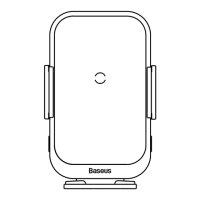

 To Next Page