
 Need help?
Do you have a question about the Baseus I-Wok Series and is the answer not in the manual?
Asymmetric light source design reduces screen reflection and glare, preventing eye strain.
Features stepless dimming and three lighting modes (warm, mixed, white) for personalized lighting.
Includes quick installation, stable counterweight, and USB power for ease of use.
Clamp the lamp body securely onto the middle of the screen's top edge.
Insert USB cable into Type-C port and connect to a computer or 5V adapter.
Turn the lamp body to achieve the desired lighting angle for optimal use.
Touch the switch button to turn the lamp on or off.
Cycle through white (5500K), warm (2800K), and mixed (4000K) light modes.
Long press the dimmer switch for stepless adjustment of brightness.
Remembers the last used mode upon power-up, but resets to white light if unplugged.
Use only 5V power sources to prevent product damage and safety risks.
Avoid unstable places and do not cover the lamp with flammable materials.
Avoid damp environments, wet hands when handling cables, and touching hot parts.
Clean with a dry cloth; do not disassemble. Light source is irreplaceable.
This document outlines the features and usage instructions for the Baseus i-wok Series USB Asymmetric Light Source Screen Hanging Light (Youth). This innovative lighting solution is designed to enhance your work and gaming experience by providing an asymmetric light source that reduces screen reflection and glare, thereby protecting your eyes during extended use.
The primary function of this device is to illuminate your workspace without causing discomfort or strain to your eyes. It achieves this through its unique asymmetric light source design, which directs light away from the screen, preventing reflections and glare that can often lead to eye fatigue. This makes it an ideal accessory for anyone who spends long hours in front of a computer, whether for professional tasks or recreational activities like gaming.
One of the key usage features of the Baseus i-wok Series light is its simple and quick installation process. The lamp body is designed to be clamped onto the top of your screen, fitting snugly within seconds. It is specifically suitable for screens with a thickness ranging from 8mm to 20mm, ensuring compatibility with a wide range of monitors. The installation involves clamping the lamp body, inserting the USB power cable into the Type-C interface of the lamp and connecting the other end to a 5V USB output port (such as a computer, screen, or a 5V adapter), and then adjusting the lighting angle. It is crucial to use a 5V power supply to avoid damaging the product or creating safety hazards.
The device offers a variety of lighting modes to suit different preferences and environments. Users can easily switch between three distinct lighting modes: white light (5500K), warm light (2800K), and mixed light (4000K). This flexibility allows you to choose the most comfortable and appropriate lighting for your specific task or time of day. The lighting modes cycle through these options with a simple touch of the dedicated button.
In addition to multiple lighting modes, the Baseus i-wok Series light also incorporates a stepless dimming feature. This allows for precise control over the brightness level. By long-pressing the dimmer switch, users can smoothly adjust the light intensity to their desired level, providing a customized lighting experience that caters to individual needs and ambient conditions. This stepless adjustment ensures that you can always find the perfect brightness without being limited to predefined steps.
A convenient memory function is also integrated into the device. When powered up via the USB cable, the light will automatically turn on in the mode that was last used before it was turned off. However, it's important to note that this memory function does not work if the USB power cable is unplugged or if the power is completely cut off and then restored. In such cases, the light will default to the initial white light mode. This feature adds to the user convenience by reducing the need to reconfigure settings each time the light is used, provided the power connection remains stable.
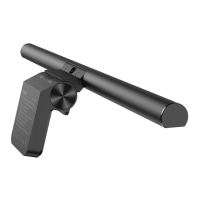
The design of the Baseus i-wok Series light emphasizes both functionality and aesthetics. It features a simple alloy process, contributing to its durable and sleek appearance. The inclusion of a stable metal counterweight ensures that the lamp remains securely in place on top of your screen, preventing any wobbling or accidental dislodgement. The product parts include a lamp body, light source surface, damped rotating shaft, Type-C charging interface, and a counterweight base, all designed for ease of use and stability.
For maintenance, the product should be cleaned regularly. When cleaning the surface, it is essential to unplug the power supply first and wipe it with a soft cotton cloth. Avoid using liquid, spray cleaner, or damp cloths, as these can damage the device. It is also important not to touch the hot part of the lamp body when it is on or within three minutes after turning it off, to prevent burns. When the lamp is not in use for an extended period, it is recommended to pull out or cut off the power of the USB power cable.
Safety warnings and cautions are provided to ensure proper and safe use of the device. Users are advised to use only a 5V SELV adapter or power supply equipment. Using an adapter or power supply device greater than 5V can cause product damage and pose safety risks. The lamp should not be used in unstable places to prevent it from falling and getting damaged. Furthermore, flammable materials such as cloth or paper should not be covered on the lamp to avoid fire accidents. The product is designed for indoor use only and should not be used in damp environments. Plugging or unplugging the USB power cable with wet hands should be avoided to prevent electric shock. Users are also cautioned against disassembling the product themselves. If the product is found to be faulty, it should be sent to the company's maintenance personnel for repair. The light source of this lamp is irreplaceable, meaning that when the light source reaches the end of its life, the entire lamp should be replaced. Finally, the product is not suitable for mounting on tubular materials.
The environmental protection service life of this product is 10 years, and it complies with standards regarding hazardous substances, indicating a commitment to environmental responsibility. The product is designed by Baseus and manufactured in China, reflecting its global reach and adherence to international quality standards.
 General
| Category | Outdoor Light |
|---|---|
| Brand | Baseus |
| Model | I-Wok Series |
| Light Source | LED |
| Waterproof Rating | IPX4 |
| Power Source | Rechargeable Battery |
| Light Modes | High, Low |
| Material | Plastic |

 To Next Page