EasyManua.ls Logo

Basic Fun Tiny TV Classics - User Manual

Basic Fun Tiny TV Classics
3 pages
Print Icon
To Next Page IconTo Next Page
Loading...
Tiny TV Classics
Instruction Manual
Top Scenes On
Tiny Screens!
Question and Answer IconNeed help?

Do you have a question about the Basic Fun Tiny TV Classics and is the answer not in the manual?

Overview

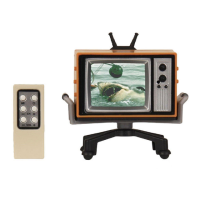
This document describes the "Tiny TV Classics" product, an instruction manual for a miniature television set and its remote control.

Function Description:

The Tiny TV Classics set is a miniature television unit designed to play "Top Scenes On Tiny Screens!" It allows users to browse through pre-loaded channels, adjust volume, and experience a scaled-down version of a classic TV viewing experience. The device includes a main TV unit and a separate remote control for convenient operation.
Important Technical Specifications:

  • TV Unit Power: Requires 3 x 1.5V "AAA" or LR3 size alkaline batteries.
  • Remote Control Power: Requires 2 x 1.5V "AG13" or LR44 size batteries.
  • FCC Compliance: The device complies with Part 15 of the FCC Rules, meaning it is designed to operate without causing harmful interference and to accept any interference received.
  • Safety Warning: Not suitable for children under 3 years due to small parts and choking hazard.

Usage Features:

  • Power On/Off: To turn on the TV unit, users must first pull out the "Try-Me" tab located at the back of the unit, then press the Power button on the side of the unit. The remote control cannot be used to power on the unit unless the main unit is already powered on.
  • Channel Surfing: Channels can be changed using either the "CHANNEL UP" or "CHANNEL DOWN" buttons on the TV unit or the remote control. The TV unit cycles through channels and loops back to the first channel. After the last channel, a "NO SIGNAL" screen will appear.
  • Volume Adjustment: Volume can be adjusted using the "VOLUME UP" or "VOLUME DOWN" buttons on both the TV unit and the remote control.
  • Play/Pause: The remote control includes a "Play/Pause" button for controlling playback.
  • Reset Function: Both the TV unit and the remote control have a "Reset" button. In case of environmental electrostatic discharge causing malfunction, the device can be reset by turning it off and on again, or by pressing the reset button. To display the FCC E-labelling on screen, the power button needs to be pushed to restart the device.
  • Sleep Mode: To conserve battery power, the unit will enter sleep mode after a few minutes of inactivity. While in sleep mode, the TV can be woken up by pressing the POWER button on either the TV unit or the remote control within the first two minutes. After this initial two-minute window, only the POWER button on the TV unit will be able to wake it up.

Maintenance Features:

  • Battery Replacement (TV Unit):
    • Locate the battery door on the back or bottom of the TV unit.
    • Use a Phillips/crosshead screwdriver (not included) to loosen the screws on the battery door cover (screws remain attached to the cover).
    • Remove the cover.
    • Insert 3 x 1.5V "AAA" or LR3 size alkaline batteries, ensuring correct polarity.
    • Replace the battery cover and tighten the screws.
  • Battery Replacement (Remote Control):
    • Locate the battery door.
    • Insert 2 x 1.5V "AG13" or LR44 size batteries, ensuring correct polarity.
    • Replace the battery door cover and tighten the screws.
  • Battery Safety Guidelines:
    • Non-rechargeable batteries are not to be charged.
    • Rechargeable batteries should only be charged under adult supervision and must be removed from the toy before charging.
    • Do not mix different types of batteries or new and used batteries.
    • Batteries must be inserted with the correct polarity.
    • Exhausted batteries must be removed from the toy.
    • Dispose of batteries safely and do not dispose of them in a fire, as they may explode or leak.
    • Keep new and used batteries away from children. Seek immediate medical attention if batteries are swallowed or placed inside any part of the body.
  • Troubleshooting Interference: If the equipment causes harmful interference to radio or television reception, users are encouraged to:
    • Reorient or relocate the receiving antenna.
    • Increase the separation between the equipment and receiver.
    • Connect the equipment into an outlet on a different circuit from that to which the receiver is connected.
    • Consult the dealer or an experienced radio/TV technician for help.
  • Product Information Retention: Users are advised to retain the package and instruction sheet for future reference, as colors and decorations of products may vary from the pictures on the packaging.

Basic Fun Tiny TV Classics Specifications

General IconGeneral
BrandBasic Fun
ModelTiny TV Classics
CategoryToy
LanguageEnglish

Related product manuals