EasyManua.ls Logo

Bauknecht BIK9 PPH8TS2 PT - User Manual

Bauknecht BIK9 PPH8TS2 PT
90 pages
Print Icon
To Next Page IconTo Next Page
Loading...
EN
Quick guide
1
THANK YOU FOR BUYING A BAUKNECHT PRODUCT
In order to receive a more complete assistance, please
register your product on www . bauknecht . eu / register
Before using the appliance carefully read the Safety
Instruction.
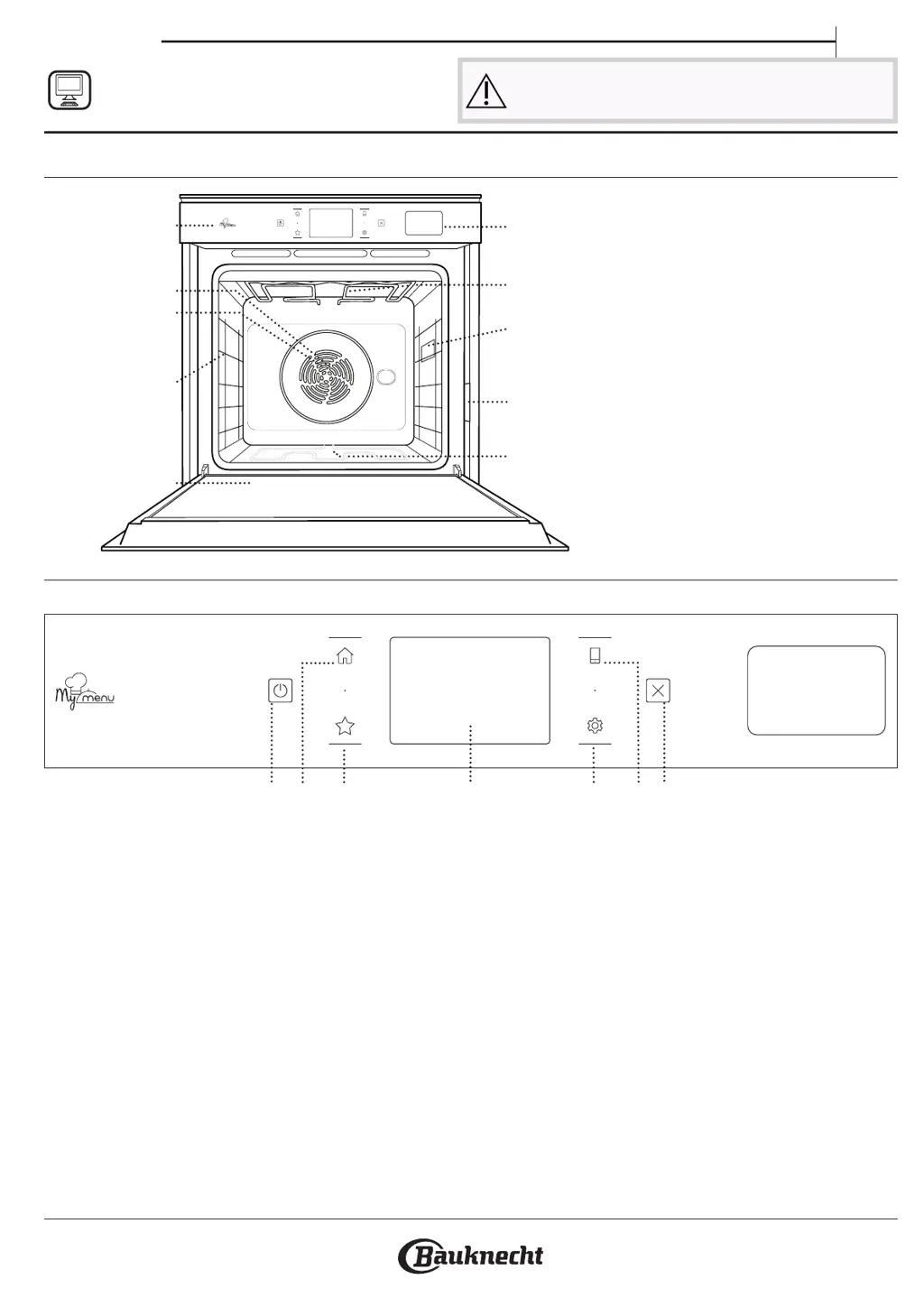
PRODUCT DESCRIPTION
1. Control panel
2. Fan
3. Circular heating element
(not visible)
4. Shelf guides
(the level is indicated on the
front of the oven)
5. Door
6. Water drawer
7. Upper heating element/grill
8. Lamp
9. Identification plate
(do not remove)
10. Lower heating element
(not visible)
CONTROL PANEL DESCRIPTION
1
2 3 4 65 7
1. ON / OFF
For switching the oven on and off.
2. HOME
For gaining quick access to the
main menu.
3. FAVORITE
For retrieving up the list of your
favorite functions.
4. DISPLAY
5. TOOLS
To choose from several options
and also change the oven settings
and preferences.
6. REMOTE CONTROL
To enable use of the Bauknecht
Home Net App.
7. CANCEL
To stop any oven function except
the Clock, Kitchen Timer and
Control Lock.
1
2
3
4
8
9
10
5
7
5
4
3
2
1
5
4
3
2
1
6

Questions and Answers

  • S
    Sharon CohenAug 9, 2025
    What to do if the WiFi icon is shown on my Bauknecht Oven display?
    • M
      maria14Aug 9, 2025
      If the icon is displayed on your Bauknecht Oven, it could be due to several reasons: * The WiFi router may be off. * The router's setup properties might have changed. * The wireless connection may not be reaching the appliance. * The oven may be unable to establish a stable connection to your home network. * The connectivity might not be supported. To resolve this, ensure your WiFi router is connected to the internet and that the WiFi signal strength near the oven is good. Try restarting the router. If your home wireless network properties have changed, re-establish the network connection by pressing, tapping “WiFi” and then selecting “Connect to network.”
  • M
    Miss Kimberly BryantAug 14, 2025
    Why does the home power go off when I use my Bauknecht BIK9 PPH8TS2 PT Oven?
    • K
      Kristin GillAug 14, 2025
      If your home power goes off when using the Bauknecht Oven, it's possible that the power setting is incorrect. Verify that your domestic network has a rating of at least 3 kW. If it doesn't, decrease the power to 13 Amperes. To change the power setting, press, select “More Modes” and then select “Power Management.”
  • S
    sscottAug 18, 2025
    How to fix a Bauknecht BIK9 PPH8TS2 PT that is not working?
    • J
      Joshua JonesAug 19, 2025
      If your Bauknecht Oven is not working, it could be due to a power cut or disconnection from the mains. Check that there is mains electrical power and that the oven is properly connected to the electricity supply. Try turning off the oven and restarting it to see if the problem persists.
  • S
    Steven OlsonAug 25, 2025
    What to do if my Bauknecht BIK9 PPH8TS2 PT Oven does not heat up?
    • N
      Nicole GonzalezAug 25, 2025
      If your Bauknecht Oven does not heat up, it is possible that the demo mode is running. To exit the demo mode, press, tap “Info” and then select “Store Demo Mode”.
  • A
    Andrew MosleyAug 29, 2025
    Why is steam leaving the drawer during cooking in my Bauknecht BIK9 PPH8TS2 PT?
    • K
      kathryn14Aug 29, 2025
      If steam leaves the drawer during cooking with your Bauknecht Oven, it's likely due to a low water level in the tank. Simply add a glass of drinking water to resolve this.
  • S
    sharon70Sep 3, 2025
    What does it mean when my Bauknecht BIK9 PPH8TS2 PT display shows 'F' followed by a number?
    • K
      Kaylee BrownSep 3, 2025
      If the display on your Bauknecht Oven shows the letter “F” followed by a number or letter, it indicates an oven failure. Contact your nearest Client After-sales Service Centre and state the number following the letter “F”. Alternatively, you can attempt a “Factory Reset” by pressing, tapping and then selecting “Factory Reset”. Please note that all saved settings will be deleted.

Bauknecht BIK9 PPH8TS2 PT Specifications

General IconGeneral
BrandBauknecht
ModelBIK9 PPH8TS2 PT
CategoryOven
LanguageEnglish

Related product manuals