20
You cook with your Microwave Oven by first
choosing a Power Level and then setting the time
you need to cook for.
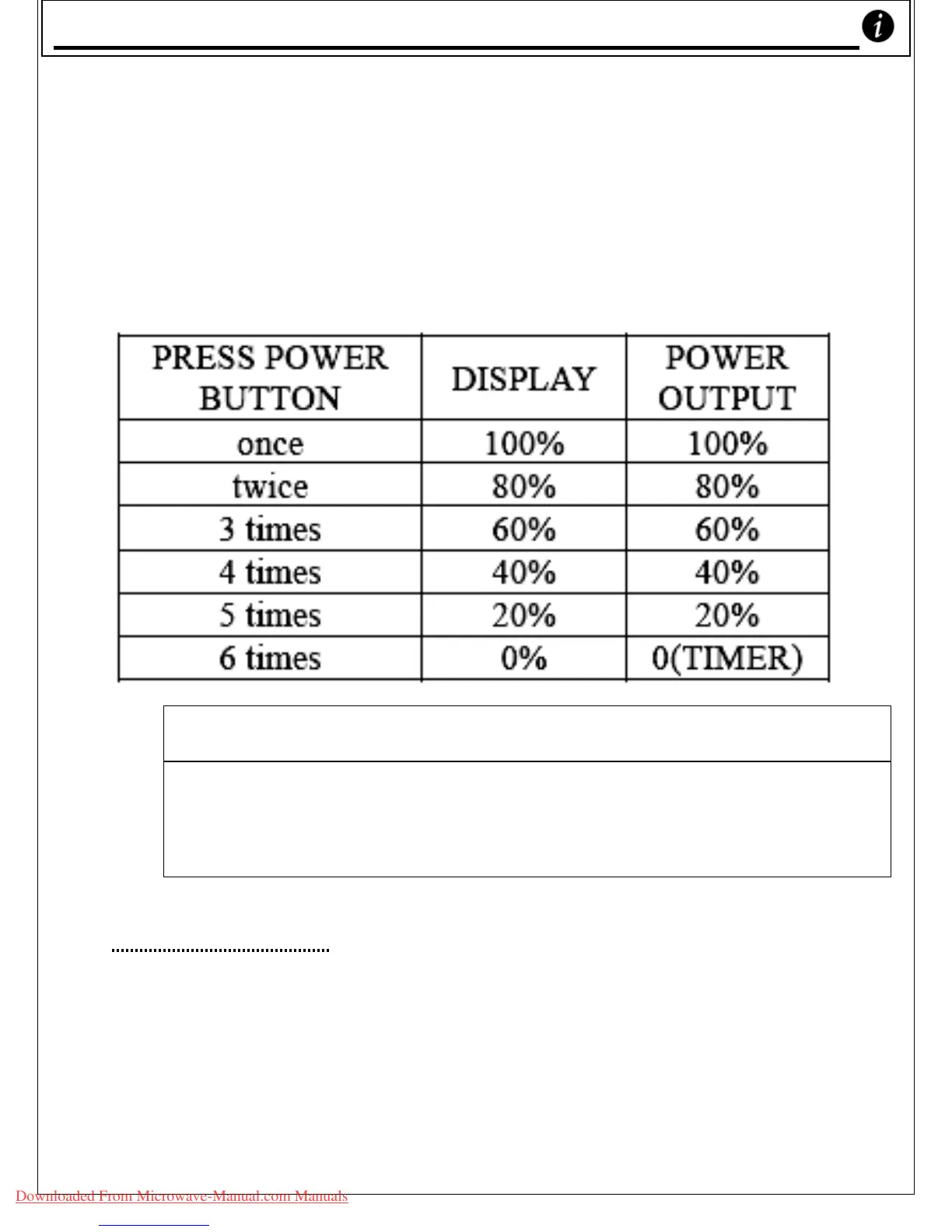
o To set the Cooking Power you’d like to use, you need to
press the ‘Power’ button one or more times. You have
several different cooking powers available to you.
o Please see the table below to select the power you want:
FOR EXAMPLE:
SUPPOSE YOU WANT TO COOK FOR 1 MINUTE AT 60%.
1. Press the ‘STOP / CANCEL’ button.
2. Press the ‘POWER’ button three times.
3. Rotate the ‘TIMER’ dial clockwise until the correct minute is
displayed (1:00)
4. Press the ‘START’ button.
Minute Timer:
• SUPPOSE YOU WANT TO SET THE TIMER FOR 3 MINUTES.
1. Press the ‘
STOP/CANCEL’ button.
2. Press the
‘POWER’ button 6 times.
3. Turn the
‘TIMER’ dial clockwise until the correct
minute is displayed (3:00).
4. Press the
‘START’ button.
Using your Microwave Oven
Downloaded From Microwave-Manual.com Manuals



 To Next Page