Rev.7/06/2017 Pg. 3
Rev.7/06/2017 Pg. 2
Bluetooth module audio indicators:
Audio Response
Power on:
Power off:
Beep:
Beep:
Double Beep:
Module is turned on
Module is turned off
After LED light stops blinking means module is paired
When play/pause button is pressed and held means
module is unpaired from Bluetooth device.
When forward button is pressed and held means
module has reached maximum volume.
Description
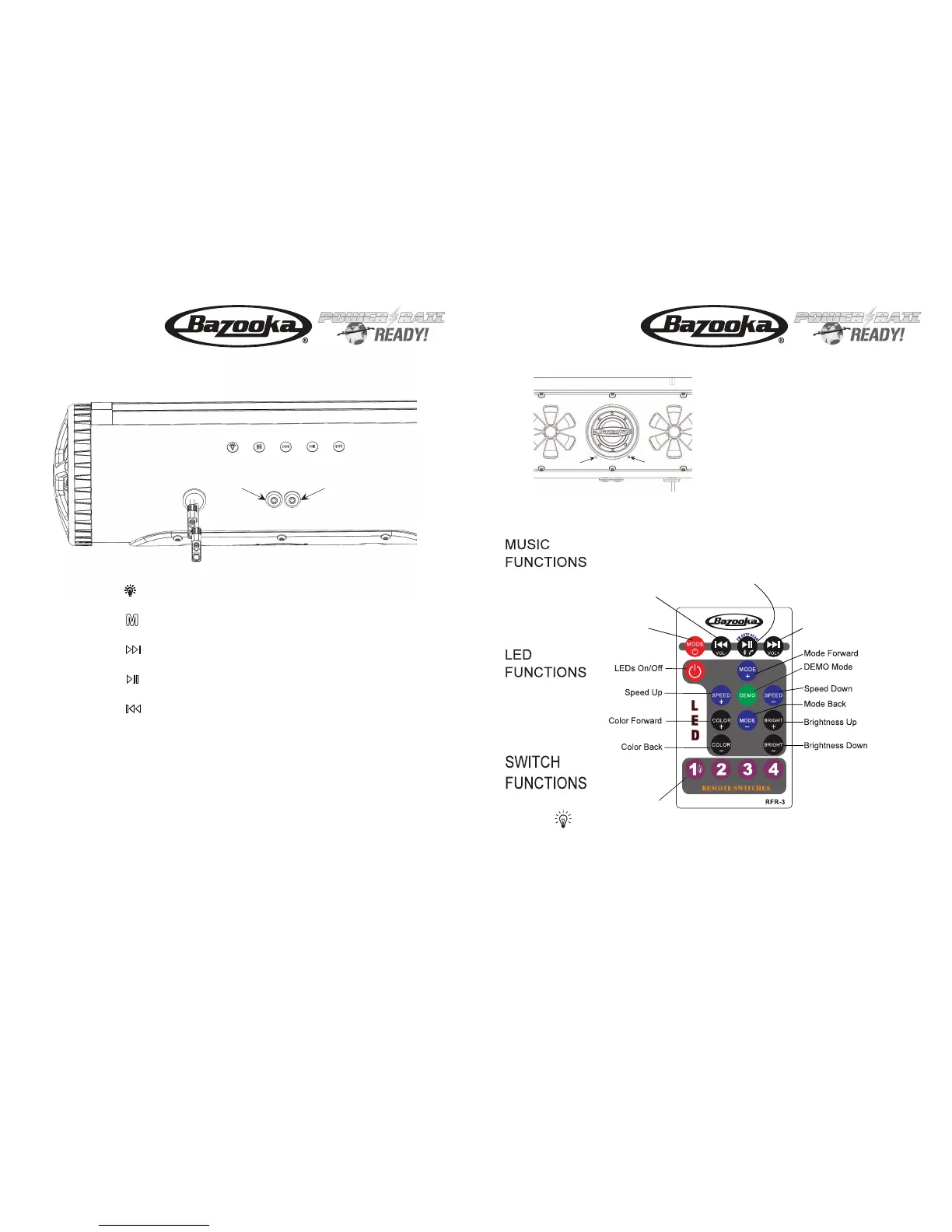
Press: Next Song (FM Station)
Press & Hold: Volume Up
Switch 1 On/Off
Remote switch buttons 2-4 are not used with this model
Switch aux. 12vdc (15 amp) ouput.
LED light status indicator:
LED Light Description
Note: * When pressing for Power Off, be sure to hold until Power Off is indicated (audible). Failure to do so
may toggle the Bluetooth Receiver into AUX/BT Mode and it will remain in the last selected mode on subsequent Power On.
If this occurs, simply press the M button again to reselect BT, AUX or FM mode as desired. The receiver should automatically
pair with the last device in BT mode. To pair a new device, press and hold the Play/Pause button.
BPB24 / BPB24-DS
or BPB36
Installation Instructions
BPB24 / BPB24-DS
or BPB36
Installation Instructions
Bluetooth Mode:
Press: Play/Pause (Phone Answer/Hang Up)
Press & Hold: Unpair current Bluetooth device, then enter
pairing mode for new device.
FM Radio Mode:
Press: Auto Scan for stations available in the area.
AUX Mode:
Press: Mute Speaker
Press: Mode Select
(AUX, Bluetooth, FM Raido)
Press & Hold: Power OFF
Press: (if OFF) Power ON*
Press: Previous Song (FM Station)
Press & Hold: Volume Down
Auxiliary 12vdc output on/off switch.
Button1
Press to power on. Press while power is on to switch input among AUX,
Bluetooth and FM radio. Press and hold to power off.
Button2
Press to go forward one track/station. Press and hold to increase volume.
Button3
Press to play/pause. Press to answer/hang up phone. Double
press for last number radial or open Siri on Iphone. Press and
hold to unpair bluetooth device.
Button4
Press to go back one track/station. Press and hold to decrease volume.
Button5
Usedfor a1/8”audiocable
AUX Input
Used for line level audio signal output to an amplifier
Audio Output
Blinking: Bluetooth module is pairing
Solid Blue: Bluetooth module is paired
Blue/Red: AUX Input Mode
Fast Blinking: FM Radio Mode


 To Previous Page
 Loading...