18 English
4. Buons
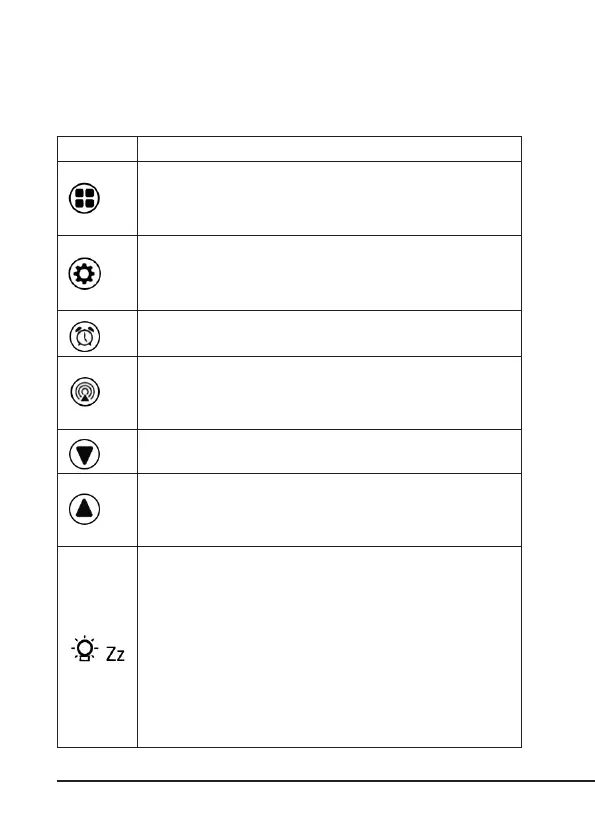
Symbol Buon
MODE: Press the "MODE" buon in the default screen to select
between the dierent display modes. If you do not press any
buon within 10 seconds, the weather staon switches back to
the default screen).
SET: Press the "SET" buon in the default screen to select be-
tween °C and °F. Alternavely, you can set the date and me by
pressing for 2-3 seconds in the me mode.
ALARM: Press the "ALARM" buon in the default screen to
switch the Alarm 1/2 on or o.
CHANNEL: Press the "CHANNEL" buon in the default screen
to change between the radio channels 1, 2 and 3. Hold the
buon to delete the previously displayed values. The deleon is
conrmed with a beep.
DOWN: Use the buon to change the values in the sengs.
UP: Use the buon to change the values in the sengs. Press
the buon in the default screen to change between the current,
minimum and maximum temperature display. Press the buon
for about 2-3 seconds to reset the temperature displays.
SNOOZE/LIGHT:
• When operang the device with baeries, press the "SNOOZE
/ LIGHT" buon to turn on the backlight for 5 seconds.
• When operang the device using a power adapter, you can
choose between four dierent brightness levels (Light O,
Level 3, Level 2, Level 1) using the "SNOOZE/LIGHT" buon .
You can press the "SNOOZE/LIGHT" buon as soon as the alarm
goes o to put the device in snooze mode for 5 minutes. The
alarm goes o once again aer 5 minutes.



 To Next Page