3
Indoor Monitor
Video Intercom Systems (Cat-5)
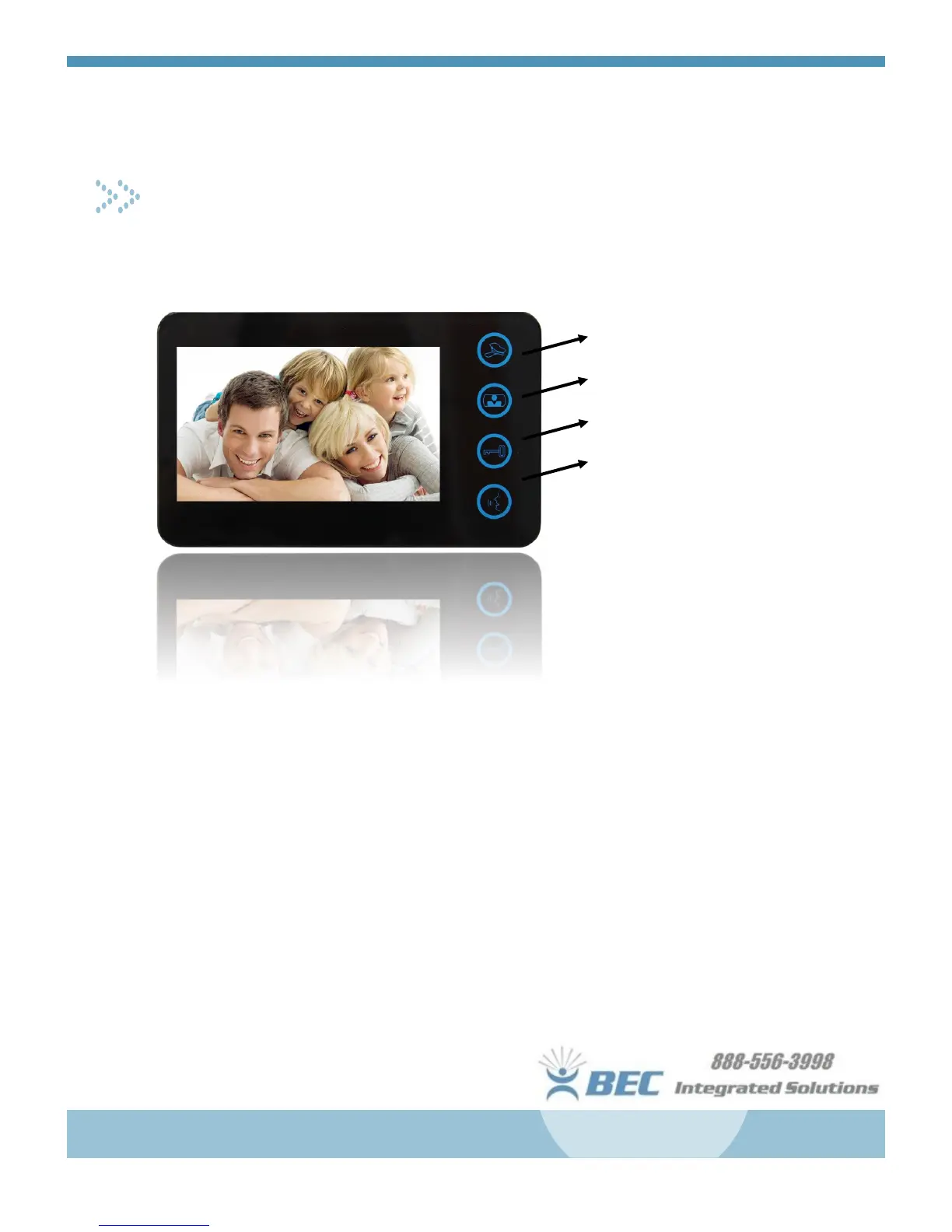
The indoor monitor included with the system has four illuminated buttons on the face, and three scrolling
adjusters on the edge for Volume, Brightness, and Contrast.
1. Alarm/Concierge (If Applicable)
2. Monitor
3. Unlock
4. Talk/Answer
For an incoming call, press Talk to answer then
talk as you would normally.
You may press Unlock only during the
initial ring
or
during the call
to release the door latch to al-
low entry.
Press the Monitor button to view the camera at
the door station any time the monitor is off
To change the ringtone, press and hold Unlock until you hear the tone, then press Alarm/Concierge to cycle
through the different ringtones. Once you’ve chosen the tone, press Unlock to save your selection.
If your system includes the optional Picture Memory room station, there are 5 buttons (Menu, Up, Down, Left,
Right) on the side of the panel for controlling the On-Screen Display. With this feature, the panel will
take one still image for each call that is received at that station. While the display is active, you can
scroll through past images using the controls. You may also adjust settings (date/time, display settings,
etc.) using the on screen menu.
We hope you enjoy your system, and if you have any questions or need troubleshooting help,
please call our technical support line. Thank you for your business!


 To Next Page
 Loading...