27
EN
Becken Flex Induction Hob | Placa de Inducción Becken Flex | Placa de Indução Becken Flex
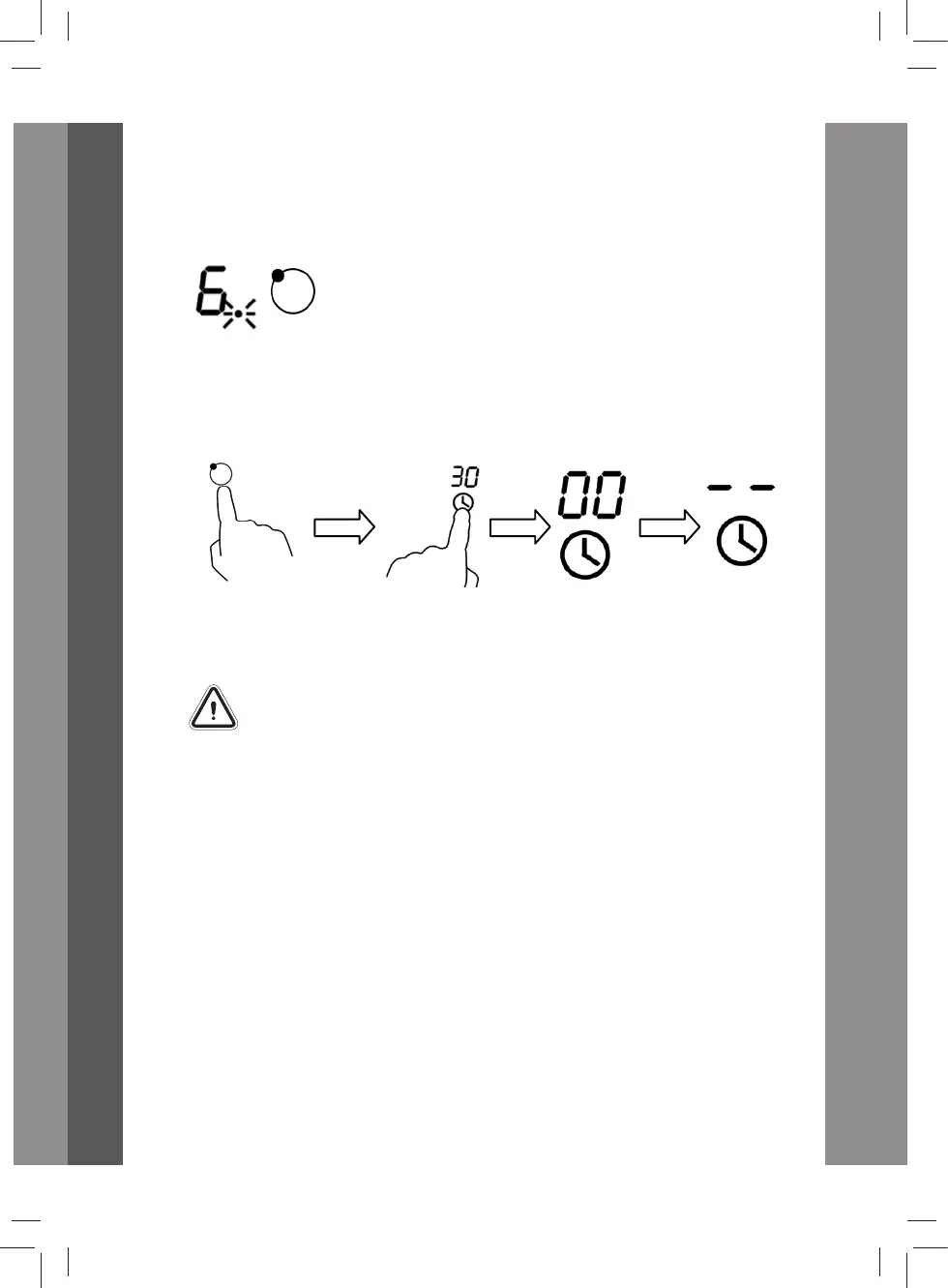
NOTE: The red dot next to power level indicator will light up
indicating that the zone is selected.
5. To cancel the timer, touch the heating zone selection control, and
then touch the “Timer”; the timer is then cancelled. “00” will show in
the minute display, and then “--” right after.
6. When the cooking timer expires, the corresponding cooking zone will
be automatically switch o and show “H”.
Other cooking zones will keep operating if they are previously
turned on.
Setting the timer to turn more than one cooking zone o
1. If you use this function in more than one heating zone, the timer
indicator will show the shortest time. (e.g. zone 2# setting time of
3 minutes, zone 3# setting time of 6 minutes, the timer indicator
shows “3”.)
NOTE: The ashing red dot next to the power level indicator means
the timer indicator is showing time for the heating zone.
If you want to check the set time of another heating zone, touch the
heating zone selection control. The timer will indicate its set time.
Becken_Placa de Indução_BIH3302_Manual_v3.indd 27 06/04/2018 10:13


 To Next Page