Win 7 or later
Chrome book, Linux, Win ARM
Installation guide video in U-disk for better reference.
a. Connect power and computer(Please skip this step if you have finished it before.)
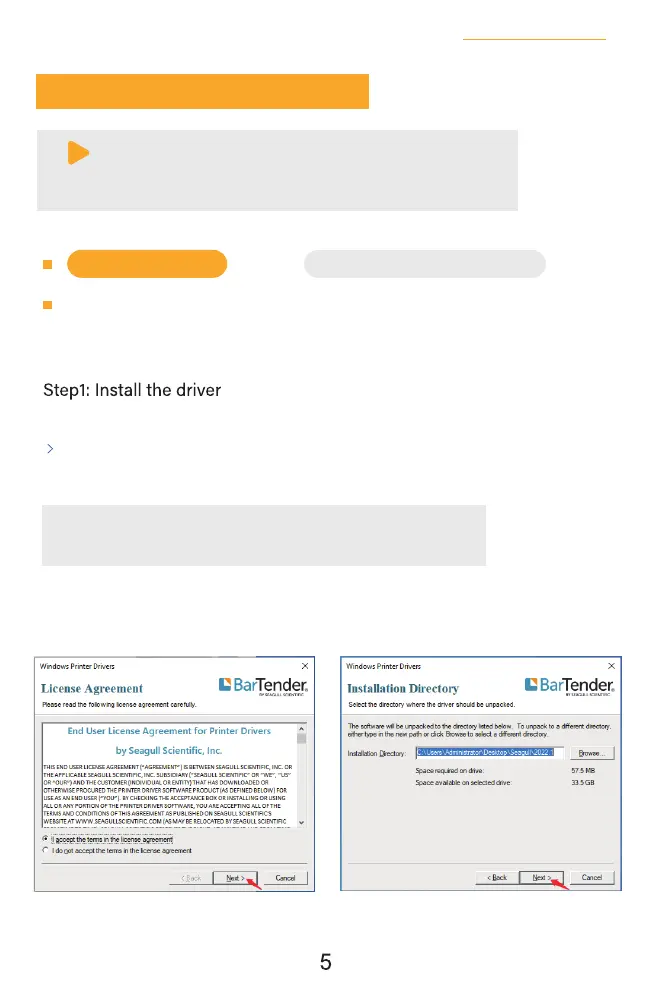
Copy the driver in the U-disk(Label Printer Driver Setup.exe) to your
PC desk, open and install it as below:
b. Install the driver and printer for Windows
6.Installation for Windows
Recommend to close security software before installation in case of
preventing installation, and you can open it again after installation.
Note:
(You can also download ' Driver for Windows (BY-426BT)' from
https://jadens.com/download-and-video
Driver version may be updated, see latest info at support.jadens.com.
√
×
See FAQ at support.jadens.com



 To Next Page