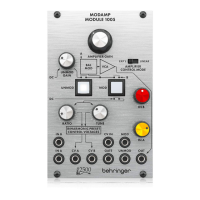
1. AMPLIFIER GAIN - This knob
controls the VCA’s gain and final
output volume at the OUT jack.!
2. UNMOD GAIN - This knob controls
the IN A signal gain when the module
is in UNMOD mode (as indicated by
the UNMOD button).
UNMOD mode allows the module to
be used as a VCA when modulation
is not required. !
3. AMPLIFIER CONTROL MODE
(EXP’L/LINEAR) - This sliding switch
determines whether the VCA gain
response is exponential (EXP’L) or
linear (LINEAR).!
4. UNMOD - Press this button to place
the module into UNMOD mode.
In UNMOD mode, the IN A signal
passes to the OUT jack without any
modulation, and the signal level is
controlled by both the UNMOD GAIN
and AMPLIFIER GAIN knobs. IN B
does not function in UNMOD mode.!
5. MOD - Press the button to activate
MOD mode. In MOD mode, the
circuit combines the IN A signal and
the IN B signal to produce an output
signal that is a modulated
combination of the two input signals.!
6. RATIO - Use this knob in MOD mode
to offset the tune control voltage that
is sent out through the CV B jack.
This function only operates when
MOD mode is selected. !
7. TUNE - Use this knob in MOD mode
to control the output level of the tune
control voltage sent out through both
the CV A and CV B jacks.
This function only operates when
MOD mode is selected. !
8. IN A - This knob controls the input
level for the signal coming in through
the IN A jack.!
9. IN B - This knob controls the input
level for the signal coming in through
the IN B jack.!
Patchpoints!
10. IN A / IN B - Use these input jack to
route in audio signals for the internal
modulation process via cables with
3.5 mm connectors. !
11. CV A / CV B - Use these jacks to
route TUNE (CV A and CV B) and
RATIO (CV B offset) control voltages
out to the two VCOs that typically
supply the audio signals to the IN A
and IN B inputs to be modulated.!
12. CV IN - Use this jack to route in
control voltages signals for remote
control of the AMPLIFIER GAIN
setting.!
13. MOD - Use this jack to route in a
trigger signal to remotely activate
MOD via a cable with 3.5 mm
connectors.!
14. GATE - Use this input jack to route in
a gate signal to turn the modulation
circuit on and off via a cable with
3.5 mm connectors.!
15. UNMOD - Use this jack to route in a
trigger signal to remotely switch off
MOD mode via a cable with 3.5 mm
connectors. !
16. OUT - This jack sends out the final
VCA signal via a cable with 3.5 mm
connectors.






 To Next Page